Our Community is getting an upgrade! To get everything ready for the relaunch, we’ll be placing the site in read-only mode starting September 21st.
We really appreciate your understanding while we get things set up behind the scenes. Catch up on all the exciting details about the move here.
Need help or have questions? Drop us a line at [email protected]

Support Questions

Find answers, ask questions, and share your expertise
Announcements
Share your experience with Cloudera on G2 and get a $25 Amazon Gift card.
Hi, I'm CLEO! Something exciting is coming to the Community. Stay Tuned!

Add flow attribute from Json

avatar
Frequent Visitor

Hi, 

I am trying to add flow attribute from my json file which looks like:

[ {
"name" : "id",
"value" : "29879"
}, {
"name" : "file",
"value" : ""
}, {
"name" : "barcode",
"value" : ""
}, {
"name" : "roll no",
"value" : "3032"
}, {
"name" : "name",
"value" : "Daniel"
}]


Now I want to add roll no. as a flow atrribute using  evaljson.PNG


Can someone please help me with it? Thanks

1 ACCEPTED SOLUTION

avatar
Super Guru

Hi ,

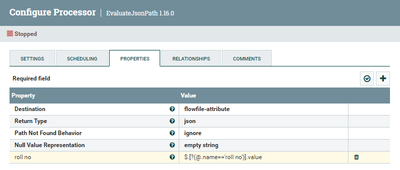
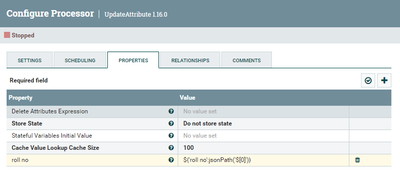
If you want to extract the value (3032) of the name "roll no" into flowfile attribute called "roll no" you can accomplish this with two processors as follows:


1- EvaluateJsonPath:

    roll no = $.[?(@.name=='roll no')].value

    Make sure the Return Type is set to Json since the exrepssion above will return json ["3032"].


SAMSAL_0-1659035286850.png


2- Update Attribute : which will extract the actual value from result json above with the following  attribute:   roll no = ${'roll no':jsonPath('$[0]')}


SAMSAL_1-1659035395931.png


Also you can refer to :

https://community.cloudera.com/t5/Support-Questions/Unable-to-return-a-scalar-value-for-the-expressi...


If that helps, please Accept Solution. Thanks

View solution in original post

2 REPLIES 2

avatar
Super Guru

Hi ,

If you want to extract the value (3032) of the name "roll no" into flowfile attribute called "roll no" you can accomplish this with two processors as follows:


1- EvaluateJsonPath:

    roll no = $.[?(@.name=='roll no')].value

    Make sure the Return Type is set to Json since the exrepssion above will return json ["3032"].


SAMSAL_0-1659035286850.png


2- Update Attribute : which will extract the actual value from result json above with the following  attribute:   roll no = ${'roll no':jsonPath('$[0]')}


SAMSAL_1-1659035395931.png


Also you can refer to :

https://community.cloudera.com/t5/Support-Questions/Unable-to-return-a-scalar-value-for-the-expressi...


If that helps, please Accept Solution. Thanks

avatar
Frequent Visitor

It worked for me. Thanks.