
Our Community is getting an upgrade! To get everything ready for the relaunch, we’ll be placing the site in read-only mode starting September 21st.
We really appreciate your understanding while we get things set up behind the scenes. Catch up on all the exciting details about the move here.
Need help or have questions? Drop us a line at [email protected]

Support Questions
 Hi, I'm CLEO! Something exciting is coming to the Community. Stay Tuned!
- Cloudera Community
- Support
- Support Questions
- [Ambari Installer Step 3 Fail] - Cluster Setup
- Subscribe to RSS Feed
- Mark Question as New
- Mark Question as Read
- Float this Question for Current User
- Bookmark
- Subscribe
- Mute
- Printer Friendly Page
- Subscribe to RSS Feed
- Mark Question as New
- Mark Question as Read
- Float this Question for Current User
- Bookmark
- Subscribe
- Mute
- Printer Friendly Page
[Ambari Installer Step 3 Fail] - Cluster Setup
- Labels:
-
Apache Ambari


- Mark as New
- Bookmark
- Subscribe
- Mute
- Subscribe to RSS Feed
- Permalink
- Report Inappropriate Content
Hi everyone, I already try to search many topics in internet, especially clouderaforum but can not fix the problem 😞
I am doing: setup a cluster with 2 PCs.
/etc/hosts
127.0.0.1	localhost
# 127.0.1.1	uvmu02

# The following lines are desirable for IPv6 capable hosts
::1     ip6-localhost ip6-loopback
fe00::0 ip6-localnet
ff00::0 ip6-mcastprefix
ff02::1 ip6-allnodes
ff02::2 ip6-allrouters

# uVMU0X
192.168.56.101	uvmu01.uvmu0x.com	uvmu01
192.168.56.102	uvmu02.uvmu0x.com	uvmu02
192.168.56.103	uvmu03.uvmu0x.com	uvmu03
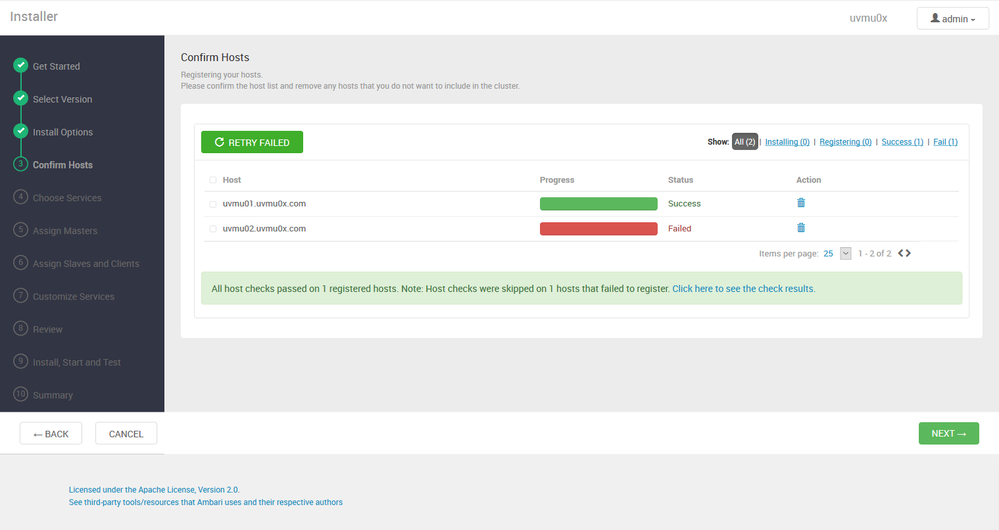
I already tried re-install ambari-server, ambari-agent, setting public-hostname script, edit hostname info in ambari-agent.ini for each node.
[server]
hostname=uvmu01.uvmu0x.com
[server]
hostname=uvmu02.uvmu0x.com[agent]
## uvmu0x
## Added following to customize the public hostname
hostname_script=/var/lib/ambari-agent/public_hostname.sh
public_hostname_script=/var/lib/ambari-agent/public_hostname.sh
But it will always fail on registering the node 02 😞
Already tried ambari-server reset, too. The pre-setting is re-checked such as ssh passwordless, sellinux...
I am using Ubuntu 18.04 and following the setup instruction in homepage.
I attached the log files for both notes.
Thank you very much.


Created 10-18-2019 02:08 PM
- Mark as New
- Bookmark
- Subscribe
- Mute
- Subscribe to RSS Feed
- Permalink
- Report Inappropriate Content
Can you share your /etc/hosts from the 2 servers? many a time member forget very trivial things ib your /etc/hosts on uvmu02.uvmu0x.com should look like this don't comment
127.0.0.1 localhost
127.0.1.1 uvmu02.uvmu0x.com # This one
# The following lines are desirable for IPv6 capable hosts
::1 ip6-localhost ip6-loopback
fe00::0 ip6-localnet
ff00::0 ip6-mcastprefix
ff02::1 ip6-allnodes
ff02::2 ip6-allrouters
# uVMU0X
192.168.56.101 uvmu01.uvmu0x.com uvmu01
192.168.56.102 uvmu02.uvmu0x.com uvmu02
192.168.56.103 uvmu03.uvmu0x.com uvmu03
Assuming the Ambari server is uvmu01.uvmu0x.com firstly I would like you to check that the ambari server and agent are of the same version
# rpm -qa|grep ambari
On server uvmu02.uvmu0x.com
Thereafter share ensure you disabled the Firewall
$ sudo ufw disable
Confirm the Firewall stopped and disabled on system startup
$ sudo ufw status
$ sudo apt-get install ambari-agent
Share your ambari-agent.ini it should look like this on all nodes I even the one hosting Ambari I am wondering why your second server has hostname=uvmu02.uvmu0x.com in the Ambari-agent.ini????
[server]
hostname=uvmu01.uvmu0x.com
url_port=8440
secured_url_port=8441
connect_retry_delay=10
max_reconnect_retry_delay=30
$ ambari-agent start
Now go back to the Ambari UI and choose manual registration your uvmu02.uvmu0x.com should now register successfully
Please revert

Created 10-18-2019 10:55 AM
- Mark as New
- Bookmark
- Subscribe
- Mute
- Subscribe to RSS Feed
- Permalink
- Report Inappropriate Content
<a href="https://drive.google.com/open?id=1palwEteOtV6q8ahFnC4pUEgoxBEsJ2tS" target="_blank">https://drive.google.com/open?id=1palwEteOtV6q8ahFnC4pUEgoxBEsJ2tS</a>Sorry I did not yet send the log files, this is the link for log files (node 1 and note 2).
Created 10-18-2019 11:02 AM
- Mark as New
- Bookmark
- Subscribe
- Mute
- Subscribe to RSS Feed
- Permalink
- Report Inappropriate Content
I faced this problem too but already try re-install and nothing changes 😞
Could you please help me, thank you.
Created 10-18-2019 11:20 AM
- Mark as New
- Bookmark
- Subscribe
- Mute
- Subscribe to RSS Feed
- Permalink
- Report Inappropriate Content
I am trying to figure out this log:
2019-10-19 00:49:02,964 WARN [ambari-action-scheduler] ExecutionCommandWrapper:219 - Unable to lookup the cluster by ID; assuming that there is no cluster and therefore no configs for this execution command: Cluster not found, clusterName=clusterID=-1
2019-10-19 00:49:24,822 ERROR [alert-event-bus-2] AmbariJpaLocalTxnInterceptor:180 - [DETAILED ERROR] Rollback reason:
Local Exception Stack:
Exception [EclipseLink-4002] (Eclipse Persistence Services - 2.6.2.v20151217-774c696): org.eclipse.persistence.exceptions.DatabaseException
Internal Exception: org.postgresql.util.PSQLException: ERROR: invalid byte sequence for encoding "UTF8": 0x00
Error Code: 0
Call: UPDATE alert_current SET latest_timestamp = ?, latest_text = ?, occurrences = ? WHERE (alert_id = ?)
bind => [4 parameters bound]
at org.eclipse.persistence.exceptions.DatabaseException.sqlException(DatabaseException.java:340)
at org.eclipse.persistence.internal.databaseaccess.DatabaseAccessor.processExceptionForCommError(DatabaseAccessor.java:1620)
at org.eclipse.persistence.internal.databaseaccess.DatabaseAccessor.executeDirectNoSelect(DatabaseAccessor.java:900)
at org.eclipse.persistence.internal.databaseaccess.DatabaseAccessor.executeNoSelect(DatabaseAccessor.java:964)
at org.eclipse.persistence.internal.databaseaccess.DatabaseAccessor.basicExecuteCall(DatabaseAccessor.java:633)
at org.eclipse.persistence.internal.databaseaccess.ParameterizedSQLBatchWritingMechanism.executeBatch(ParameterizedSQLBatchWritingMechanism.java:149)
at org.eclipse.persistence.internal.databaseaccess.ParameterizedSQLBatchWritingMechanism.executeBatchedStatements(ParameterizedSQLBatchWritingMechanism.java:134)
at org.eclipse.persistence.internal.databaseaccess.DatabaseAccessor.writesCompleted(DatabaseAccessor.java:1845)
at org.eclipse.persistence.internal.sessions.AbstractSession.writesCompleted(AbstractSession.java:4300)
at org.eclipse.persistence.internal.sessions.UnitOfWorkImpl.writesCompleted(UnitOfWorkImpl.java:5592)
at org.eclipse.persistence.internal.sessions.UnitOfWorkImpl.acquireWriteLocks(UnitOfWorkImpl.java:1646)
at org.eclipse.persistence.internal.sessions.UnitOfWorkImpl.commitTransactionAfterWriteChanges(UnitOfWorkImpl.java:1614)
at org.eclipse.persistence.internal.sessions.RepeatableWriteUnitOfWork.commitRootUnitOfWork(RepeatableWriteUnitOfWork.java:285)
at org.eclipse.persistence.internal.sessions.UnitOfWorkImpl.commitAndResume(UnitOfWorkImpl.java:1169)
at org.eclipse.persistence.internal.jpa.transaction.EntityTransactionImpl.commit(EntityTransactionImpl.java:134)
at org.apache.ambari.server.orm.AmbariJpaLocalTxnInterceptor.invoke(AmbariJpaLocalTxnInterceptor.java:153)
at com.google.inject.internal.InterceptorStackCallback$InterceptedMethodInvocation.proceed(InterceptorStackCallback.java:77)
at com.google.inject.internal.InterceptorStackCallback.intercept(InterceptorStackCallback.java:55)
at org.apache.ambari.server.events.listeners.alerts.AlertReceivedListener$$EnhancerByGuice$$c6d5f173.saveEntities(<generated>)
at org.apache.ambari.server.events.listeners.alerts.AlertReceivedListener.onAlertEvent(AlertReceivedListener.java:388)
at org.apache.ambari.server.events.listeners.alerts.AlertReceivedListener$$EnhancerByGuice$$c6d5f173.CGLIB$onAlertEvent$0(<generated>)
at org.apache.ambari.server.events.listeners.alerts.AlertReceivedListener$$EnhancerByGuice$$c6d5f173$$FastClassByGuice$$3f418344.invoke(<generated>)
at com.google.inject.internal.cglib.proxy.$MethodProxy.invokeSuper(MethodProxy.java:228)
at com.google.inject.internal.InterceptorStackCallback$InterceptedMethodInvocation.proceed(InterceptorStackCallback.java:76)
at org.apache.ambari.server.orm.AmbariLocalSessionInterceptor.invoke(AmbariLocalSessionInterceptor.java:44)
at com.google.inject.internal.InterceptorStackCallback$InterceptedMethodInvocation.proceed(InterceptorStackCallback.java:77)
at com.google.inject.internal.InterceptorStackCallback.intercept(InterceptorStackCallback.java:55)
at org.apache.ambari.server.events.listeners.alerts.AlertReceivedListener$$EnhancerByGuice$$c6d5f173.onAlertEvent(<generated>)
at sun.reflect.GeneratedMethodAccessor266.invoke(Unknown Source)
at sun.reflect.DelegatingMethodAccessorImpl.invoke(DelegatingMethodAccessorImpl.java:43)
at java.lang.reflect.Method.invoke(Method.java:498)
at com.google.common.eventbus.Subscriber.invokeSubscriberMethod(Subscriber.java:87)
at com.google.common.eventbus.Subscriber$1.run(Subscriber.java:72)
at java.util.concurrent.ThreadPoolExecutor.runWorker(ThreadPoolExecutor.java:1142)
at java.util.concurrent.ThreadPoolExecutor$Worker.run(ThreadPoolExecutor.java:617)
at java.lang.Thread.run(Thread.java:745)
Caused by: org.postgresql.util.PSQLException: ERROR: invalid byte sequence for encoding "UTF8": 0x00
at org.postgresql.core.v3.QueryExecutorImpl.receiveErrorResponse(QueryExecutorImpl.java:2433)
at org.postgresql.core.v3.QueryExecutorImpl.processResults(QueryExecutorImpl.java:2178)
at org.postgresql.core.v3.QueryExecutorImpl.execute(QueryExecutorImpl.java:306)
at org.postgresql.jdbc.PgStatement.executeInternal(PgStatement.java:441)
at org.postgresql.jdbc.PgStatement.execute(PgStatement.java:365)
at org.postgresql.jdbc.PgPreparedStatement.executeWithFlags(PgPreparedStatement.java:155)
at org.postgresql.jdbc.PgPreparedStatement.executeUpdate(PgPreparedStatement.java:132)
at org.eclipse.persistence.internal.databaseaccess.DatabaseAccessor.executeDirectNoSelect(DatabaseAccessor.java:892)
... 33 more
2019-10-19 00:49:24,823 ERROR [alert-event-bus-2] AmbariJpaLocalTxnInterceptor:188 - [DETAILED ERROR] Internal exception (1) :
org.postgresql.util.PSQLException: ERROR: invalid byte sequence for encoding "UTF8": 0x00
at org.postgresql.core.v3.QueryExecutorImpl.receiveErrorResponse(QueryExecutorImpl.java:2433)
at org.postgresql.core.v3.QueryExecutorImpl.processResults(QueryExecutorImpl.java:2178)
at org.postgresql.core.v3.QueryExecutorImpl.execute(QueryExecutorImpl.java:306)
at org.postgresql.jdbc.PgStatement.executeInternal(PgStatement.java:441)
at org.postgresql.jdbc.PgStatement.execute(PgStatement.java:365)
at org.postgresql.jdbc.PgPreparedStatement.executeWithFlags(PgPreparedStatement.java:155)
at org.postgresql.jdbc.PgPreparedStatement.executeUpdate(PgPreparedStatement.java:132)
at org.eclipse.persistence.internal.databaseaccess.DatabaseAccessor.executeDirectNoSelect(DatabaseAccessor.java:892)
at org.eclipse.persistence.internal.databaseaccess.DatabaseAccessor.executeNoSelect(DatabaseAccessor.java:964)
at org.eclipse.persistence.internal.databaseaccess.DatabaseAccessor.basicExecuteCall(DatabaseAccessor.java:633)
at org.eclipse.persistence.internal.databaseaccess.ParameterizedSQLBatchWritingMechanism.executeBatch(ParameterizedSQLBatchWritingMechanism.java:149)
at org.eclipse.persistence.internal.databaseaccess.ParameterizedSQLBatchWritingMechanism.executeBatchedStatements(ParameterizedSQLBatchWritingMechanism.java:134)
at org.eclipse.persistence.internal.databaseaccess.DatabaseAccessor.writesCompleted(DatabaseAccessor.java:1845)
at org.eclipse.persistence.internal.sessions.AbstractSession.writesCompleted(AbstractSession.java:4300)
at org.eclipse.persistence.internal.sessions.UnitOfWorkImpl.writesCompleted(UnitOfWorkImpl.java:5592)
at org.eclipse.persistence.internal.sessions.UnitOfWorkImpl.acquireWriteLocks(UnitOfWorkImpl.java:1646)
at org.eclipse.persistence.internal.sessions.UnitOfWorkImpl.commitTransactionAfterWriteChanges(UnitOfWorkImpl.java:1614)
at org.eclipse.persistence.internal.sessions.RepeatableWriteUnitOfWork.commitRootUnitOfWork(RepeatableWriteUnitOfWork.java:285)
at org.eclipse.persistence.internal.sessions.UnitOfWorkImpl.commitAndResume(UnitOfWorkImpl.java:1169)
at org.eclipse.persistence.internal.jpa.transaction.EntityTransactionImpl.commit(EntityTransactionImpl.java:134)
at org.apache.ambari.server.orm.AmbariJpaLocalTxnInterceptor.invoke(AmbariJpaLocalTxnInterceptor.java:153)
at com.google.inject.internal.InterceptorStackCallback$InterceptedMethodInvocation.proceed(InterceptorStackCallback.java:77)
at com.google.inject.internal.InterceptorStackCallback.intercept(InterceptorStackCallback.java:55)
at org.apache.ambari.server.events.listeners.alerts.AlertReceivedListener$$EnhancerByGuice$$c6d5f173.saveEntities(<generated>)
at org.apache.ambari.server.events.listeners.alerts.AlertReceivedListener.onAlertEvent(AlertReceivedListener.java:388)
at org.apache.ambari.server.events.listeners.alerts.AlertReceivedListener$$EnhancerByGuice$$c6d5f173.CGLIB$onAlertEvent$0(<generated>)
at org.apache.ambari.server.events.listeners.alerts.AlertReceivedListener$$EnhancerByGuice$$c6d5f173$$FastClassByGuice$$3f418344.invoke(<generated>)
at com.google.inject.internal.cglib.proxy.$MethodProxy.invokeSuper(MethodProxy.java:228)
at com.google.inject.internal.InterceptorStackCallback$InterceptedMethodInvocation.proceed(InterceptorStackCallback.java:76)
at org.apache.ambari.server.orm.AmbariLocalSessionInterceptor.invoke(AmbariLocalSessionInterceptor.java:44)
at com.google.inject.internal.InterceptorStackCallback$InterceptedMethodInvocation.proceed(InterceptorStackCallback.java:77)
at com.google.inject.internal.InterceptorStackCallback.intercept(InterceptorStackCallback.java:55)
at org.apache.ambari.server.events.listeners.alerts.AlertReceivedListener$$EnhancerByGuice$$c6d5f173.onAlertEvent(<generated>)
at sun.reflect.GeneratedMethodAccessor266.invoke(Unknown Source)
at sun.reflect.DelegatingMethodAccessorImpl.invoke(DelegatingMethodAccessorImpl.java:43)
at java.lang.reflect.Method.invoke(Method.java:498)
at com.google.common.eventbus.Subscriber.invokeSubscriberMethod(Subscriber.java:87)
at com.google.common.eventbus.Subscriber$1.run(Subscriber.java:72)
at java.util.concurrent.ThreadPoolExecutor.runWorker(ThreadPoolExecutor.java:1142)
at java.util.concurrent.ThreadPoolExecutor$Worker.run(ThreadPoolExecutor.java:617)
at java.lang.Thread.run(Thread.java:745)
2019-10-19 00:49:24,825 ERROR [alert-event-bus-2] default:232 - Exception thrown by subscriber method onAlertEvent(org.apache.ambari.server.events.AlertReceivedEvent) on subscriber org.apache.ambari.server.events.listeners.alerts.AlertReceivedListener$$EnhancerByGuice$$c6d5f173@4cffcc61 when dispatching event: AlertReceivedEvent{cluserId=0, alerts=[{clusterId=3, state=CRITICAL, name=hive_server_process, service=HIVE, component=HIVE_SERVER, host=uvmu01.uvmu0x.com, instance=null, text='Connection failed on host uvmu01.uvmu0x.com:10000 (Traceback (most recent call last):
File "/var/lib/ambari-agent/cache/stacks/HDP/3.0/services/HIVE/package/alerts/alert_hive_thrift_port.py", line 204, in execute
ldap_password=ldap_password)
File "/usr/lib/ambari-agent/lib/resource_management/libraries/functions/hive_check.py", line 89, in check_thrift_port_sasl
timeout_kill_strategy=TerminateStrategy.KILL_PROCESS_TREE,
File "/usr/lib/ambari-agent/lib/resource_management/core/base.py", line 166, in __init__
self.env.run()
File "/usr/lib/ambari-agent/lib/resource_management/core/environment.py", line 160, in run
self.run_action(resource, action)
File "/usr/lib/ambari-agent/lib/resource_management/core/environment.py", line 124, in run_action
provider_action()
File "/usr/lib/ambari-agent/lib/resource_management/core/providers/system.py", line 263, in action_run
returns=self.resource.returns)
File "/usr/lib/ambari-agent/lib/resource_management/core/shell.py", line 72, in inner
result = function(command, **kwargs)
File "/usr/lib/ambari-agent/lib/resource_management/core/shell.py", line 102, in checked_call
tries=tries, try_sleep=try_sleep, timeout_kill_strategy=timeout_kill_strategy, returns=returns)
File "/usr/lib/ambari-agent/lib/resource_management/core/shell.py", line 150, in _call_wrapper
result = _call(command, **kwargs_copy)
File "/usr/lib/ambari-agent/lib/resource_management/core/shell.py", line 314, in _call
raise ExecutionFailed(err_msg, code, out, err)
ExecutionFailed: Execution of '! (beeline -u 'jdbc:hive2://uvmu01.uvmu0x.com:10000/;transportMode=binary' -n hive -e ';' 2>&1 | awk '{print}' | grep -vz -i -e 'Connected to:' -e 'Transaction isolation:' -e 'inactive HS2 instance; use service discovery')' returned 1. SLF4J: Class path contains multiple SLF4J bindings.
SLF4J: Found binding in [jar:file:/usr/hdp/3.1.4.0-315/hive/lib/log4j-slf4j-impl-2.10.0.jar!/org/slf4j/impl/StaticLoggerBinder.class]
SLF4J: Found binding in [jar:file:/usr/hdp/3.1.4.0-315/hadoop/lib/slf4j-log4j12-1.7.25.jar!/org/slf4j/impl/StaticLoggerBinder.class]
SLF4J: Actual binding is of type [org.apache.logging.slf4j.Log4jLoggerFactory]
Connecting to jdbc:hive2://uvmu01.uvmu0x.com:10000/;transportMode=binary
19/10/19 00:49:21 [main]: WARN jdbc.HiveConnection: Failed to connect to uvmu01.uvmu0x.com:10000
Could not open connection to the HS2 server. Please check the server URI and if the URI is correct, then ask the administrator to check the server status.
Error: Could not open client transport with JDBC Uri: jdbc:hive2://uvmu01.uvmu0x.com:10000/;transportMode=binary: java.net.ConnectException: Connection refused (Connection refused) (state=08S01,code=0)
)'}]}
javax.persistence.RollbackException: Exception [EclipseLink-4002] (Eclipse Persistence Services - 2.6.2.v20151217-774c696): org.eclipse.persistence.exceptions.DatabaseException
Internal Exception: org.postgresql.util.PSQLException: ERROR: invalid byte sequence for encoding "UTF8": 0x00
Error Code: 0
Call: UPDATE alert_current SET latest_timestamp = ?, latest_text = ?, occurrences = ? WHERE (alert_id = ?)
bind => [4 parameters bound]
at org.eclipse.persistence.internal.jpa.transaction.EntityTransactionImpl.commit(EntityTransactionImpl.java:159)
at org.apache.ambari.server.orm.AmbariJpaLocalTxnInterceptor.invoke(AmbariJpaLocalTxnInterceptor.java:153)
at org.apache.ambari.server.events.listeners.alerts.AlertReceivedListener.onAlertEvent(AlertReceivedListener.java:388)
at org.apache.ambari.server.orm.AmbariLocalSessionInterceptor.invoke(AmbariLocalSessionInterceptor.java:44)
at sun.reflect.GeneratedMethodAccessor266.invoke(Unknown Source)
at sun.reflect.DelegatingMethodAccessorImpl.invoke(DelegatingMethodAccessorImpl.java:43)
at java.lang.reflect.Method.invoke(Method.java:498)
at com.google.common.eventbus.Subscriber.invokeSubscriberMethod(Subscriber.java:87)
at com.google.common.eventbus.Subscriber$1.run(Subscriber.java:72)
at java.util.concurrent.ThreadPoolExecutor.runWorker(ThreadPoolExecutor.java:1142)
at java.util.concurrent.ThreadPoolExecutor$Worker.run(ThreadPoolExecutor.java:617)
at java.lang.Thread.run(Thread.java:745)
Caused by: Exception [EclipseLink-4002] (Eclipse Persistence Services - 2.6.2.v20151217-774c696): org.eclipse.persistence.exceptions.DatabaseException
Internal Exception: org.postgresql.util.PSQLException: ERROR: invalid byte sequence for encoding "UTF8": 0x00
Error Code: 0
Call: UPDATE alert_current SET latest_timestamp = ?, latest_text = ?, occurrences = ? WHERE (alert_id = ?)
bind => [4 parameters bound]
at org.eclipse.persistence.exceptions.DatabaseException.sqlException(DatabaseException.java:340)
at org.eclipse.persistence.internal.databaseaccess.DatabaseAccessor.processExceptionForCommError(DatabaseAccessor.java:1620)
at org.eclipse.persistence.internal.databaseaccess.DatabaseAccessor.executeDirectNoSelect(DatabaseAccessor.java:900)
at org.eclipse.persistence.internal.databaseaccess.DatabaseAccessor.executeNoSelect(DatabaseAccessor.java:964)
at org.eclipse.persistence.internal.databaseaccess.DatabaseAccessor.basicExecuteCall(DatabaseAccessor.java:633)
at org.eclipse.persistence.internal.databaseaccess.ParameterizedSQLBatchWritingMechanism.executeBatch(ParameterizedSQLBatchWritingMechanism.java:149)
at org.eclipse.persistence.internal.databaseaccess.ParameterizedSQLBatchWritingMechanism.executeBatchedStatements(ParameterizedSQLBatchWritingMechanism.java:134)
at org.eclipse.persistence.internal.databaseaccess.DatabaseAccessor.writesCompleted(DatabaseAccessor.java:1845)
at org.eclipse.persistence.internal.sessions.AbstractSession.writesCompleted(AbstractSession.java:4300)
at org.eclipse.persistence.internal.sessions.UnitOfWorkImpl.writesCompleted(UnitOfWorkImpl.java:5592)
at org.eclipse.persistence.internal.sessions.UnitOfWorkImpl.acquireWriteLocks(UnitOfWorkImpl.java:1646)
at org.eclipse.persistence.internal.sessions.UnitOfWorkImpl.commitTransactionAfterWriteChanges(UnitOfWorkImpl.java:1614)
at org.eclipse.persistence.internal.sessions.RepeatableWriteUnitOfWork.commitRootUnitOfWork(RepeatableWriteUnitOfWork.java:285)
at org.eclipse.persistence.internal.sessions.UnitOfWorkImpl.commitAndResume(UnitOfWorkImpl.java:1169)
at org.eclipse.persistence.internal.jpa.transaction.EntityTransactionImpl.commit(EntityTransactionImpl.java:134)
... 11 more
Caused by: org.postgresql.util.PSQLException: ERROR: invalid byte sequence for encoding "UTF8": 0x00
at org.postgresql.core.v3.QueryExecutorImpl.receiveErrorResponse(QueryExecutorImpl.java:2433)
at org.postgresql.core.v3.QueryExecutorImpl.processResults(QueryExecutorImpl.java:2178)
at org.postgresql.core.v3.QueryExecutorImpl.execute(QueryExecutorImpl.java:306)
at org.postgresql.jdbc.PgStatement.executeInternal(PgStatement.java:441)
at org.postgresql.jdbc.PgStatement.execute(PgStatement.java:365)
at org.postgresql.jdbc.PgPreparedStatement.executeWithFlags(PgPreparedStatement.java:155)
at org.postgresql.jdbc.PgPreparedStatement.executeUpdate(PgPreparedStatement.java:132)
at org.eclipse.persistence.internal.databaseaccess.DatabaseAccessor.executeDirectNoSelect(DatabaseAccessor.java:892)
... 23 more
2019-10-19 00:50:17,807 INFO [MessageBroker-1] WebSocketMessageBrokerStats:124 - WebSocketSession[0 current WS(0)-HttpStream(0)-HttpPoll(0), 0 total, 0 closed abnormally (0 connect failure, 0 send limit, 0 transport error)], stompSubProtocol[processed CONNECT(0)-CONNECTED(0)-DISCONNECT(0)], stompBrokerRelay[null], inboundChannel[pool size = 0, active threads = 0, queued tasks = 0, completed tasks = 0], outboundChannel[pool size = 0, active threads = 0, queued tasks = 0, completed tasks = 0], sockJsScheduler[pool size = 1, active threads = 1, queued tasks = 0, completed tasks = 1]
2019-10-19 00:50:19,163 INFO [MessageBroker-1] WebSocketMessageBrokerStats:124 - WebSocketSession[1 current WS(1)-HttpStream(0)-HttpPoll(0), 4 total, 0 closed abnormally (0 connect failure, 0 send limit, 0 transport error)], stompSubProtocol[processed CONNECT(4)-CONNECTED(4)-DISCONNECT(3)], stompBrokerRelay[null], inboundChannel[pool size = 10, active threads = 0, queued tasks = 0, completed tasks = 1308], outboundChannel[pool size = 8, active threads = 0, queued tasks = 0, completed tasks = 411], sockJsScheduler[pool size = 1, active threads = 1, queued tasks = 0, completed tasks = 1]
No handlers could be found for logger "ambari_agent.AmbariConfig"
But, tried to re-install ambari-agent, set hostname on AmbariConfig = uvmu01.uvmu0x.com, and still not solve problem.
Created 10-18-2019 02:08 PM
- Mark as New
- Bookmark
- Subscribe
- Mute
- Subscribe to RSS Feed
- Permalink
- Report Inappropriate Content
Can you share your /etc/hosts from the 2 servers? many a time member forget very trivial things ib your /etc/hosts on uvmu02.uvmu0x.com should look like this don't comment
127.0.0.1 localhost
127.0.1.1 uvmu02.uvmu0x.com # This one
# The following lines are desirable for IPv6 capable hosts
::1 ip6-localhost ip6-loopback
fe00::0 ip6-localnet
ff00::0 ip6-mcastprefix
ff02::1 ip6-allnodes
ff02::2 ip6-allrouters
# uVMU0X
192.168.56.101 uvmu01.uvmu0x.com uvmu01
192.168.56.102 uvmu02.uvmu0x.com uvmu02
192.168.56.103 uvmu03.uvmu0x.com uvmu03
Assuming the Ambari server is uvmu01.uvmu0x.com firstly I would like you to check that the ambari server and agent are of the same version
# rpm -qa|grep ambari
On server uvmu02.uvmu0x.com
Thereafter share ensure you disabled the Firewall
$ sudo ufw disable
Confirm the Firewall stopped and disabled on system startup
$ sudo ufw status
$ sudo apt-get install ambari-agent
Share your ambari-agent.ini it should look like this on all nodes I even the one hosting Ambari I am wondering why your second server has hostname=uvmu02.uvmu0x.com in the Ambari-agent.ini????
[server]
hostname=uvmu01.uvmu0x.com
url_port=8440
secured_url_port=8441
connect_retry_delay=10
max_reconnect_retry_delay=30
$ ambari-agent start
Now go back to the Ambari UI and choose manual registration your uvmu02.uvmu0x.com should now register successfully
Please revert
Created 10-18-2019 07:43 PM
- Mark as New
- Bookmark
- Subscribe
- Mute
- Subscribe to RSS Feed
- Permalink
- Report Inappropriate Content
Perfect <3.
I was misunderstading about the hostname property in Ambari Agent ini, due to I modified it such as each node is each own ambari server.
There is also have one error in mysql connector jar missing (even I am using postgresql), I also add my sql connector jar in resource file of Ambari server on uvmu01 host.
Thank you so much.


