Our Community is getting an upgrade! To get everything ready for the relaunch, we’ll be placing the site in read-only mode starting September 21st.
We really appreciate your understanding while we get things set up behind the scenes. Catch up on all the exciting details about the move here.
Need help or have questions? Drop us a line at [email protected]

Support Questions

Find answers, ask questions, and share your expertise
Announcements
Share your experience with Cloudera on G2 and get a $25 Amazon Gift card.
Hi, I'm CLEO! Something exciting is coming to the Community. Stay Tuned!

Apache Nifi - use of Notify and Wait with unknown amount of files

avatar
Not applicable

I tried to find out on myself, but after days of trying I decided that I need help. My usecase is to concat splitted zip-files (FilaA.zip.001, 002, 003 - 00x) and  I don't really know how many files will be delivered.  The files  are big and delivery takes time... The last file  to be delivered is a notification-file "ready.txt"


My current workflow is like this:

- receive alle files

-extract   number of zip-file   (001-x) and build a priority (999-number of zip-file) of it

-move to a queue with a PriorityAttributePrioritizer

-extract max number of files (i.e. 7 from 007 - the file with priority 992)

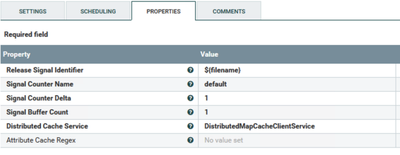
-move files via  notify processer to the wait processor

MelbarKasom_0-1589556094961.png

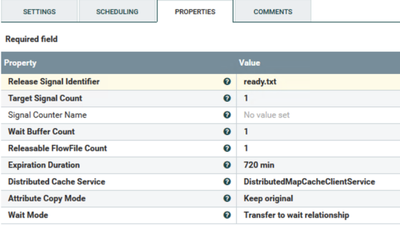
- in the wait processor I want to wait until the notfication-file  arrived and  deliver all the files in wait-queue

MelbarKasom_1-1589556254435.png

-after the the files will be concatenated  with the MergeContent processor and unzipped.


My configuration works only one time.  ... The second delivery with exact the same filenames as in the first delivery is directly moved to "success" and not into the wait queue... 

What I am doing wrong ?


1 ACCEPTED SOLUTION

avatar
Not applicable

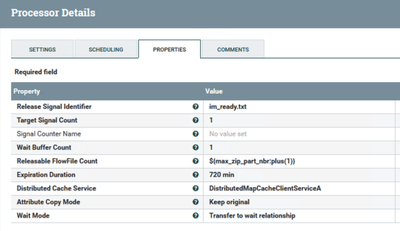
I created a new MapCacheService and changed the release condition back to 

MelbarKasom_0-1589557626903.png

now it seems to work 🙂

View solution in original post

2 REPLIES 2

avatar
Not applicable

I created a new MapCacheService and changed the release condition back to 

MelbarKasom_0-1589557626903.png

now it seems to work 🙂

avatar
Community Manager

I'm happy to see you resolved your issue. Please mark the appropriate reply as the solution, as it will make it easier for others to find the answer in the future. 

Screen Shot 2019-08-06 at 1.54.47 PM.pngmark as solution button


Keep the questions coming