Our Community is getting an upgrade! To get everything ready for the relaunch, we’ll be placing the site in read-only mode starting September 21st.
We really appreciate your understanding while we get things set up behind the scenes. Catch up on all the exciting details about the move here.
Need help or have questions? Drop us a line at [email protected]

Support Questions

Find answers, ask questions, and share your expertise
Announcements
Share your experience with Cloudera on G2 and get a $25 Amazon Gift card.
Hi, I'm CLEO! Something exciting is coming to the Community. Stay Tuned!

Appplication Master, User yarn is not authorized to access this page

avatar
New Contributor

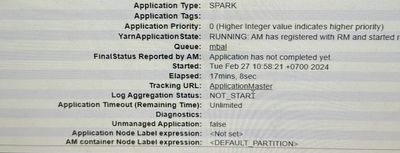
When my job streaming is running, i go to yarn cluster ui and i choose the application that im running. I click to the Tracking URL: ApplicationMaster, it bring me to the page "ip:port/proxy/application_id".

IMG_7895.jpeg

It said HTTP ERROR 403 User yarn is not authorized to access this page.

1922dc7c-e99e-4c50-b239-93f6795c2342.jpeg

Is this because of yarn manager queue authorization or some missing configs for yarn.

1 REPLY 1

avatar
Master Collaborator

Hi @valerio29 To access the application logs add the following property in Spark Client Advanced Configuration Snippet (Safety Valve) for spark-conf/spark-defaults.conf

spark.acls.enable=true

spark.ui.view.acls=<specify users that can have access to the application>

spark.ui.view.acls.groups=<specify groups that can have access to the application>

 Deploy Client configurations under Spark => Actions