
Our Community is getting an upgrade! To get everything ready for the relaunch, we’ll be placing the site in read-only mode starting September 21st.
We really appreciate your understanding while we get things set up behind the scenes. Catch up on all the exciting details about the move here.
Need help or have questions? Drop us a line at [email protected]

Support Questions
 Hi, I'm CLEO! Something exciting is coming to the Community. Stay Tuned!
- Cloudera Community
- Support
- Support Questions
- Automating Cloudera Manager Deployment via Path C ...
- Subscribe to RSS Feed
- Mark Question as New
- Mark Question as Read
- Float this Question for Current User
- Bookmark
- Subscribe
- Mute
- Printer Friendly Page
- Subscribe to RSS Feed
- Mark Question as New
- Mark Question as Read
- Float this Question for Current User
- Bookmark
- Subscribe
- Mute
- Printer Friendly Page
Automating Cloudera Manager Deployment via Path C and Python CM-API
- Labels:
-
Cloudera Manager


Created on
01-17-2018
03:07 PM
- last edited on
05-15-2026
11:40 AM
by
 cjervis

- Mark as New
- Bookmark
- Subscribe
- Mute
- Subscribe to RSS Feed
- Permalink
- Report Inappropriate Content
Context
I'm working on setting up a Hadoop cluster consisting of multiple VMs (for testing and development purposes) on a local desktop machine. I have a proof of concept working, where I installed Cloudera Manager manually and then setup the cluster. But now I'd like to automate it.
Problem
To automate this process, I need to be able to script the installation of Cloudera Manager, so that it works without manual intervention. Using Cloudera Director doesn't seem to be an option for this use case, because we're not running the cluster on any cloud provider (AWS, Azure, etc.). Is there any way to automate the Cloudera Manager installation for a local desktop?


Created 01-19-2018 04:10 PM
- Mark as New
- Bookmark
- Subscribe
- Mute
- Subscribe to RSS Feed
- Permalink
- Report Inappropriate Content
To get started, you can install CM using path C: https://www.cloudera.com/documentation/enterprise/5-8-x/topics/cm_ig_install_path_c.html#concept_fbv...
In Cloudera, our internal framework is built on top of the python cm-api. Here is a tutorial to interact with the python bindings: https://cloudera.github.io/cm_api/docs/python-client/. This will help you further in automating security, HA, etc.


Created 01-18-2018 12:53 AM
- Mark as New
- Bookmark
- Subscribe
- Mute
- Subscribe to RSS Feed
- Permalink
- Report Inappropriate Content
Simple bash script would work. place all the rpms , jdk in a directory and you can write simple shell script to build the yum repo, install and set the java path and complete the installation CM server.
Created 01-18-2018 11:12 AM
- Mark as New
- Bookmark
- Subscribe
- Mute
- Subscribe to RSS Feed
- Permalink
- Report Inappropriate Content
Thanks for the reply. I have tried something similar, but when I run the installer binary (./cloudera-manager-installer.bin), it gives an interactive prompt:
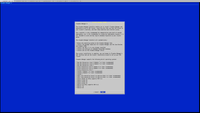
Is there any way to get this installer to run without user input?
Created 01-19-2018 04:10 PM
- Mark as New
- Bookmark
- Subscribe
- Mute
- Subscribe to RSS Feed
- Permalink
- Report Inappropriate Content
To get started, you can install CM using path C: https://www.cloudera.com/documentation/enterprise/5-8-x/topics/cm_ig_install_path_c.html#concept_fbv...
In Cloudera, our internal framework is built on top of the python cm-api. Here is a tutorial to interact with the python bindings: https://cloudera.github.io/cm_api/docs/python-client/. This will help you further in automating security, HA, etc.


