Our Community is getting an upgrade! To get everything ready for the relaunch, we’ll be placing the site in read-only mode starting September 21st.
We really appreciate your understanding while we get things set up behind the scenes. Catch up on all the exciting details about the move here.
Need help or have questions? Drop us a line at [email protected]
Created on
05-18-2022
06:25 AM
- last edited on
04-21-2026
12:56 AM
by
GrazittiAPI
Hi,
I would like to convert this json to csv. But it failed because of the special characters in the json content. Below is the json i would like to convert to csv. So the responseMessage value is where the problem is & its auto-generated in that format.
Thank you.
INPUT
{
"responseMessage": "hdhdhdhdh:dgdgdgdg "fdfdf" bbbbbbb",
"result": "failed",
"code": "34"
}
DESIRED OUTPUT
{
"responseMessage": "hdhdhdhdh dgdgdgdg fdfdf bbbbbbb",
"result": "failed",
"code": "34"
}
Created 05-18-2022 04:19 PM
The extra character in the response message is not a special character. It's just some extra double-quotes. However, when double-quotes appear in a string in JSON they must be escaped. The correct valid JSON would've been:
{
"responseMessage": "hdhdhdhdh:dgdgdgdg \"fdfdf\" bbbbbbb",
"result": "failed",
"code": "34"
}
The application that's generating those messages should be fixed to generate valid JSON representations.
Cheers
André
Created 05-18-2022 06:44 PM
Thanks so much.
But i have no control over the system generated json.
Created 05-18-2022 08:59 PM
@rafy ,
This is tricky and whatever solution we come up with here cannot be guaranteed to always work. It will always depend on the content that comes in the responseMessage field.
For the particular example that you shared above, this works:
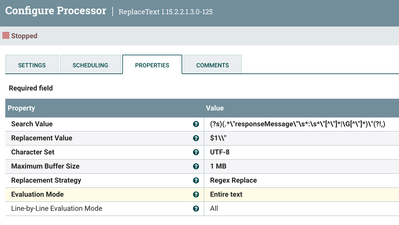
The settings are:
Search Value: (?s)(.*\"responseMessage\"\s*:\s*\"[^\"]*|\G[^\"]*)\"(?!,)
Replacement Value: $1\\"
Evaluation Mode: Entire text
You can check it out here: https://regex101.com/r/paPPhK/1
Cheers,
André