
Our Community is getting an upgrade! To get everything ready for the relaunch, we’ll be placing the site in read-only mode starting September 21st.
We really appreciate your understanding while we get things set up behind the scenes. Catch up on all the exciting details about the move here.
Need help or have questions? Drop us a line at [email protected]

Support Questions
 Hi, I'm CLEO! Something exciting is coming to the Community. Stay Tuned!
- Cloudera Community
- Support
- Support Questions
- Re: Cloudera Atlas 2.0; error when acess any item,...
- Subscribe to RSS Feed
- Mark Question as New
- Mark Question as Read
- Float this Question for Current User
- Bookmark
- Subscribe
- Mute
- Printer Friendly Page
- Subscribe to RSS Feed
- Mark Question as New
- Mark Question as Read
- Float this Question for Current User
- Bookmark
- Subscribe
- Mute
- Printer Friendly Page
Cloudera Atlas 2.0; error when acess any item, " Unknown Entity-Type"
- Labels:
-
Apache Atlas
-
Cloudera


Created on
12-08-2020
09:43 AM
- last edited on
04-21-2026
04:22 AM
by
 GrazittiAPI

- Mark as New
- Bookmark
- Subscribe
- Mute
- Subscribe to RSS Feed
- Permalink
- Report Inappropriate Content
Hi folks,
After install Cloudera CDP 7.1.4 we access Altas and searched items .
When click any item we receive this error "Unknown Entity-Type"

But, looking the searching options we can´t find any ENTITY-TYPE:
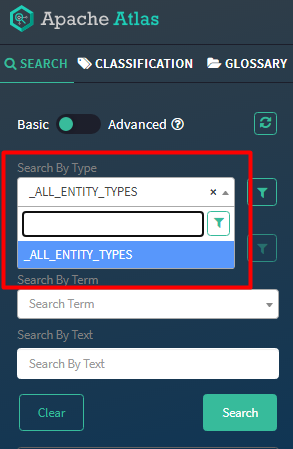
Someone have any idea why not show any ENTITY TYPE?
Thanks
Eduardo



Created 01-06-2021 12:45 AM
- Mark as New
- Bookmark
- Subscribe
- Mute
- Subscribe to RSS Feed
- Permalink
- Report Inappropriate Content
- This happens because the "Read Type" permission is absent in the Ranger-Atlas plugin repository for the Atlas service.
- During the upgrade, a step to upgrade the ranger DB with the patches is skipped. Which is causing this permission to be not present after the CDP upgrade.
- The update handler needs to call the right script to install the DB patches for ranger which should automatically update the DB patches (during the upgrade process) and fix the issue.
- Issue is addressed and should be fixed in the upcoming releases of the the Cloudera Manager product line.
The workaround for this issue:
- Stop the Ranger Admin service.
1. Login in into CM UI -> Ranger -> Instances -> Select Ranger Admin.
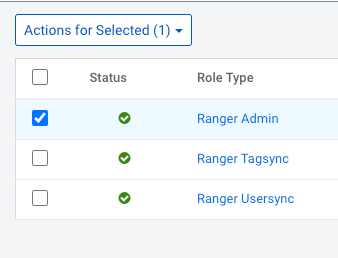
2. From the drop down actions menu, select "Upgrade Ranger database and apply patches".
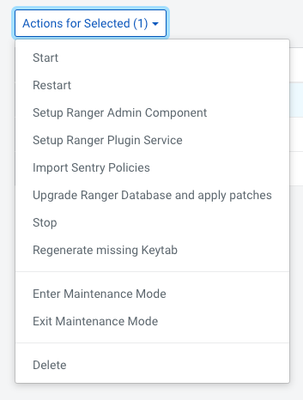
3. This step will manually apply the patches and will finish.
4. Once finished, you can restart the Ranger Admin service.
The atlas policy which is missing the permission (the id of policy can be different in your environment):

We need something similar to this:

Created 01-11-2021 05:02 PM
- Mark as New
- Bookmark
- Subscribe
- Mute
- Subscribe to RSS Feed
- Permalink
- Report Inappropriate Content
Hi Parth,
I apply the fix that you sent and it works fine.
Really, the problem was in upgrade ranger database after last upgrade.
thanks very much.
best regards
Eduardo
Created 01-11-2021 05:02 PM
- Mark as New
- Bookmark
- Subscribe
- Mute
- Subscribe to RSS Feed
- Permalink
- Report Inappropriate Content
Hi Parth,
I apply the fix that you sent and it works fine.
Really, the problem was in upgrade ranger database after last upgrade.
thanks very much.
best regards
Eduardo

Created 06-29-2021 04:40 AM
- Mark as New
- Bookmark
- Subscribe
- Mute
- Subscribe to RSS Feed
- Permalink
- Report Inappropriate Content
I have upgraded from 7.1.1 to 7.1.6 and "Upgrade Ranger database and apply patches" is grayed out.

- « Previous
-
- 1
- 2
- Next »

