
Support Questions
- Cloudera Community
- Support
- Support Questions
- Re: Cloudera Virtual box setup issue - Could not r...
- Subscribe to RSS Feed
- Mark Question as New
- Mark Question as Read
- Float this Question for Current User
- Bookmark
- Subscribe
- Mute
- Printer Friendly Page
- Subscribe to RSS Feed
- Mark Question as New
- Mark Question as Read
- Float this Question for Current User
- Bookmark
- Subscribe
- Mute
- Printer Friendly Page
Cloudera Virtual box setup issue - Could not read from the boot medium! System halted


Created 05-26-2016 05:51 AM
- Mark as New
- Bookmark
- Subscribe
- Mute
- Subscribe to RSS Feed
- Permalink
- Report Inappropriate Content
I am trying to setup a Cloudera vm via Oracle VM Virtual box after downloading cloudera-quickstart-vm-5.5.0-0-virtualbox and getting the below mentioned error.
FATAL: Could not read from the boot medium! System halted.
Created 07-12-2016 10:43 PM
- Mark as New
- Bookmark
- Subscribe
- Mute
- Subscribe to RSS Feed
- Permalink
- Report Inappropriate Content
Thank you so much.
Created 07-11-2016 01:17 PM
- Mark as New
- Bookmark
- Subscribe
- Mute
- Subscribe to RSS Feed
- Permalink
- Report Inappropriate Content
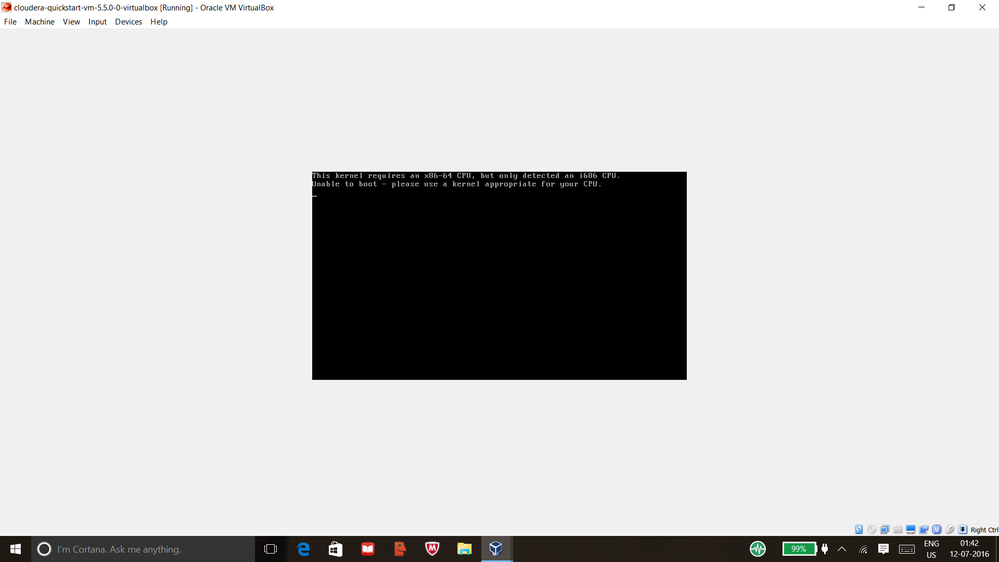
I changed the bios setting as well still I am facing the issue.Kindly request someone to help.



Created 07-12-2016 05:39 AM
- Mark as New
- Bookmark
- Subscribe
- Mute
- Subscribe to RSS Feed
- Permalink
- Report Inappropriate Content
Did you use a download manager to download the quickstart VM as mentioned in Cloudera's Community Knowledge article on setting up a Quickstart VM? It is possible that the file is corrupted.
Keep the questions coming,
Cy Jervis | Senior Manager, Knowledge Programs
if (helpful) { mark_as_solution(); } | if (appreciated) { give_kudos(); }
Created 07-12-2016 10:43 PM
- Mark as New
- Bookmark
- Subscribe
- Mute
- Subscribe to RSS Feed
- Permalink
- Report Inappropriate Content
Thank you so much.
Created 07-13-2016 05:19 AM
- Mark as New
- Bookmark
- Subscribe
- Mute
- Subscribe to RSS Feed
- Permalink
- Report Inappropriate Content
Great! Good luck on your exploration with the VM. 🙂
Keep the questions coming,
Cy Jervis | Senior Manager, Knowledge Programs
if (helpful) { mark_as_solution(); } | if (appreciated) { give_kudos(); }


Created on 12-04-2020 02:29 PM - edited 12-04-2020 02:37 PM
- Mark as New
- Bookmark
- Subscribe
- Mute
- Subscribe to RSS Feed
- Permalink
- Report Inappropriate Content
@vdineshk What setting did you change in system? I have the same error.


