
Our Community is getting an upgrade! To get everything ready for the relaunch, we’ll be placing the site in read-only mode starting September 21st.
We really appreciate your understanding while we get things set up behind the scenes. Catch up on all the exciting details about the move here.
Need help or have questions? Drop us a line at [email protected]

Support Questions
 Hi, I'm CLEO! Something exciting is coming to the Community. Stay Tuned!
- Cloudera Community
- Support
- Support Questions
- Re: Configured Ranger with AD/LDAP but not able to...
- Subscribe to RSS Feed
- Mark Question as New
- Mark Question as Read
- Float this Question for Current User
- Bookmark
- Subscribe
- Mute
- Printer Friendly Page
- Subscribe to RSS Feed
- Mark Question as New
- Mark Question as Read
- Float this Question for Current User
- Bookmark
- Subscribe
- Mute
- Printer Friendly Page
Configured Ranger with AD/LDAP but not able to sync users and groups from AD.


Created 05-04-2021 09:58 AM
- Mark as New
- Bookmark
- Subscribe
- Mute
- Subscribe to RSS Feed
- Permalink
- Report Inappropriate Content
Hi,
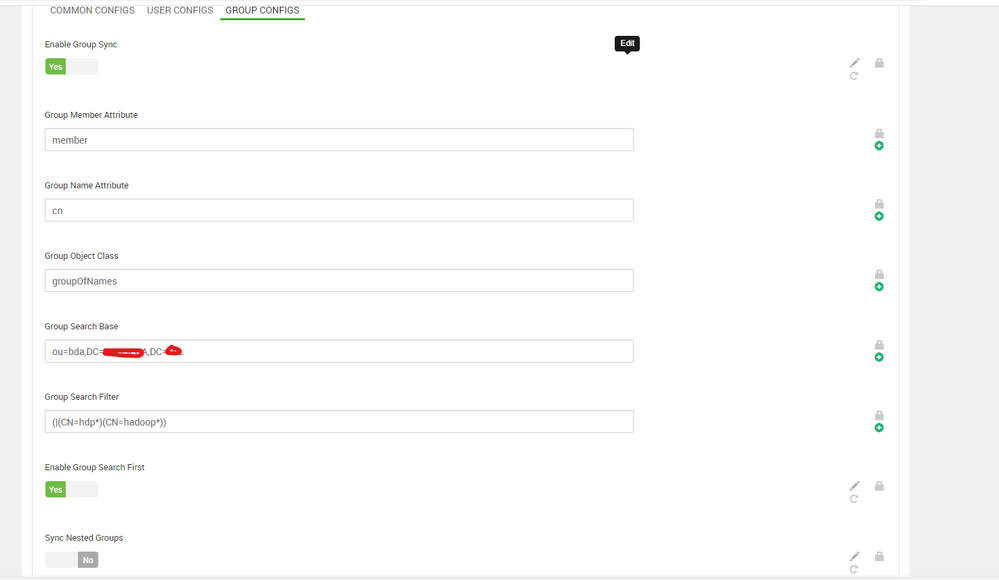
I have configured Ranger with AD for user and group sync but not able to see the users in the Ranger. Ldapsearch is working fine and able to retrieve the users from group hdpadmin. Please find below snap for the user configuration.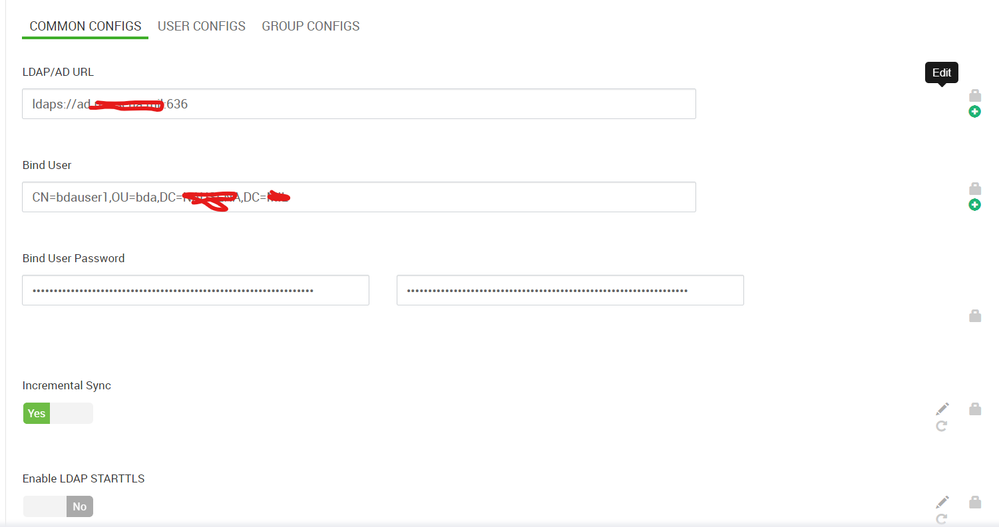

Created 05-04-2021 11:22 PM
- Mark as New
- Bookmark
- Subscribe
- Mute
- Subscribe to RSS Feed
- Permalink
- Report Inappropriate Content
Able to retrieved the groups and users from that group by changing the parameters as per below link.



Created 05-04-2021 08:27 PM
- Mark as New
- Bookmark
- Subscribe
- Mute
- Subscribe to RSS Feed
- Permalink
- Report Inappropriate Content
@somesh Can you try syncing the users by disabling "Enable Group Search First"
Created 05-04-2021 10:02 PM
- Mark as New
- Bookmark
- Subscribe
- Mute
- Subscribe to RSS Feed
- Permalink
- Report Inappropriate Content
@Scharan ,the users are not syncing by disabling "Enable Group Search First". Please find the below configuration.
ldapUrl: ldap://ad.xxx.xxx:389,
ldapBindDn: CN=user1,OU=bda,DC=HWX,DC=COM,
ldapBindPassword: ***** ,
ldapAuthenticationMechanism: simple,
searchBase: dc=hadoop,dc=apache,dc=org,
userSearchBase: [OU=bda,DC=HWX,DC=COM],
userSearchScope: 2,
userObjectClass: (|(objectClass=person)(objectClass=user)(objectClass=top)),
userSearchFilter: (|(objectClass=person)(objectClass=user)),
extendedUserSearchFilter: (&(objectclass=(|(objectClass=person)(objectClass=user)(objectClass=top)))(|(objectClass=person)(objectClass=user))),
userNameAttribute: sAMAccountName,
userSearchAttributes: [sAMAccountName, memberof, ismemberof],
userGroupNameAttributeSet: [memberof, ismemberof],
pagedResultsEnabled: true,
pagedResultsSize: 500,
groupSearchEnabled: false,
groupSearchBase: [CN=hdpadmin,OU=bda,DC=HWX,DC=COM],
groupSearchScope: 2,
groupObjectClass: hdpadmin,
groupSearchFilter: (|(objectClass=person)(objectClass=user)),
extendedGroupSearchFilter: (&(objectclass=hdpadmin)(|(objectClass=person)(objectClass=user))(|(member={0})(member={1}))),
extendedAllGroupsSearchFilter: (&(objectclass=hdpadmin)(|(objectClass=person)(objectClass=user))),
groupMemberAttributeName: member,
groupNameAttribute: hdpadmin, groupSearchAttributes: [hdpadmin, member],
groupUserMapSyncEnabled: false, groupSearchFirstEnabled: false, userSearchEnabled: true,
ldapReferral: follow
Created 05-04-2021 11:22 PM
- Mark as New
- Bookmark
- Subscribe
- Mute
- Subscribe to RSS Feed
- Permalink
- Report Inappropriate Content
Able to retrieved the groups and users from that group by changing the parameters as per below link.


