

dqsdqs
Silver ⭐️⭐️
February 28, 2024
Question

Connection to Hive & Impala - Kerberos Authentication - ERROR [Cloudera][ThriftExtension] (9)

Hello,

We have a situation where we want to connect to both Cloudera Hive and Impala, using a Kerberos authentication. On top of that, we can go through 2 different realms under these two DBs. 

To proceed with this setup, we are using the MIT tool. This setup works well when it comes to Impala (in both realms), however it does not work with Hive; we essentially get this type of error below (this is the result of the "Test" from the ODBC setup).
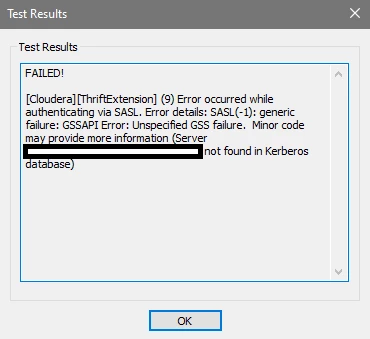
Erreur - Connexion Hive-Kerberos.png

I found two similar topics on this forum talking about this error, but the resolution was not clear to me (https://community.cloudera.com/t5/Support-Questions/ERROR-28000-Cloudera-ThriftExtension-9-Error-occurred-while/td-p/365047 and https://community.cloudera.com/t5/Support-Questions/Hive-ODBC-kerberos-SASL-1-generic-failure-GSSAPI-Error/m-p/61548)

Would anyone have clues on where to go from here to resolve this conflict ?

Thank you

6 replies

DianaTorres
Community Manager
Community Manager
February 28, 2024

@dqsdqs Welcome to the Cloudera Community!

To help you get the best possible solution, I have tagged our Hive experts @mszurap @Shmoo  who may be able to assist you further.

Please keep us updated on your post, and we hope you find a satisfactory solution to your query.

Translate
Regards, Diana Torres, Senior Community Moderator
james_jones
Gold ⭐️⭐️⭐️
Gold ⭐️⭐️⭐️
February 28, 2024

When using two realms, there has to be a trust between realms and your krb5.conf has to be configured properly to handle both realms on both the client and server. Setting this up isn't super difficult if you've done it once or twice but can be hard if it's new to you. The krb5.conf requires proper host or domain realm mapping.

If you set up a 1 way trust (but it can also be a 2 way trust), and assuming you use MIT KDC for cluster service principals but AD is the other realm, then MIT KDC has to trust AD, but AD doesn't have to trust MIT KDC. To set up the trust you need to do configurations in both environments. Here's an example: https://community.cloudera.com/t5/Community-Articles/One-Way-Trust-MIT-KDC-to-Active-Directory/ta-p/247638

If the KDC trust isn't the issue, it may be something in there's probably an issue with the driver configuration. And, if this is being done on a Windows computer, you may need to configure the Windows machine to know about the other realm.

I also recommend opening a Cloudera support case.

Translate
mszurap
Platinum ⭐️
Platinum ⭐️
February 29, 2024

Hi @dqsdqs ,

Please also see the following article:

https://community.cloudera.com/t5/Customer/Troubleshooting-Kerberos-Related-Issues-Common-Errors-and/ta-p/76192

Most of the times the "Server xxx not found in Kerberos database" message indicates that you need to include the server hostname in the "[domain_realm]" (host to realm mapping) section, so that the kerberos client can go to the proper KDC.

Cheers

 Miklos

Translate
DianaTorres
Community Manager
Community Manager
March 4, 2024

@dqsdqs Has the reply helped resolve your issue? If so, please mark the appropriate reply as the solution, as it will make it easier for others to find the answer in the future. Thanks.

Translate
Regards, Diana Torres, Senior Community Moderator
dqsdqs
dqsdqsAuthor
Silver ⭐️⭐️
April 17, 2024

Hello @DianaTorres, I've tried to follow the instructions & looked around a few changes in our configuration, but I can't easily figure out the solution; it might be simple, but it's my first look / attempt at this setup. I've tried to create a Cloudera support case but couldn't, it seems I don't have the rights. Could you create one on my behalf ? As a reminder of the issue :

- We are informing two realms in the conf file

- When attempting a connection, and specifically with Hive where the error pops-up, it seems like the process only takes into account the default realm.

- As we have two tickets simultaneously, one for each realm, the connection fails, likely because it does not find the right credentials of the ticket to the right domain.

Translate
dqsdqs
dqsdqsAuthor
Silver ⭐️⭐️
March 7, 2024

Hello,

Thank you @mszurap @james_jones, I thought there hadn't been any updates on this post so missed them. I will look into your comments and will update this ticket if it's resolved.

Thanks again,

Translate
