
Our Community is getting an upgrade! To get everything ready for the relaunch, we’ll be placing the site in read-only mode starting September 21st.
We really appreciate your understanding while we get things set up behind the scenes. Catch up on all the exciting details about the move here.
Need help or have questions? Drop us a line at [email protected]

Support Questions
 Hi, I'm CLEO! Something exciting is coming to the Community. Stay Tuned!
- Cloudera Community
- Support
- Support Questions
- Different Log directory free space warning on one ...
- Subscribe to RSS Feed
- Mark Question as New
- Mark Question as Read
- Float this Question for Current User
- Bookmark
- Subscribe
- Mute
- Printer Friendly Page
- Subscribe to RSS Feed
- Mark Question as New
- Mark Question as Read
- Float this Question for Current User
- Bookmark
- Subscribe
- Mute
- Printer Friendly Page
Different Log directory free space warning on one host in cloudera
- Labels:
-
Cloudera Manager


Created on
12-05-2019
11:05 PM
- last edited on
12-06-2019
02:02 AM
by
 VidyaSargur

- Mark as New
- Bookmark
- Subscribe
- Mute
- Subscribe to RSS Feed
- Permalink
- Report Inappropriate Content
Hi,
We are running CDH 5.14.0 version of cloudera.There are multiple warnings coming related to log data directory for only one Data node( hadoop-slave-1). please see warnings.
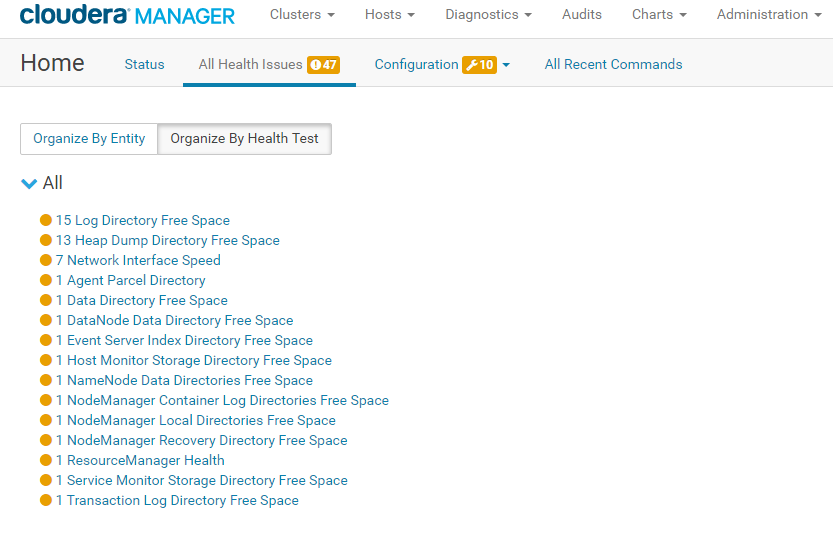
for the same node,root / dir space is showing critical.
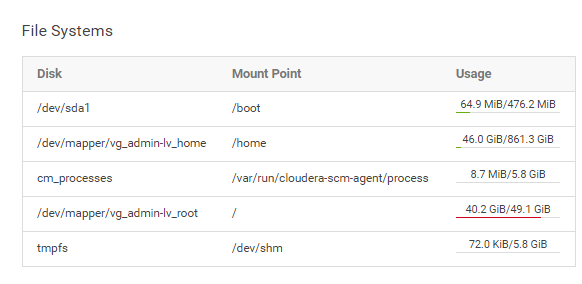
can anyone suggest what files i should delete from "/ ,so that i can clear these alarms .
Thanks
Devendra


Created 12-06-2019 08:31 PM
- Mark as New
- Bookmark
- Subscribe
- Mute
- Subscribe to RSS Feed
- Permalink
- Report Inappropriate Content
Hi Devendra,
I see you are seeing multiple low disk space alerts for various role log and role data directories. It is not advised to delete anything manually from these directories instead adjust the retention policy for them in CM and let CM delete it automatically for you.
Review the documentation to find default retention policy for Cloudera Management Services data directories and following documentation for setting retention policy for any role log that by default reside in /var/log/. Remove and Delete any unused parcel from CM > Parcel page to reclaim disk space occupied by parcels. Details are given here.
I hope that will help.
Thanks,
Salim
Created 12-12-2019 03:28 AM
- Mark as New
- Bookmark
- Subscribe
- Mute
- Subscribe to RSS Feed
- Permalink
- Report Inappropriate Content
Thanks salim.


Created 12-06-2019 01:11 AM
- Mark as New
- Bookmark
- Subscribe
- Mute
- Subscribe to RSS Feed
- Permalink
- Report Inappropriate Content
Hi @pdev Login to the host and execute below command -
for a in /*; do mountpoint -q -- "$a" || du -s -h -x "$a"; done
command which will ignore all mounts and only give size details of filesystem/dirs which resides under "/"
You can check and delete data accordingly.
Created 12-06-2019 08:31 PM
- Mark as New
- Bookmark
- Subscribe
- Mute
- Subscribe to RSS Feed
- Permalink
- Report Inappropriate Content
Hi Devendra,
I see you are seeing multiple low disk space alerts for various role log and role data directories. It is not advised to delete anything manually from these directories instead adjust the retention policy for them in CM and let CM delete it automatically for you.
Review the documentation to find default retention policy for Cloudera Management Services data directories and following documentation for setting retention policy for any role log that by default reside in /var/log/. Remove and Delete any unused parcel from CM > Parcel page to reclaim disk space occupied by parcels. Details are given here.
I hope that will help.
Thanks,
Salim
Created 12-12-2019 03:28 AM
- Mark as New
- Bookmark
- Subscribe
- Mute
- Subscribe to RSS Feed
- Permalink
- Report Inappropriate Content
Thanks salim.


Created 12-12-2019 05:42 AM
- Mark as New
- Bookmark
- Subscribe
- Mute
- Subscribe to RSS Feed
- Permalink
- Report Inappropriate Content
Can you advise if your issue is now resolved? If so, please mark the appropriate reply as the solution, as it will make it easier for others to find the answer in the future.


