Hi,
I was trying to install Cloudera Manager 6 with CDH 6.3.0 for a 3 node cluster. I have downloaded and installed cloudera-manager-installer.bin in CentOS6 and installed cloudera server and agent. Then I have logged into CM using admin:admin to configure cluster and I stuck here at Add Cluster Configuration step as Upload Oozie ShareLib step failed with no log4j2 file found. PFB logs.
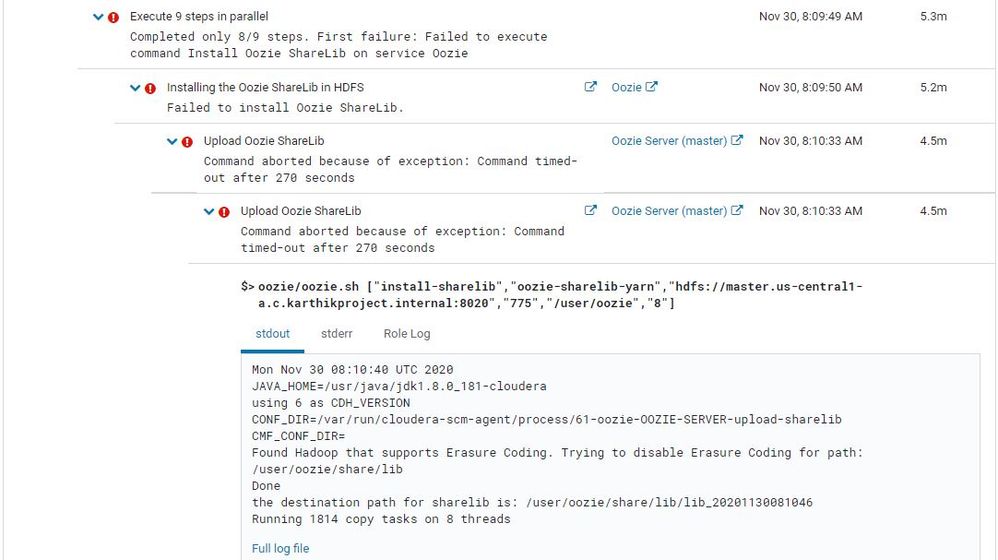 Upload Oozie ShareLib
Also, I have checked in /var/log/cloudera-scm-server/cloudera-scm-server.log and found the same error message there as well. Is this log4j2 something that I need to install manually before configuring cluster ? If so, please suggest me on how to do that.
stdout and stderr for reference. PFB!!
stdout:
Mon Nov 30 08:10:40 UTC 2020
JAVA_HOME=/usr/java/jdk1.8.0_181-cloudera
using 6 as CDH_VERSION
CONF_DIR=/var/run/cloudera-scm-agent/process/61-oozie-OOZIE-SERVER-upload-sharelib
CMF_CONF_DIR=
Found Hadoop that supports Erasure Coding. Trying to disable Erasure Coding for path: /user/oozie/share/lib
Done
the destination path for sharelib is: /user/oozie/share/lib/lib_20201130081046
Running 1814 copy tasks on 8 threads
stderr:
org.apache.oozie.tools.OozieSharelibCLI create -fs hdfs://master.us-central1-a.c.karthikproject.internal:8020 -locallib /opt/cloudera/parcels/CDH-6.3.2-1.cdh6.3.2.p0.1605554/lib/oozie/oozie-sharelib-yarn -concurrency 8
SLF4J: Class path contains multiple SLF4J bindings.
SLF4J: Found binding in [jar:file:/opt/cloudera/parcels/CDH-6.3.2-1.cdh6.3.2.p0.1605554/jars/log4j-slf4j-impl-2.8.2.jar!/org/slf4j/impl/StaticLoggerBinder.class]
SLF4J: Found binding in [jar:file:/opt/cloudera/parcels/CDH-6.3.2-1.cdh6.3.2.p0.1605554/jars/slf4j-log4j12-1.7.25.jar!/org/slf4j/impl/StaticLoggerBinder.class]
SLF4J: Found binding in [jar:file:/opt/cloudera/parcels/CDH-6.3.2-1.cdh6.3.2.p0.1605554/jars/slf4j-simple-1.7.25.jar!/org/slf4j/impl/StaticLoggerBinder.class]
SLF4J: See http://www.slf4j.org/codes.html#multiple_bindings for an explanation.
SLF4J: Actual binding is of type [org.apache.logging.slf4j.Log4jLoggerFactory]
ERROR StatusLogger No log4j2 configuration file found. Using default configuration: logging only errors to the console. Set system property 'org.apache.logging.log4j.simplelog.StatusLogger.level' to TRACE to show Log4j2 internal initialization logging.
[30/Nov/2020 08:15:14 +0000] 1740 MainThread redactor     INFO     Killing with SIGTERM


 Hi, I'm CLEO! Something exciting is coming to the Community. Stay Tuned!


