Our Community is getting an upgrade! To get everything ready for the relaunch, we’ll be placing the site in read-only mode starting September 21st.
We really appreciate your understanding while we get things set up behind the scenes. Catch up on all the exciting details about the move here.
Need help or have questions? Drop us a line at [email protected]
Created on 01-28-2022 09:50 AM - edited 01-28-2022 09:56 AM
Hello Guys,
How to Extract recent past Saturday based on today date and is there any expression language to get by update attribute
Created 03-09-2022 11:30 AM
@sachin_32
You can accomplish by utilizing the "Advanced UI" capability found in the UpdateAttribute processor.
The advanced UI allows you to create Rules (think if these as an IF/Then capability).
So you would setup 3 rules:
1. If current date falls on Mon - Fri, do X
2. if current date falls on Sat, do nothing
3. if current date falls on Sun, do Y
Below you can see I have created 3 rules (Day1-5, Day6, and Day7)
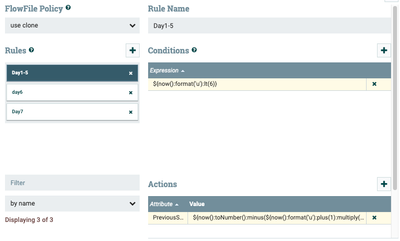
Once you create a Rule, you need to provide a Condition (This is your boolean if statement)
In this case I am using it to figure out what the current day of the week with 1= Monday and 7 = Sunday and seeing if the day of the week is prior to Sat or after Sat in the current week.
If a rules condition (if statement) resolves to a boolean "true", then the configured "Actions" (then statement) are evaluated.
For my "Day1-5" rule, I set:
Condition:
${now():format('u'):lt(6)}
Action:
${now():toNumber():minus(${now():format('u'):plus(1):multiply(86400000)}):toDate():format("EEE, dd MMM yyyy")}
For my "Day6" rule, I set:
Condition:
${now():format('u'):equals(6)}
Action:
${now():format('EEE, dd MMM yyyy')}
For my "Day7" rule, I set:
Condition:
${now():format('u'):gt(6)}
Action:
${now():toNumber():minus(86400000):toDate():format("EEE, dd MMM yyyy")}
About above:
- The "now()" function returns the current date.
- 86400000 is the number of milliseconds in 1 day.
- So first I get the current date and convert it to milliseconds using the "toNumber()" function.
- Then for Day1-5, I am subtracting based on current day of week a multiple of days worth of milliseconds.
- For Day6, I am doing nothing other than reformatting the current days date.
- For Day7, I am just subtracting one day or 86400000 milliseconds
No matter which rule is applied the final date format i choose to write to an attribute named "PreviousSaturday" on the FlowFile is formatted using java simple date format "EEE, dd MMM yyyy"
Example: "Sat, 05 Mar 2022"
If you found this response assisted with your query, please take a moment to login and click on "Accept as Solution" below this post.
Thank you,
Matt
Created 03-09-2022 11:30 AM
@sachin_32
You can accomplish by utilizing the "Advanced UI" capability found in the UpdateAttribute processor.
The advanced UI allows you to create Rules (think if these as an IF/Then capability).
So you would setup 3 rules:
1. If current date falls on Mon - Fri, do X
2. if current date falls on Sat, do nothing
3. if current date falls on Sun, do Y
Below you can see I have created 3 rules (Day1-5, Day6, and Day7)
Once you create a Rule, you need to provide a Condition (This is your boolean if statement)
In this case I am using it to figure out what the current day of the week with 1= Monday and 7 = Sunday and seeing if the day of the week is prior to Sat or after Sat in the current week.
If a rules condition (if statement) resolves to a boolean "true", then the configured "Actions" (then statement) are evaluated.
For my "Day1-5" rule, I set:
Condition:
${now():format('u'):lt(6)}
Action:
${now():toNumber():minus(${now():format('u'):plus(1):multiply(86400000)}):toDate():format("EEE, dd MMM yyyy")}
For my "Day6" rule, I set:
Condition:
${now():format('u'):equals(6)}
Action:
${now():format('EEE, dd MMM yyyy')}
For my "Day7" rule, I set:
Condition:
${now():format('u'):gt(6)}
Action:
${now():toNumber():minus(86400000):toDate():format("EEE, dd MMM yyyy")}
About above:
- The "now()" function returns the current date.
- 86400000 is the number of milliseconds in 1 day.
- So first I get the current date and convert it to milliseconds using the "toNumber()" function.
- Then for Day1-5, I am subtracting based on current day of week a multiple of days worth of milliseconds.
- For Day6, I am doing nothing other than reformatting the current days date.
- For Day7, I am just subtracting one day or 86400000 milliseconds
No matter which rule is applied the final date format i choose to write to an attribute named "PreviousSaturday" on the FlowFile is formatted using java simple date format "EEE, dd MMM yyyy"
Example: "Sat, 05 Mar 2022"
If you found this response assisted with your query, please take a moment to login and click on "Accept as Solution" below this post.
Thank you,
Matt