Support Questions

Find answers, ask questions, and share your expertise
Announcements
Share your experience with Cloudera on G2 and get a $25 Amazon Gift card.

File Descriptor Issue on Data Node

avatar
Rising Star

Hello,

We are seeing concerning alert on one of our data node related to File Descriptor (Concerning: Open file descriptors: 16,410. File descriptor limit: 32,768. Percentage in use: 50.08%. Warning threshold: 50.00%.)


Would appreciate any help/ guidance to fix this before it goes out of hand.


[user1@myserver ~]$ ulimit -a
core file size (blocks, -c) 0
data seg size (kbytes, -d) unlimited
scheduling priority (-e) 0
file size (blocks, -f) unlimited
pending signals (-i) 1030544
max locked memory (kbytes, -l) 64
max memory size (kbytes, -m) unlimited
open files (-n) 1024
pipe size (512 bytes, -p) 8
POSIX message queues (bytes, -q) 819200
real-time priority (-r) 0
stack size (kbytes, -s) 8192
cpu time (seconds, -t) unlimited
max user processes (-u) 4096
virtual memory (kbytes, -v) unlimited
file locks (-x) unlimited


[user1@myserver ~]$ cat /proc/sys/fs/file-max
26161091


[user1@myserver ~]$ cat /proc/sys/fs/file-nr
80400 0 26161091


Thanks 

Amn

1 ACCEPTED SOLUTION

avatar
Contributor

Hello @Amn_468 


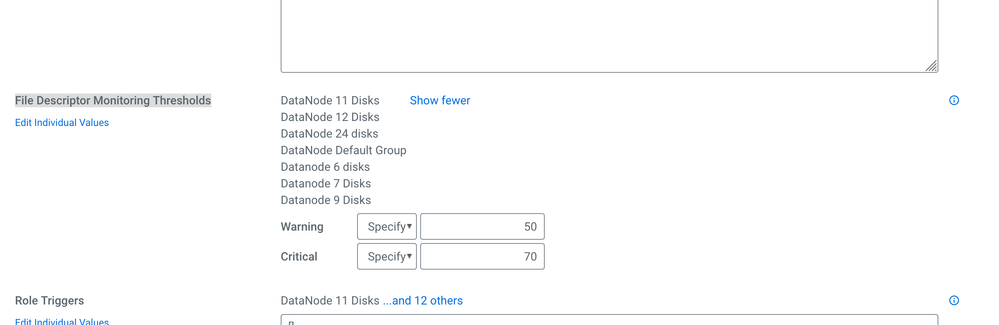
Could you please check - HDFS -> configuration -> File Descriptor Monitoring Thresholds Value.


Try to increase the monitoring threshold value. Please find the attached screenshot for reference, Please accept the solution if its works. Thanks


Screenshot_2021-03-09 Configuration - HDFS - Cloudera Manager.png

View solution in original post

2 REPLIES 2

avatar
Contributor

Hello @Amn_468 


Could you please check - HDFS -> configuration -> File Descriptor Monitoring Thresholds Value.


Try to increase the monitoring threshold value. Please find the attached screenshot for reference, Please accept the solution if its works. Thanks


Screenshot_2021-03-09 Configuration - HDFS - Cloudera Manager.png

avatar
Rising Star

Thanks @PandurangB 


That worked 🙂