Our Community is getting an upgrade! To get everything ready for the relaunch, we’ll be placing the site in read-only mode starting September 21st.
We really appreciate your understanding while we get things set up behind the scenes. Catch up on all the exciting details about the move here.
Need help or have questions? Drop us a line at [email protected]

Support Questions

Find answers, ask questions, and share your expertise
Announcements
Share your experience with Cloudera on G2 and get a $25 Amazon Gift card.
Hi, I'm CLEO! Something exciting is coming to the Community. Stay Tuned!

HIVE MANAGED TABLE

avatar
Explorer

Good Morning.
I am doing a small example with HIVE and MANAGED TABLE.

My environment is Oracle VM virtual Box 6.0
Hive 1.1.0-cdh5.13.0

I indicate the steps I have taken:
1st)
CREATE DATABASE scenariox

2nd)

USE scenariox

CREATE TABLE scenariox
(
smallint order;
name string;
)
ROW FORMAT DELIMITED FIELDS TERMINATED BY ',';

3rd) I load the table with my csv file that is stored in HDFS

HDFS> /scenariox/scenariox.csv

LOAD DATA LOCAL INPATH '/scenariox/scenariox.csv' INTO TABLE scenariox

The table loads correctly. I can run: '' Select * from scenariox ''. I recover data correctly. The table has been loaded successfully.
The directories in hive are created correctly:

/user/hive/warehouse/scenariox.db/scenariox/scenariox.csv

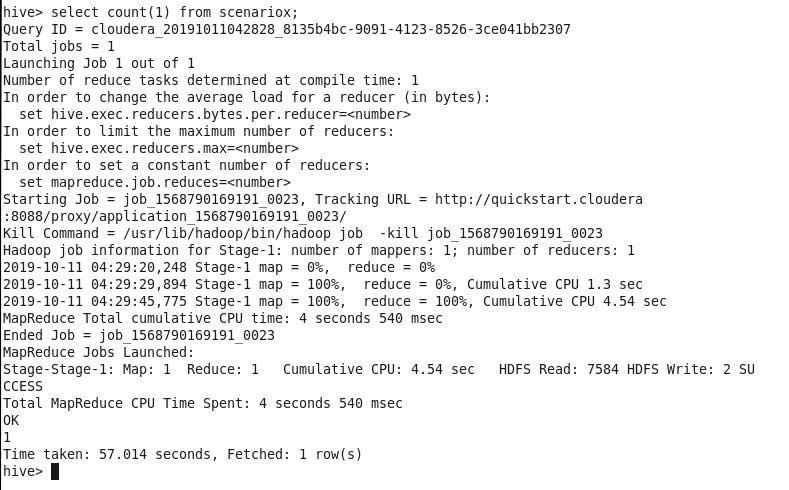
I execute the sentence: SELECT COUNT (1) FROM scenariox;
MAP / REDUCE launched


Captura.JPG

My problem is: I can't find the output file that produces the map / reduce.

What directory is it stored in? I thought that a file of type '00000_0' was generated and stored in the HDFS.

Can somebody help me? Thank you. Greetings

1 ACCEPTED SOLUTION

avatar
Master Guru

@Gerva 


Select count(*) from <table>; 

Query launches map reduce job and output will be displayed to the console.

-

If you want to store the output to file then use 

Insert overwrite directory '<directory_name>' select count(*) from scenariox;


Now output of map reduce job will be stored into the given hdfs directory and you can find 00000_0 file in directory..

View solution in original post

2 REPLIES 2

avatar
Master Guru

@Gerva 


Select count(*) from <table>; 

Query launches map reduce job and output will be displayed to the console.

-

If you want to store the output to file then use 

Insert overwrite directory '<directory_name>' select count(*) from scenariox;


Now output of map reduce job will be stored into the given hdfs directory and you can find 00000_0 file in directory..

avatar
Explorer

@Shu_ashu Great!. With the instructions you have given me, the output file is created correctly. I also tried the option: CREATE TABLE AS scenariox_out AS SELECT select count (*) from scenariox; And the output file was created in: /user/hive/warehouse/scenariox.db/scenariox/scenariox_out/000000_0 Thank you. You have a good day