Our Community is getting an upgrade! To get everything ready for the relaunch, we’ll be placing the site in read-only mode starting September 21st.
We really appreciate your understanding while we get things set up behind the scenes. Catch up on all the exciting details about the move here.
Need help or have questions? Drop us a line at [email protected]

Support Questions

Find answers, ask questions, and share your expertise
Announcements
Share your experience with Cloudera on G2 and get a $25 Amazon Gift card.
Hi, I'm CLEO! Something exciting is coming to the Community. Stay Tuned!

Hadoop suppress security logger log level

avatar
New Contributor

Hi Team,

I want to change the log level of the Hadoop security logger from INFO to ERROR. I've exported the following environment variable for that

export HADOOP_NAMENODE_OPTS="-Dhadoop.security.logger=ERROR,RFA ${HADOOP_NAMENODE_OPTS}"

I can see the new parameter has been reflected in the command line

hdfs 13048 2.1 0.7 3899916 509000 ? Sl 01:22 0:29 /usr/lib/jvm/java-11-openjdk-amd64/bin/java -Dproc_namenode -Djava.net.preferIPv4Stack=true -Dhdfs.audit.logger=INFO,NullAppender -Dhadoop.security.logger=ERROR,RFA -Dyarn.log.dir=/var/log/hadoop-hdfs -Dyarn.log.file=hadoop-hdfs-namenode-hadoop-master-1.log -Dyarn.home.dir=/usr/lib/hadoop-yarn -Dyarn.root.logger=INFO,console -Djava.library.path=/usr/lib/hadoop/lib/native -Xmx2048m -Dhadoop.log.dir=/var/log/hadoop-hdfs -Dhadoop.log.file=hadoop-hdfs-namenode-hadoop-master-1.log -Dhadoop.home.dir=/usr/lib/hadoop -Dhadoop.id.str=hdfs -Dhadoop.root.logger=ERROR,RFA -Dhadoop.policy.file=hadoop-policy.xml org.apache.hadoop.hdfs.server.namenode.NameNode

But still, I can see the INFO level logs from the security logger in the log file

[Socket Reader #1 for port 9820] INFO SecurityLogger.org.apache.hadoop.ipc.Server - Auth successful for hdfs/[email protected] (auth:KERBEROS)
[Socket Reader #1 for port 9820] INFO SecurityLogger.org.apache.hadoop.security.authorize.ServiceAuthorizationManager - Authorization successful for hdfs/[email protected] (auth:KERBEROS) for protocol=interface org.apache.hadoop.ha.HAServiceProtocol

Anything I'm missing here?

1 REPLY 1

avatar
Expert Contributor

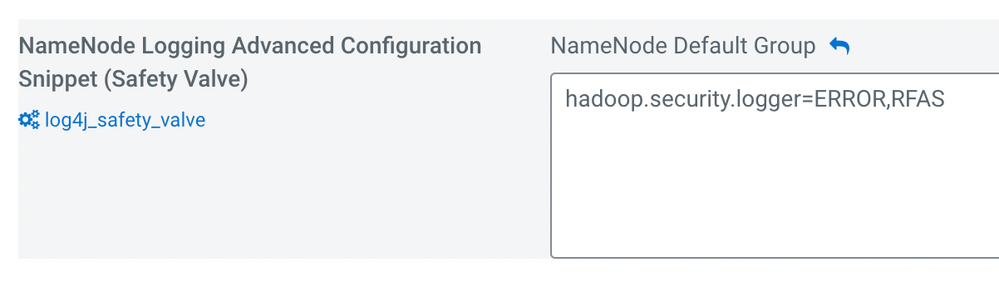
Hi @akshaydalvi , I am not sure if you are using Cloudera Manager or not. Please confirm. Make sure your log4j.properties reflects what you are trying to change. You could add "hadoop.security.logger=ERROR,RFAS" line under the log4j safety valve. Be sure that you are using the right RollingAppender name RFA or RFAS. We generally use RFAS for SecurityLogger as shown below snippet.

hadoop.security.log.file=SecurityAuth-${user.name}.audit
log4j.appender.RFAS=org.apache.log4j.RollingFileAppender
log4j.appender.RFAS.File=/var/log/hadoop-hdfs/SecurityAuth-${user.name}.audit

Here is how we configure the log4j safety valve in Cloudera Manager under HDFS -> Configuration

@Screenshot 2023-12-08 at 6.17.41 PM.png