Our Community is getting an upgrade! To get everything ready for the relaunch, we’ll be placing the site in read-only mode starting September 21st.
We really appreciate your understanding while we get things set up behind the scenes. Catch up on all the exciting details about the move here.
Need help or have questions? Drop us a line at [email protected]
Created on
08-25-2016
02:39 PM
- last edited on
06-03-2026
07:54 AM
by
cjervis
how to copy files from local desktop lo hdfs location using NiFi?
Created on 08-25-2016 02:55 PM - edited 08-19-2019 03:39 AM
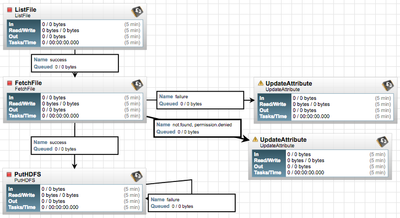
The simplest answer to your question is to use the ListFile processor to produce a list of the files from your local filesystem, feed that to a fetchFile processor that will pickup the content and then pass them to a PutHDFS processor to send them to your HDFS. The listFile processor will maintain state based on lastModified time on the files to ensure the files are not listed more then once.
If you right click on either of these NiFi processors you can select "usage" from the displayed context menu to get more details on the configuration of each of these.
Thanks,
Matt
Created on 08-25-2016 02:55 PM - edited 08-19-2019 03:39 AM
The simplest answer to your question is to use the ListFile processor to produce a list of the files from your local filesystem, feed that to a fetchFile processor that will pickup the content and then pass them to a PutHDFS processor to send them to your HDFS. The listFile processor will maintain state based on lastModified time on the files to ensure the files are not listed more then once.
If you right click on either of these NiFi processors you can select "usage" from the displayed context menu to get more details on the configuration of each of these.
Thanks,
Matt
Created 08-25-2016 02:58 PM
@kishore sanchina you will need to use a protocol. If you simply want to "push" local files to nifi, you can use the ListenHTTP processor. Then simply curl the file to nifi.