Our Community is getting an upgrade! To get everything ready for the relaunch, we’ll be placing the site in read-only mode starting September 21st.
We really appreciate your understanding while we get things set up behind the scenes. Catch up on all the exciting details about the move here.
Need help or have questions? Drop us a line at [email protected]

Support Questions

Find answers, ask questions, and share your expertise
Announcements
Share your experience with Cloudera on G2 and get a $25 Amazon Gift card.
Hi, I'm CLEO! Something exciting is coming to the Community. Stay Tuned!

How to Move FlowFiles Between Queues: Rerouting Connections in Apache NiFi

avatar
New Member

Hi,

How to move the flowfiles from one queue/relationship to another one through NiFi Web Interface.

Thanks,,

1 ACCEPTED SOLUTION

avatar
Master Mentor

@yazeed salem

-

Please correct me if my below understanding of what you are asking is not correct:

-

There is no way to click on an existing connection with queued data and select/copy the queued FlowFiles from that connection to another connection.

-

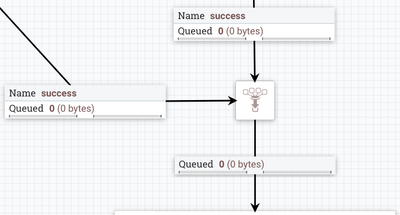
If you want to join to different connections together, you can use a "funnel". With the processors on both ends of a connection stopped, you will be able to click on that connection and drag the small blue square at destination side of connection to another end-point. This will cause any connections feeding into the funnel to be funneled into a common destination queue.

77650-screen-shot-2018-06-11-at-13610-pm.png

-

Thank you,

Matt

-

When an "Answer" addresses/solves your question, please select "Accept" beneath that answer. This encourages user participation in this forum.

View solution in original post

2 REPLIES 2

avatar
Master Mentor

@yazeed salem

-

Please correct me if my below understanding of what you are asking is not correct:

-

There is no way to click on an existing connection with queued data and select/copy the queued FlowFiles from that connection to another connection.

-

If you want to join to different connections together, you can use a "funnel". With the processors on both ends of a connection stopped, you will be able to click on that connection and drag the small blue square at destination side of connection to another end-point. This will cause any connections feeding into the funnel to be funneled into a common destination queue.

77650-screen-shot-2018-06-11-at-13610-pm.png

-

Thank you,

Matt

-

When an "Answer" addresses/solves your question, please select "Accept" beneath that answer. This encourages user participation in this forum.

avatar
New Member

thanks. works perfectly