Our Community is getting an upgrade! To get everything ready for the relaunch, we’ll be placing the site in read-only mode starting September 21st.
We really appreciate your understanding while we get things set up behind the scenes. Catch up on all the exciting details about the move here.
Need help or have questions? Drop us a line at [email protected]

Support Questions

Find answers, ask questions, and share your expertise
Announcements
Share your experience with Cloudera on G2 and get a $25 Amazon Gift card.
Hi, I'm CLEO! Something exciting is coming to the Community. Stay Tuned!

How to avoid deadlocks in Nifi when put something in database? Error Transaction (Process ID 76) was deadlocked on lock resources with another process and has been chosen as the deadlock victim

avatar
Explorer

Hi! I have flows on NIFi and in many places, I have to save data to the database. I mainly use PutSql or PutdatabaseRacord processors. So far, everything was working fine, but today we wanted to test our data and issued 15 messages at once. Unfortunately, in several places, during data saving or updating, an error appeared - error.code 1205 error.message Transaction (Process ID 76) was deadlocked on lock resources with another process and has been chosen as the deadlock victim. Rerun the transaction. error.sql.state 40001 - after which some data was saved or updated correctly, others unfortunately were not. How can I resolve this situation, and how can I protect myself against something like this?


1 REPLY 1

avatar
Master Collaborator

Hello @donaldo71, 

This looks like SQL is getting the deadlock because of the many records in once. 

You can try couple of this. 
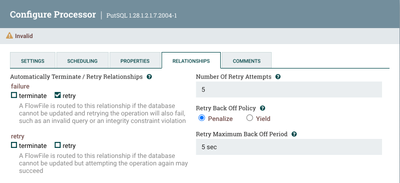
First, enable the retry option on the PutSql or PutdatabaseRacord processors.

vafs_0-1760819691830.png

If the retries helped previously, this could also help in your case.

Also, decrease the concurrency and batch sizes to try to decrease the SQL load. 

Additionally, on the SQL side, if you can, use row versioning isolation to reduce locking: 

ALTER DATABASE DBNAME SET READ_COMMITTED_SNAPSHOT ON;

Regards,
Andrés Fallas
--
Was your question answered? Please take some time to click on "Accept as Solution" below this post.
If you find a reply useful, say thanks by clicking on the thumbs-up button.