
Our Community is getting an upgrade! To get everything ready for the relaunch, we’ll be placing the site in read-only mode starting September 21st.
We really appreciate your understanding while we get things set up behind the scenes. Catch up on all the exciting details about the move here.
Need help or have questions? Drop us a line at [email protected]

Support Questions
 Hi, I'm CLEO! Something exciting is coming to the Community. Stay Tuned!
- Cloudera Community
- Support
- Support Questions
- Re: How to connect apache nifi with hadoop?
- Subscribe to RSS Feed
- Mark Question as New
- Mark Question as Read
- Float this Question for Current User
- Bookmark
- Subscribe
- Mute
- Printer Friendly Page
- Subscribe to RSS Feed
- Mark Question as New
- Mark Question as Read
- Float this Question for Current User
- Bookmark
- Subscribe
- Mute
- Printer Friendly Page
How to connect apache nifi with hadoop?
- Labels:
-
Apache NiFi
-
HDFS


Created on
03-01-2021
02:46 AM
- last edited on
03-01-2021
03:58 AM
by
 VidyaSargur

- Mark as New
- Bookmark
- Subscribe
- Mute
- Subscribe to RSS Feed
- Permalink
- Report Inappropriate Content


Created 03-01-2021 10:11 AM
- Mark as New
- Bookmark
- Subscribe
- Mute
- Subscribe to RSS Feed
- Permalink
- Report Inappropriate Content
Nifi cluste is not aware of your Hadoop cluster until you copy these 2 files from your cluster /etc/hadoop/conf/hdfs-site.xml or /etc/hadoop/conf/core-site.xml to your local nifi installation
Hadoop configuration resources=/local/dir/hdfs-site.xml,/local/dir/core-site.xml
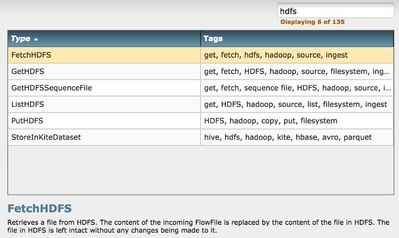
look for any of these processor group for HDFS
Hope that helps
Created 03-01-2021 12:41 PM
- Mark as New
- Bookmark
- Subscribe
- Mute
- Subscribe to RSS Feed
- Permalink
- Report Inappropriate Content
You will need to copy the hdfs/core-site.xml to a local path accessible to your windows. And you will need to update your host's file entry to make the VM reachable from the windows machine.
You should be able to ping your vm from the windows machine and vice versa.
Edit and change core-site.xml and hdfs-site.xml files and remove the FQDN:8020 to an IP ie for class C network like 192.168.10.201:8020 restart the processors and let me know.
Hope that helps?
Created 03-01-2021 10:11 AM
- Mark as New
- Bookmark
- Subscribe
- Mute
- Subscribe to RSS Feed
- Permalink
- Report Inappropriate Content
Nifi cluste is not aware of your Hadoop cluster until you copy these 2 files from your cluster /etc/hadoop/conf/hdfs-site.xml or /etc/hadoop/conf/core-site.xml to your local nifi installation
Hadoop configuration resources=/local/dir/hdfs-site.xml,/local/dir/core-site.xml
look for any of these processor group for HDFS
Hope that helps
Created 03-01-2021 11:49 AM
- Mark as New
- Bookmark
- Subscribe
- Mute
- Subscribe to RSS Feed
- Permalink
- Report Inappropriate Content
Thank you for the reply
first of all I am installing apache nifi in windows and cloudera in a virtual machine
how to put those files in putHDFS processor configuration ???
Created 03-01-2021 12:01 PM
- Mark as New
- Bookmark
- Subscribe
- Mute
- Subscribe to RSS Feed
- Permalink
- Report Inappropriate Content
And now I'm getting this error
- 20:57:07 CET WARNING
PutHDFS[id=ecd594bf-0177-1000-916a-aeb3f6dc26ca] Error stopping FileSystem statistics thread: null
- 20:57:07 CET ERROR
PutHDFS[id=ecd594bf-0177-1000-916a-aeb3f6dc26ca] Failed to properly initialize Processor. If still scheduled to run, NiFi will attempt to initialize and run the Processor again after the 'Administrative Yield Duration' has elapsed. Failure is due to java.nio.channels.UnresolvedAddressException: java.nio.channels.UnresolvedAddressException
- 20:57:07 CET ERROR
PutHDFS[id=ecd594bf-0177-1000-916a-aeb3f6dc26ca] HDFS Configuration error - null: java.nio.channels.UnresolvedAddressException
- 20:56:35 CET WARNING
PutHDFS[id=ecd594bf-0177-1000-916a-aeb3f6dc26ca] Error stopping FileSystem statistics thread: null
- 20:56:35 CET ERROR
PutHDFS[id=ecd594bf-0177-1000-916a-aeb3f6dc26ca] Failed to properly initialize Processor. If still scheduled to run, NiFi will attempt to initialize and run the Processor again after the 'Administrative Yield Duration' has elapsed. Failure is due to java.nio.channels.UnresolvedAddressException: java.nio.channels.UnresolvedAddressException
Created 03-01-2021 12:41 PM
- Mark as New
- Bookmark
- Subscribe
- Mute
- Subscribe to RSS Feed
- Permalink
- Report Inappropriate Content
You will need to copy the hdfs/core-site.xml to a local path accessible to your windows. And you will need to update your host's file entry to make the VM reachable from the windows machine.
You should be able to ping your vm from the windows machine and vice versa.
Edit and change core-site.xml and hdfs-site.xml files and remove the FQDN:8020 to an IP ie for class C network like 192.168.10.201:8020 restart the processors and let me know.
Hope that helps?
Created 03-02-2021 02:45 AM
- Mark as New
- Bookmark
- Subscribe
- Mute
- Subscribe to RSS Feed
- Permalink
- Report Inappropriate Content
It worked Thank you so much



Created 03-23-2021 07:50 AM
- Mark as New
- Bookmark
- Subscribe
- Mute
- Subscribe to RSS Feed
- Permalink
- Report Inappropriate Content
For future reference adding here the link to our public documentation on how to connect NiFi with Hive on CDP.
Ferenc Erdelyi, Technical Solutions Manager
Was your question answered? Make sure to mark the answer as the accepted solution.
If you find a reply useful, say thanks by clicking on the thumbs up button.
Learn more about the Cloudera Community:


