
Our Community is getting an upgrade! To get everything ready for the relaunch, we’ll be placing the site in read-only mode starting September 21st.
We really appreciate your understanding while we get things set up behind the scenes. Catch up on all the exciting details about the move here.
Need help or have questions? Drop us a line at [email protected]

Support Questions
 Hi, I'm CLEO! Something exciting is coming to the Community. Stay Tuned!
- Cloudera Community
- Support
- Support Questions
- Re: Installation failed. Failed to copy installati...
- Subscribe to RSS Feed
- Mark Question as New
- Mark Question as Read
- Float this Question for Current User
- Bookmark
- Subscribe
- Mute
- Printer Friendly Page
- Subscribe to RSS Feed
- Mark Question as New
- Mark Question as Read
- Float this Question for Current User
- Bookmark
- Subscribe
- Mute
- Printer Friendly Page
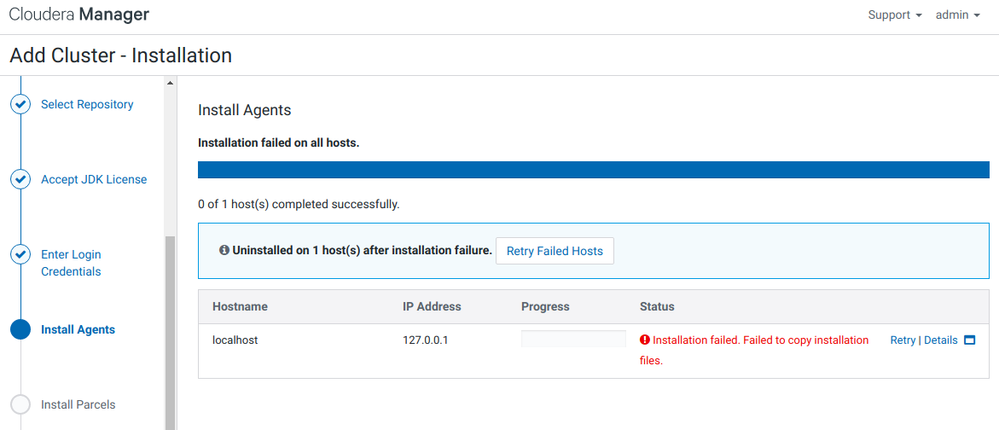
Installation failed. Failed to copy installation files.
- Labels:
-
Cloudera Manager


Created 05-20-2019 08:19 AM
- Mark as New
- Bookmark
- Subscribe
- Mute
- Subscribe to RSS Feed
- Permalink
- Report Inappropriate Content
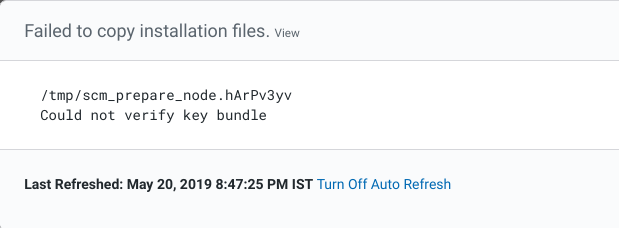
I'm running Ubuntu 18.04 LTS in my machine.I'm trying to install CDH 6.1.While installing agents I got error
message like this below
Please help give soliution.
Thank you
Regard,
solomonchinni



Created 07-16-2020 05:29 PM
- Mark as New
- Bookmark
- Subscribe
- Mute
- Subscribe to RSS Feed
- Permalink
- Report Inappropriate Content
When you add the node, there is a script called allkeys.sh will generate a key bundle, it contains the GPG key info and key bundle is called allkeys.asc
DEFAULT_CLOUDERA_KEY_BUNDLE_NAME = "allkeys.asc"
The key bundle will get the key for each of the flavor, so in your case it is archive.key which is located here : https://archive.cloudera.com/cdh5/ubuntu/lucid/amd64/cdh/archive.key
If it is RHEL, then it uses this: https://archive.cloudera.com/cdh5/redhat/7/x86_64/cdh/RPM-GPG-KEY-cloudera
Once all these keys are downloaded, it will be signed by the master key. Finally gpg command is used to export the keys to bundle called allkeys
gpg --export -a > allkeys
So I would check what is the repo that is being used


Created 05-20-2019 11:22 PM
- Mark as New
- Bookmark
- Subscribe
- Mute
- Subscribe to RSS Feed
- Permalink
- Report Inappropriate Content
What repository have you put it ? Did you chose the cloudera archive one ?

Created 07-15-2020 01:43 AM
- Mark as New
- Bookmark
- Subscribe
- Mute
- Subscribe to RSS Feed
- Permalink
- Report Inappropriate Content
i have the same issue,any help please

Created 07-15-2020 03:08 AM
- Mark as New
- Bookmark
- Subscribe
- Mute
- Subscribe to RSS Feed
- Permalink
- Report Inappropriate Content
The error seems to be relevant with the bundle. Did you choose wise repo while installing?
If so can you give here, so that I could verify and let you know.
Created 07-16-2020 05:29 PM
- Mark as New
- Bookmark
- Subscribe
- Mute
- Subscribe to RSS Feed
- Permalink
- Report Inappropriate Content
When you add the node, there is a script called allkeys.sh will generate a key bundle, it contains the GPG key info and key bundle is called allkeys.asc
DEFAULT_CLOUDERA_KEY_BUNDLE_NAME = "allkeys.asc"
The key bundle will get the key for each of the flavor, so in your case it is archive.key which is located here : https://archive.cloudera.com/cdh5/ubuntu/lucid/amd64/cdh/archive.key
If it is RHEL, then it uses this: https://archive.cloudera.com/cdh5/redhat/7/x86_64/cdh/RPM-GPG-KEY-cloudera
Once all these keys are downloaded, it will be signed by the master key. Finally gpg command is used to export the keys to bundle called allkeys
gpg --export -a > allkeys
So I would check what is the repo that is being used


