
Our Community is getting an upgrade! To get everything ready for the relaunch, we’ll be placing the site in read-only mode starting September 21st.
We really appreciate your understanding while we get things set up behind the scenes. Catch up on all the exciting details about the move here.
Need help or have questions? Drop us a line at [email protected]

Support Questions
 Hi, I'm CLEO! Something exciting is coming to the Community. Stay Tuned!
- Cloudera Community
- Support
- Support Questions
- JSON file with operation values ADD/MODIFY based ...
- Subscribe to RSS Feed
- Mark Question as New
- Mark Question as Read
- Float this Question for Current User
- Bookmark
- Subscribe
- Mute
- Printer Friendly Page
- Subscribe to RSS Feed
- Mark Question as New
- Mark Question as Read
- Float this Question for Current User
- Bookmark
- Subscribe
- Mute
- Printer Friendly Page
JSON file with operation values ADD/MODIFY based on this I need to send JSON data to INSERT or UPDATE
- Labels:
-
Apache NiFi


Created on
03-22-2020
04:52 PM
- last edited on
03-22-2020
06:05 PM
by
 ask_bill_brooks

- Mark as New
- Bookmark
- Subscribe
- Mute
- Subscribe to RSS Feed
- Permalink
- Report Inappropriate Content
My file:
"ws:Operation": "ADD",
"ws:Supervisor_Name": {
"ws:PriorValue": "",
"content": "Dr. Leah Thaler"
In above example i need to send the content:Dr. Leah Thaler to insert
My file:
"ws:Operation": "MODIFY",
"ws:Supervisor_Name": {
"ws:PriorValue": "",
"content": "Dr. Leah Thal"
In above example i need to send the content:Dr. Leah Thaler to update.
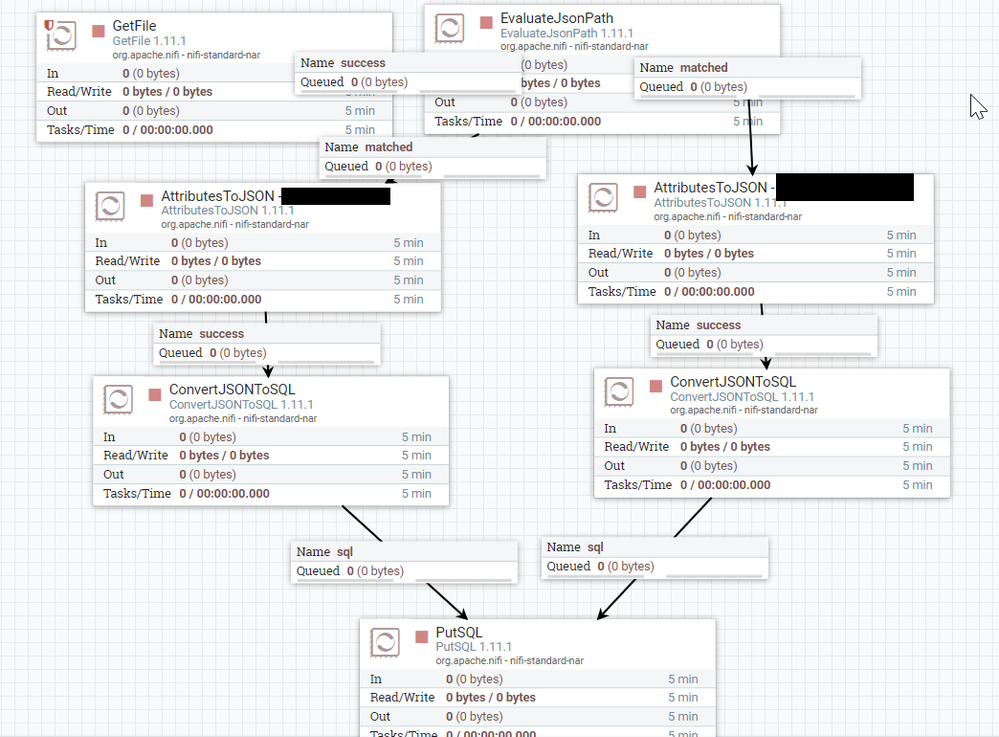
Database is Oracle - the flow: Getfile-> EvaluateJSONPath -> send the data to two tables using AttributesToJSON for flatten JSON -> ConvertJSONSQL to Putsql.
Note: I dont want to write AVRO schema. So we build this flow


Created 03-23-2020 12:05 PM
- Mark as New
- Bookmark
- Subscribe
- Mute
- Subscribe to RSS Feed
- Permalink
- Report Inappropriate Content
After you get all the attributes you want, you check them with RouteOnAttribute. In that proc click + and set update / inserts equal to matches you want. You use regex in the value for each. For example insert is ${operation.equals('add')}. After RouteOnAttribute is configured, drag update to the update query proc, and insert to the insert query proc.
Created 03-25-2020 06:48 PM
- Mark as New
- Bookmark
- Subscribe
- Mute
- Subscribe to RSS Feed
- Permalink
- Report Inappropriate Content
Thanks @stevenmatison . worked perfectly..
Created 03-23-2020 12:05 PM
- Mark as New
- Bookmark
- Subscribe
- Mute
- Subscribe to RSS Feed
- Permalink
- Report Inappropriate Content
After you get all the attributes you want, you check them with RouteOnAttribute. In that proc click + and set update / inserts equal to matches you want. You use regex in the value for each. For example insert is ${operation.equals('add')}. After RouteOnAttribute is configured, drag update to the update query proc, and insert to the insert query proc.
Created 03-25-2020 06:48 PM
- Mark as New
- Bookmark
- Subscribe
- Mute
- Subscribe to RSS Feed
- Permalink
- Report Inappropriate Content
Thanks @stevenmatison . worked perfectly..


