Our Community is getting an upgrade! To get everything ready for the relaunch, we’ll be placing the site in read-only mode starting September 21st.
We really appreciate your understanding while we get things set up behind the scenes. Catch up on all the exciting details about the move here.
Need help or have questions? Drop us a line at [email protected]

Support Questions

Find answers, ask questions, and share your expertise
Announcements
Share your experience with Cloudera on G2 and get a $25 Amazon Gift card.
Hi, I'm CLEO! Something exciting is coming to the Community. Stay Tuned!

Kerberos on Ambari 2.6.2.2: 500 status code received on POST method for API: /api/v1/clusters/hdp265/requests

avatar
Explorer

I am trying to enable Kerberos on Ambari 2.6.2.2 on CentOS 7.  Below are the errors
***********************

500 status code received on POST method for API: /api/v1/clusters/hdp265/requests
Error message: An internal system exception occurred: Failed to execute the command: Broken pipe

***********************************

Below is my krb5.conf file

nano /etc/krb5.conf

# Configuration snippets may be placed in this directory as well
includedir /etc/krb5.conf.d/

[logging]
default = FILE:/var/log/krb5libs.log
kdc = FILE:/var/log/krb5kdc.log
admin_server = FILE:/var/log/kadmind.log

[libdefaults]
dns_lookup_realm = false
ticket_lifetime = 24h
renew_lifetime = 7d
forwardable = true
rdns = false
pkinit_anchors = /etc/pki/tls/certs/ca-bundle.crt
default_realm = HADOOPSECURITY.COM
default_ccache_name = KEYRING:persistent:%{uid}

[realms]
# EXAMPLE.COM = {
# kdc = kerberos.example.com
# admin_server = kerberos.example.com
# }
HADOOPSECURITY.COM = {
kdc = p1.bigdata.com
admin_server = p1.bigdata.com
}

[domain_realm]
.p1.bigdata.com = HADOOPSECURITY.COM
p1.bigdata.com = HADOOPSECURITY.COM


************************************

nano /var/kerberos/krb5kdc/kadm5.acl
*/[email protected] *

1 ACCEPTED SOLUTION

avatar
Explorer

Finally, it worked when I added admin/admin into /var/kerberos/krb5kdc/kadm5.acl file.  Here I have added admin/admin and root/admin as well... just created the root user.

View solution in original post

11 REPLIES 11

avatar
Master Mentor

@vsrikanth9 


Your krb5.conf entry is wrong  please change it to match the below


[domain_realm]
.hadoopsecurity.com = HADOOPSECURITY.COM
hadoopsecurity.com = HADOOPSECURITY.COM


The restart the kdc and kadmin

# systemctl start krb5kdc.service
# systemctl start kadmin.service

That should resolve your problem

Happy hadooping 


avatar
Explorer

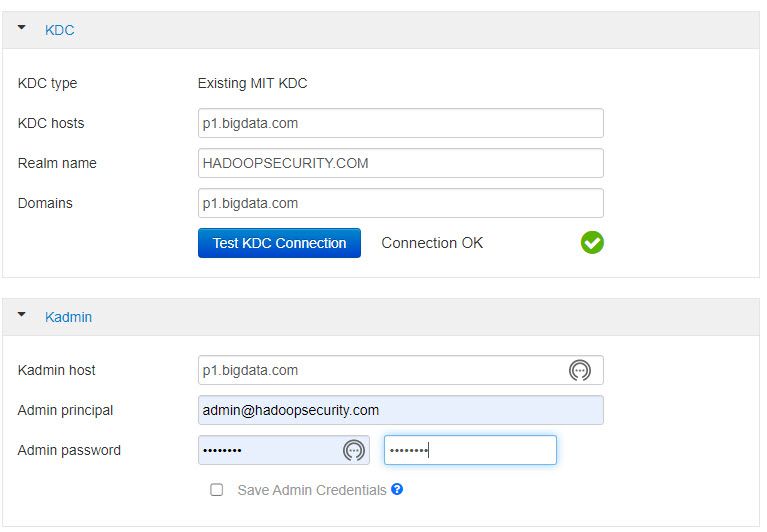
Here I am attaching the Config screenshot.  See if I am making any mistakes.

HDP Kerberos Error.jpgThere is no change in error even after your instructions.  Same error.