Created on
10-09-2019
09:39 AM
- last edited on
10-09-2019
09:47 AM
by
lwang
I am trying to enable Kerberos on Ambari 2.6.2.2 on CentOS 7. Below are the errors
***********************
500 status code received on POST method for API: /api/v1/clusters/hdp265/requests
Error message: An internal system exception occurred: Failed to execute the command: Broken pipe
***********************************
Below is my krb5.conf file
nano /etc/krb5.conf
# Configuration snippets may be placed in this directory as well
includedir /etc/krb5.conf.d/
[logging]
default = FILE:/var/log/krb5libs.log
kdc = FILE:/var/log/krb5kdc.log
admin_server = FILE:/var/log/kadmind.log
[libdefaults]
dns_lookup_realm = false
ticket_lifetime = 24h
renew_lifetime = 7d
forwardable = true
rdns = false
pkinit_anchors = /etc/pki/tls/certs/ca-bundle.crt
default_realm = HADOOPSECURITY.COM
default_ccache_name = KEYRING:persistent:%{uid}
[realms]
# EXAMPLE.COM = {
# kdc = kerberos.example.com
# admin_server = kerberos.example.com
# }
HADOOPSECURITY.COM = {
kdc = p1.bigdata.com
admin_server = p1.bigdata.com
}
[domain_realm]
.p1.bigdata.com = HADOOPSECURITY.COM
p1.bigdata.com = HADOOPSECURITY.COM
************************************
nano /var/kerberos/krb5kdc/kadm5.acl
*/admin@HADOOPSECURITY.COM *
Created 10-10-2019 09:41 AM
Finally, it worked when I added admin/admin into /var/kerberos/krb5kdc/kadm5.acl file. Here I have added admin/admin and root/admin as well... just created the root user.
Created 10-09-2019 12:21 PM
Your krb5.conf entry is wrong please change it to match the below
[domain_realm]
.hadoopsecurity.com = HADOOPSECURITY.COM
hadoopsecurity.com = HADOOPSECURITY.COM
The restart the kdc and kadmin
# systemctl start krb5kdc.service # systemctl start kadmin.service
That should resolve your problem
Happy hadooping
Created on 10-09-2019 04:41 PM - edited 10-09-2019 04:58 PM
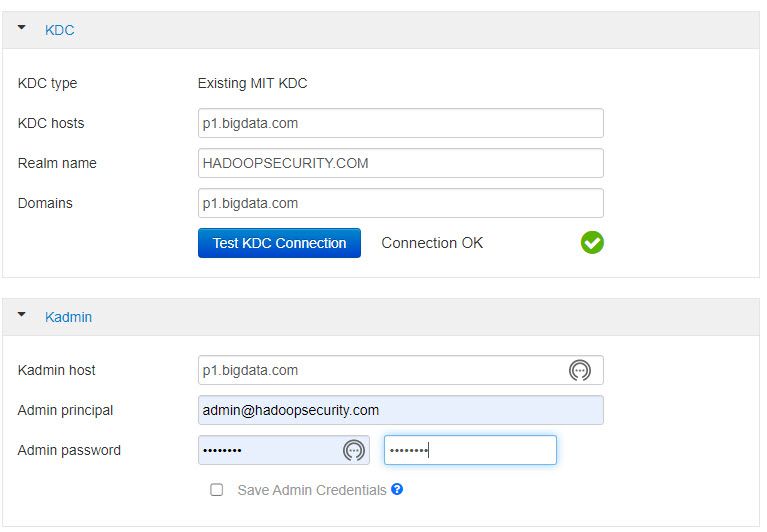
Here I am attaching the Config screenshot. See if I am making any mistakes.
There is no change in error even after your instructions. Same error.