
Our Community is getting an upgrade! To get everything ready for the relaunch, we’ll be placing the site in read-only mode starting September 21st.
We really appreciate your understanding while we get things set up behind the scenes. Catch up on all the exciting details about the move here.
Need help or have questions? Drop us a line at [email protected]

Support Questions
 Hi, I'm CLEO! Something exciting is coming to the Community. Stay Tuned!
- Cloudera Community
- Support
- Support Questions
- Re: NIFI - policies for Connection
- Subscribe to RSS Feed
- Mark Question as New
- Mark Question as Read
- Float this Question for Current User
- Bookmark
- Subscribe
- Mute
- Printer Friendly Page
- Subscribe to RSS Feed
- Mark Question as New
- Mark Question as Read
- Float this Question for Current User
- Bookmark
- Subscribe
- Mute
- Printer Friendly Page
Managing Connection-Level Access Policies and Permissions in Apache NiFi
- Labels:
-
Apache NiFi


Created on
10-25-2016
02:47 PM
- last edited on
06-04-2026
08:10 PM
by
 DianaTorres

- Mark as New
- Bookmark
- Subscribe
- Mute
- Subscribe to RSS Feed
- Permalink
- Report Inappropriate Content
Hi all,
In the WEB UI NFI, I can find where modifie the policies to have permission to list/empty queue
thanks for help.


Created on 10-25-2016 03:04 PM - edited 08-18-2019 06:07 AM
- Mark as New
- Bookmark
- Subscribe
- Mute
- Subscribe to RSS Feed
- Permalink
- Report Inappropriate Content
In order to list a queue you need the "view the data" policy.
in order to empty a queue you need the "modify the data" policy.
If you are working with a NiFi cluster, all your nodes in the cluster will also need to be granted these policies as well.
Click on the key in the "operate" window to the left of the Canvas:
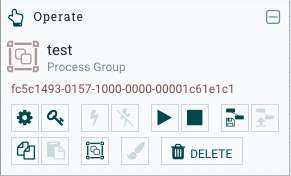
Then select the two policies listed above (Click override if you want to create a new policy and not edit the parent policy that is inherited). Add the Cluster node users and any other users you want to have those abilities.
Thanks,
Matt
Created 10-26-2016 12:56 PM
- Mark as New
- Bookmark
- Subscribe
- Mute
- Subscribe to RSS Feed
- Permalink
- Report Inappropriate Content
@mclark : I've only this message
2016-10-26 14:53:13,685 INFO [NiFi Web Server-8190] o.a.n.w.a.c.AccessDeniedExceptionMapper [email protected] does not have permission to access the requested resource. Returning Forbidden response.
2016-10-26 14:53:13,733 INFO [NiFi Web Server-8202] o.a.n.w.s.NiFiAuthenticationFilter Attempting request for (<[email protected]><CN=nifi011, OU=NIFI><CN=nifi012, OU=NIFI>) POST https://nifi011:80/nifi-api/flowfile-queues/f7135017-0157-1000-0000-000041926053/drop-requests (source ip: 10.234.217.16)
2016-10-26 14:53:13,733 INFO [NiFi Web Server-8202] o.a.n.w.s.NiFiAuthenticationFilter Authentication success for [email protected]
Created 10-26-2016 02:17 PM
- Mark as New
- Bookmark
- Subscribe
- Mute
- Subscribe to RSS Feed
- Permalink
- Report Inappropriate Content
Is [email protected] part of your "Admin NiFi" user group?
Did you grant "Admin Group" the "modify the data" policy?
You can set DEBUG in you logback.xml file for the following line to get more output in your nifi-users.log:
<logger name="org.apache.nifi.web.api.config" level="INFO" additivity="false">
No nifi restarts are needed for any changes to the logback.xml file to take affect.
Matt


Created 11-29-2016 06:37 AM
- Mark as New
- Bookmark
- Subscribe
- Mute
- Subscribe to RSS Feed
- Permalink
- Report Inappropriate Content
Following what Bryan Bende mentioned (in the case of a cluster),
You need to make sure all cluster nodes are a part of the policy. In my case, I created a new Group 'Cluster' and added all the nodes in this group. Then I went ahead and added this Group to a processor group (added this group for pilicies: view the data and modify the data)

- « Previous
-
- 1
- 2
- Next »

