Our Community is getting an upgrade! To get everything ready for the relaunch, we’ll be placing the site in read-only mode starting September 21st.
We really appreciate your understanding while we get things set up behind the scenes. Catch up on all the exciting details about the move here.
Need help or have questions? Drop us a line at [email protected]

Support Questions

Find answers, ask questions, and share your expertise
Announcements
Share your experience with Cloudera on G2 and get a $25 Amazon Gift card.
Hi, I'm CLEO! Something exciting is coming to the Community. Stay Tuned!

Map JSON Key to Database Columns/Fields

avatar
Contributor

Hello,

I am still a newbie in NiFi. 

I Json flowfile that i want to persist in a database using ConvertJsontoSql & PutSql.

I have no problem if the names of keys in Json flowfile match with the columns name in the database.

But if the keys names are different from column names whilst referring to same thing.

For example:

Flowfile attribute:  surname

Database column: lastname

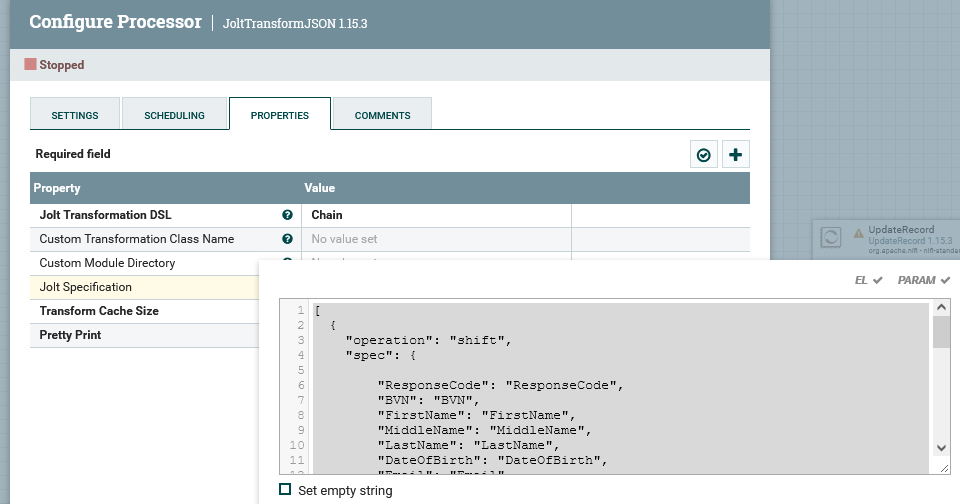
I have no access to alter database. And i have tried JoltTransform which didn't work.

Please, how do i map json keys to columns names , even if the key names change it would still point to the same column in the database.

Thank you.

Screenshot 2022-02-02 105449.png


2 REPLIES 2

avatar
Explorer

For the JoltTransformation what people will need to see is the data being fed to it in the context of the flow, i.e., the queue prior to the transform contains what? If it's an array then you're transform is wrong but seeing that will hopefully allow people to solve your issue.


Regards,

Ron.

avatar
Super Guru

You can try the following Jolt spec in a JoltTransformRecord processor to change the name of one or more columns:

Jolt Transformation DSL: Chain

Jolt Specification:

[
{
"operation": "shift",
"spec": {
"*": "&",
"surname": "lastname"
}
},
{
"operation": "remove",
"spec": {
"surname": ""
}
}
]


--
Was your question answered? Please take some time to click on "Accept as Solution" below this post.
If you find a reply useful, say thanks by clicking on the thumbs up button.