
Our Community is getting an upgrade! To get everything ready for the relaunch, we’ll be placing the site in read-only mode starting September 21st.
We really appreciate your understanding while we get things set up behind the scenes. Catch up on all the exciting details about the move here.
Need help or have questions? Drop us a line at [email protected]

Support Questions
 Hi, I'm CLEO! Something exciting is coming to the Community. Stay Tuned!
- Cloudera Community
- Support
- Support Questions
- [NIFI] Is it possible to make a x-www-form-urlenc...
- Subscribe to RSS Feed
- Mark Question as New
- Mark Question as Read
- Float this Question for Current User
- Bookmark
- Subscribe
- Mute
- Printer Friendly Page
- Subscribe to RSS Feed
- Mark Question as New
- Mark Question as Read
- Float this Question for Current User
- Bookmark
- Subscribe
- Mute
- Printer Friendly Page
[NIFI] Is it possible to make a x-www-form-urlencoded POST request through InvokeHttp
- Labels:
-
Apache NiFi


Created 03-23-2022 08:00 AM
- Mark as New
- Bookmark
- Subscribe
- Mute
- Subscribe to RSS Feed
- Permalink
- Report Inappropriate Content
Hi,
I just started using Nifi and i would like to know if it's possible to perform a POST with a content-type set to `x-www-form-urlencoded`. I need to pass these key/values to my request :
grant_type	refresh_token
client_id	myClientId
client_secret	myClientSecret
refresh_token	myRefreshToken



Created 03-23-2022 02:10 PM
- Mark as New
- Bookmark
- Subscribe
- Mute
- Subscribe to RSS Feed
- Permalink
- Report Inappropriate Content
@azg Yes, just add the values you want in the processor configuration tab. Click + to add new key/value pairs.
Created 03-24-2022 06:49 AM
- Mark as New
- Bookmark
- Subscribe
- Mute
- Subscribe to RSS Feed
- Permalink
- Report Inappropriate Content
Thanks for your reply @steven-matison .
I was trying to use FlowFile Form Data Name in the InvokeHTTP processor
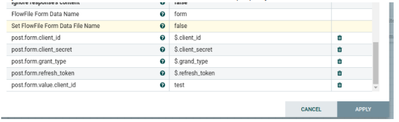
Someone gave me the right way to resolve my issue and it worked :
When the HTTP Method is POST, dynamic properties with the property name in the form of post:form:<NAME>, where the will be the form data name, will be used to fill out the multipart form parts.
so, post:form:<NAME> could be used for multipart/form-data
and you want application/x-www-form-urlencoded
format of http body should be parm1=Value1&parm2=Value2
before calling invokeHttp use replaceText with approximately this expression in replacement value:
client_secret=${client_secret:urlEncode()}&client_secret=${client_secret:urlEncode()}&...then use invokehttp with
Send Message Body = true
Content-Type = application/x-www-form-urlencoded


Created 01-12-2024 01:37 PM
- Mark as New
- Bookmark
- Subscribe
- Mute
- Subscribe to RSS Feed
- Permalink
- Report Inappropriate Content
I know this is an old post but I wonder if the procedure mentioned here is still relevant?
I can't make it work on NiFi 1.21.0, the parameters on the 'InvokeHttp' processor changed a lot but I don't think this is the problem, can you help me?
Created on 01-16-2024 03:11 AM - edited 01-16-2024 03:11 AM
- Mark as New
- Bookmark
- Subscribe
- Mute
- Subscribe to RSS Feed
- Permalink
- Report Inappropriate Content
Ofcourse we can help. Just make a new post. Try to include as much detail as possible, screenshots, how you have invokeHttp configured, errors, etc. In your new post tag me using the @ with my username "steven-matison".


