
Our Community is getting an upgrade! To get everything ready for the relaunch, we’ll be placing the site in read-only mode starting September 21st.
We really appreciate your understanding while we get things set up behind the scenes. Catch up on all the exciting details about the move here.
Need help or have questions? Drop us a line at [email protected]

Support Questions
 Hi, I'm CLEO! Something exciting is coming to the Community. Stay Tuned!
- Cloudera Community
- Support
- Support Questions
- Need info on Regex to be used in NiFi ListFile pro...
- Subscribe to RSS Feed
- Mark Question as New
- Mark Question as Read
- Float this Question for Current User
- Bookmark
- Subscribe
- Mute
- Printer Friendly Page
- Subscribe to RSS Feed
- Mark Question as New
- Mark Question as Read
- Float this Question for Current User
- Bookmark
- Subscribe
- Mute
- Printer Friendly Page
Need info on Regex to be used in NiFi ListFile processor
- Labels:
-
Apache NiFi


- Mark as New
- Bookmark
- Subscribe
- Mute
- Subscribe to RSS Feed
- Permalink
- Report Inappropriate Content
Hi All,
I have directory structure like below on Unix file system,
/DIR1/DIR2/DIR3/DIR4/DIR5
I have files under the directories DIR3 & DIR5. However I want to read files only from DIR5.
I tried with various regex but could not get the right one
.
Could you please help me with the Regex to be used in ListFile processor to read files from DIR5 only.
Thanks in Advance!


Created 02-04-2020 12:43 PM
- Mark as New
- Bookmark
- Subscribe
- Mute
- Subscribe to RSS Feed
- Permalink
- Report Inappropriate Content
The Path Filter is applied against all subdirectories of the configured "Input Directory". Any files found in the base "Input Directory" are still going to be listed. If you had files in "dir4", they should not have been listed.
Is dir2 empty? If so can you change your "Input Directory" to /dir1/dir2 instead of /dir1/dir2/dir3.
I cannot think of a reason why when filtering based on subdir path that you would still expect to returns from the base directory, so I filed an Apache jira ( https://issues.apache.org/jira/browse/NIFI-7104 ).
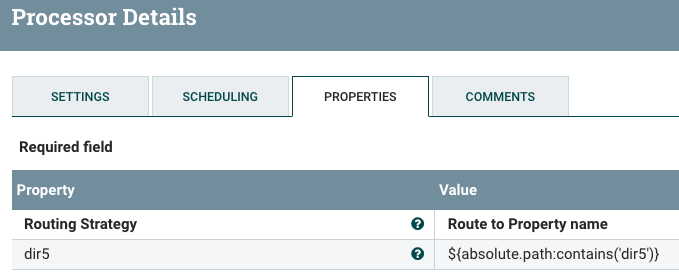
Another option is to add a RouteOnAttribute processor after your listFile processor to route on only FlowFile where the absolute.path FlowFile attribute included "dir5".
Then auto-terminate the unmatched relationship and route the "dir5" relationship on to the next component in your dataflow.
Hope this helps,
Matt
If you found this solution resolves your query, please take a moment to click accept.
Created on 02-03-2020 02:13 PM - edited 02-03-2020 02:17 PM
- Mark as New
- Bookmark
- Subscribe
- Mute
- Subscribe to RSS Feed
- Permalink
- Report Inappropriate Content
If you only want to list files from directory DIR5, simply provide the complete path to DIR5 in the "Input Directory" ListFile processor configuration property and set Recurse Subdirectories as false.
If above is not an option, you may want to try using the following "Path Filter":
.*?/DIR5
Hope this helps,
Matt

Created 02-03-2020 09:14 PM
- Mark as New
- Bookmark
- Subscribe
- Mute
- Subscribe to RSS Feed
- Permalink
- Report Inappropriate Content
Hi Matt,
Thanks for your response.
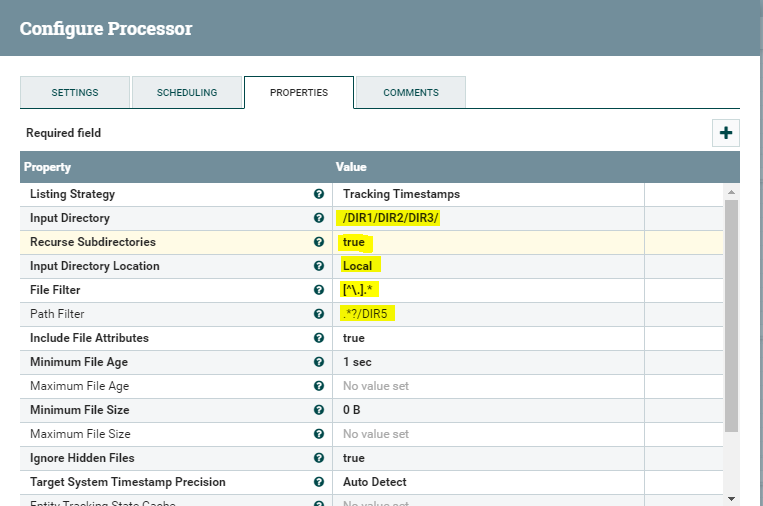
I tried the regex, but it picks the file which is present under DIR3 also. Below is my configuration,
Created 02-04-2020 12:43 PM
- Mark as New
- Bookmark
- Subscribe
- Mute
- Subscribe to RSS Feed
- Permalink
- Report Inappropriate Content
The Path Filter is applied against all subdirectories of the configured "Input Directory". Any files found in the base "Input Directory" are still going to be listed. If you had files in "dir4", they should not have been listed.
Is dir2 empty? If so can you change your "Input Directory" to /dir1/dir2 instead of /dir1/dir2/dir3.
I cannot think of a reason why when filtering based on subdir path that you would still expect to returns from the base directory, so I filed an Apache jira ( https://issues.apache.org/jira/browse/NIFI-7104 ).
Another option is to add a RouteOnAttribute processor after your listFile processor to route on only FlowFile where the absolute.path FlowFile attribute included "dir5".
Then auto-terminate the unmatched relationship and route the "dir5" relationship on to the next component in your dataflow.
Hope this helps,
Matt
If you found this solution resolves your query, please take a moment to click accept.
Created 02-04-2020 08:34 PM
- Mark as New
- Bookmark
- Subscribe
- Mute
- Subscribe to RSS Feed
- Permalink
- Report Inappropriate Content
Thanks a lot Matt!!


