
Support Questions

Find answers, ask questions, and share your expertise
Announcements
Now Live: Explore expert insights and technical deep dives on the new Cloudera Community BlogsRead the Announcement

NiFi Convert String to Date Attribute

avatar
Explorer

I'm new to NiFi and having an issue with a workflow. I created a MySQL query to pull in training course completions into a JSON RecordSetWriter format. When I view the queue contents, the "completed_on" attribute shows as a string {"name":"completed_on","type":["null","string"]} whereas it needs to be "datetime". The data appears as a string formatted like this. ("completed_on":"1605870000000")


How can I convert the attribute back to a date format so I can get the data to read in YYYY-MM-DD format?

1 REPLY 1

avatar
Master Collaborator

@GMAN 

You can do this with UpdateAttribute.

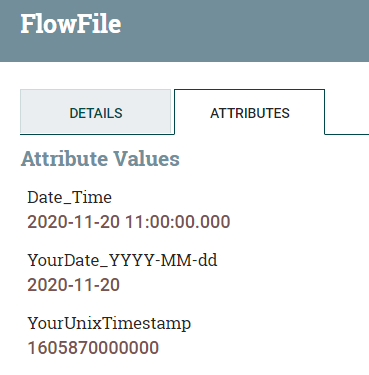
In my example:
Date_Time ==> ${YourUnixTimestamp:toDate():format('YYYY-MM-dd hh:mm:ss.SSS', 'UTC')}

YourDate_YYYY-MM-dd ==>  ${YourUnixTimestamp:toDate():format('YYYY-MM-dd')}


HCC_UnixTimestamp.PNG
You can check the result here: https://www.unixtimestamp.com/index.php
But you have to remove the last three digits of the value.

Hope this helps!