Archives of Support Questions (Read Only)

This is an archived board for historical reference. Information and links may no longer be available or relevant
Announcements
This board is archived and read-only for historical reference. To ask a new question, please post a new topic on the appropriate active board.

Nifi JOLT accessing a JSON value,NiFi expression language within JOLT

avatar
New Member

Hi There,

I wish to apply a simple transformaton to a JSON using JOLT. I want to apply :substring(1,2) to the value of the key. I am using default jolt transformation but I don't know how to access the value of JSON from within JOLT and then apply the transformation?

Please help.

JOLT :

[{
"operation": "default",
"spec": {
      "c":"${b:substring(1,2)}"
}
}] 

JSON :

{
  "b":"hello"
}


Result :

{
  "c":"",
  "b":"hello"
}

Expected result :

{
  "c":"e",
  "b":"hello"
}
1 ACCEPTED SOLUTION

avatar
Master Guru

@John Smith

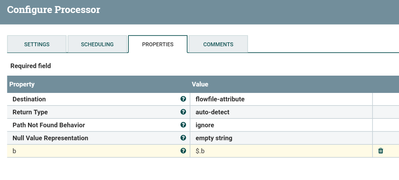
Extract the b attribute value before using it in Jolt transform by using EvaluateJson path processor and keep destination as flowfile-attibute.Then add your b attribute as a new property in evaluatejson path processor once we add b attribute to the flowfile then your jolt transform will apply substring function on the b attribute.

EvaluateJsonPath configs:-

64838-evaljson.png

Example:-

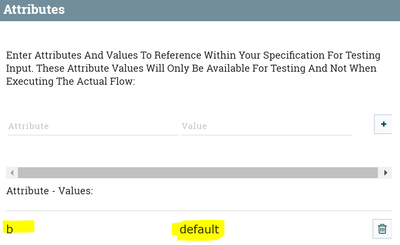
for testing i have added b attribute value as default in my jolt transform

64836-jolt-attribute.png

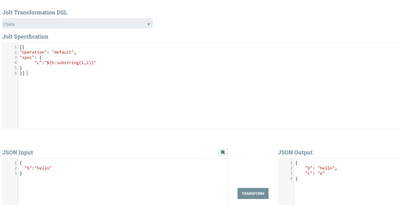
Jolt spec testing:-

64837-jolt-spec.png

As you can see at right below corner we are having output json content with c key having e as value.

Let us know if you are having issues/questions..!!

View solution in original post

1 REPLY 1

avatar
Master Guru

@John Smith

Extract the b attribute value before using it in Jolt transform by using EvaluateJson path processor and keep destination as flowfile-attibute.Then add your b attribute as a new property in evaluatejson path processor once we add b attribute to the flowfile then your jolt transform will apply substring function on the b attribute.

EvaluateJsonPath configs:-

64838-evaljson.png

Example:-

for testing i have added b attribute value as default in my jolt transform

64836-jolt-attribute.png

Jolt spec testing:-

64837-jolt-spec.png

As you can see at right below corner we are having output json content with c key having e as value.

Let us know if you are having issues/questions..!!