
Our Community is getting an upgrade! To get everything ready for the relaunch, we’ll be placing the site in read-only mode starting September 21st.
We really appreciate your understanding while we get things set up behind the scenes. Catch up on all the exciting details about the move here.
Need help or have questions? Drop us a line at [email protected]

Support Questions
 Hi, I'm CLEO! Something exciting is coming to the Community. Stay Tuned!
- Cloudera Community
- Support
- Support Questions
- Re: Oracle VM: Base memory greyed out
- Subscribe to RSS Feed
- Mark Question as New
- Mark Question as Read
- Float this Question for Current User
- Bookmark
- Subscribe
- Mute
- Printer Friendly Page
- Subscribe to RSS Feed
- Mark Question as New
- Mark Question as Read
- Float this Question for Current User
- Bookmark
- Subscribe
- Mute
- Printer Friendly Page
Oracle VM: Base memory greyed out
- Labels:
-
Cloudera Manager


Created 04-22-2021 11:01 AM
- Mark as New
- Bookmark
- Subscribe
- Mute
- Subscribe to RSS Feed
- Permalink
- Report Inappropriate Content
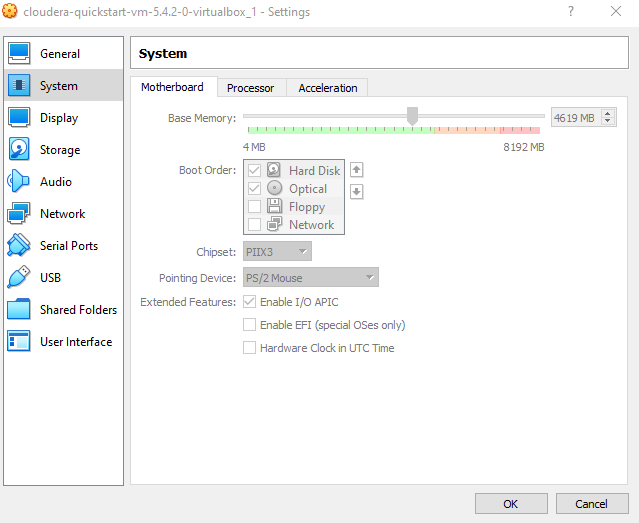
I am trying to stop the VM VirtualBox to be able to change the base memory but it is still greyed out.
Can i enable the change please? Thank you


Created 04-22-2021 02:43 PM
- Mark as New
- Bookmark
- Subscribe
- Mute
- Subscribe to RSS Feed
- Permalink
- Report Inappropriate Content
VirtualBox requires virtualization support from the CPU (and enabled in BIOS/UEFI). So, there's an invisible checkbox in that page that gets locked to "checked"
It's likely that your system does not have both of them (i.e., the CPU does not provide virtualization support [Intel VT-x or AMD-V], or it does but not enabled in BIOS/UEFI).
Can you share the screenshot?
Created 04-23-2021 03:45 AM
- Mark as New
- Bookmark
- Subscribe
- Mute
- Subscribe to RSS Feed
- Permalink
- Report Inappropriate Content
Thank you for your reply.
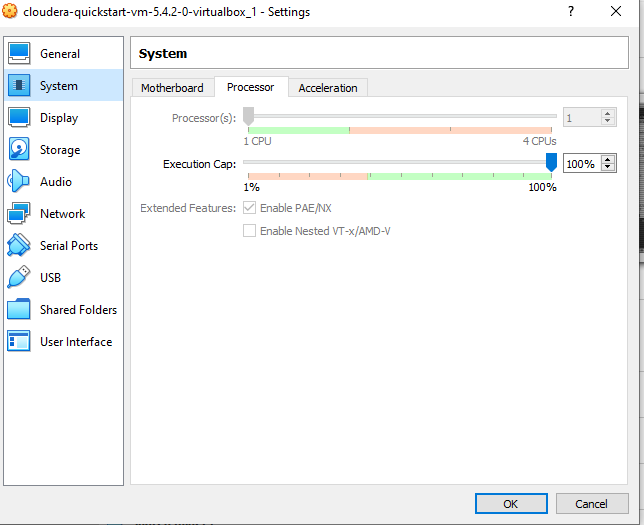
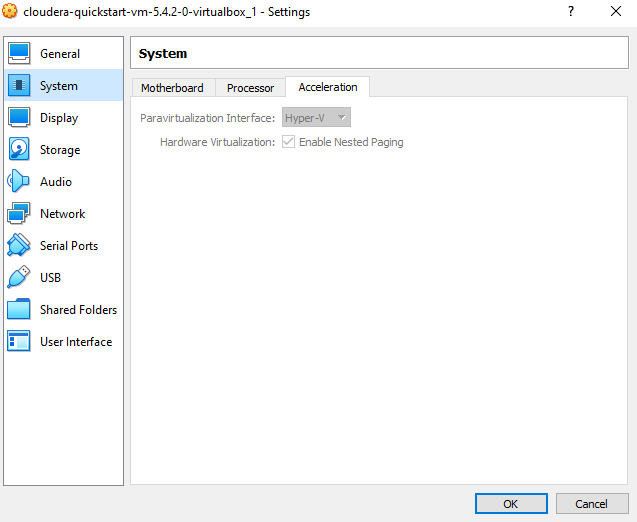
I am not sure which screenshots you mean but i have done these for you. Hopefully that clarifies the situation?
For info, here are my pc information:
- Processor: Intel(R) Core (TM) i5 -4210U CPU @ 1.70 GHz 2.40 GHz
- Installed RAM 8.00GB (7.89 GB usable)
- System type: 64-bit operating system x64-based processor
- Windows 10 home (version 2004)
- OS build: 19041.867
- Capacity 910 GB (Free 655 GB)
- File System: NTFS
Please let me know what you think. Especially if i can run Cloudera express with my pc
Created 04-23-2021 06:31 AM
- Mark as New
- Bookmark
- Subscribe
- Mute
- Subscribe to RSS Feed
- Permalink
- Report Inappropriate Content
Can I get some help on the issue below please
Created 05-22-2021 02:45 PM
- Mark as New
- Bookmark
- Subscribe
- Mute
- Subscribe to RSS Feed
- Permalink
- Report Inappropriate Content
@bsaad
Sorry I wasn't available for a while, What I meant was the BIOS , this is a much older server but it should be outright clear once you enter the BIOS

I see in your screenshot it's set to HyperV can you also boost the CPU to 2 .
Please let me know


