
Our Community is getting an upgrade! To get everything ready for the relaunch, we’ll be placing the site in read-only mode starting September 21st.
We really appreciate your understanding while we get things set up behind the scenes. Catch up on all the exciting details about the move here.
Need help or have questions? Drop us a line at [email protected]

Support Questions
 Hi, I'm CLEO! Something exciting is coming to the Community. Stay Tuned!
- Cloudera Community
- Support
- Support Questions
- Ranger Password reset
- Subscribe to RSS Feed
- Mark Question as New
- Mark Question as Read
- Float this Question for Current User
- Bookmark
- Subscribe
- Mute
- Printer Friendly Page
- Subscribe to RSS Feed
- Mark Question as New
- Mark Question as Read
- Float this Question for Current User
- Bookmark
- Subscribe
- Mute
- Printer Friendly Page
Ranger Password reset
- Labels:
-
Apache Ranger


Created on
10-22-2019
04:23 AM
- last edited on
10-22-2019
06:49 AM
by
 VidyaSargur

- Mark as New
- Bookmark
- Subscribe
- Mute
- Subscribe to RSS Feed
- Permalink
- Report Inappropriate Content
Hello, Friends.
I have a problem with Ranger, I have a Kerberized Cluster, I try to access Ranger UI with user admin:admin and I get error" The username or password you entered is incorrect". likewise changing.
Ranger Admin username for Ambari
Ranger Admin user's password
Even changing and restarting ambari I can't get in. Could you help me?
Greetings



Created 10-22-2019 08:16 AM
- Mark as New
- Bookmark
- Subscribe
- Mute
- Subscribe to RSS Feed
- Permalink
- Report Inappropriate Content
@Peruvian81 You need to update ranger,
You can follow the below steps to reset the password in postgres:
1.Login into postgres
2. postgres=# \connect ranger
3. ranger=# update x_portal_user set password = 'ceb4f32325eda6142bd65215f4c0f371' where login_id = 'admin';
Above would reset the password to 'admin'.
4. Login to Ranger UI using the above password
5. Go to User Profile and change the password
6. Open Ambari UI Ranger Configs
7. Update 'admin_password' in Advanced ranger-env with the newly set password
Created on 10-22-2019 07:17 AM - edited 10-22-2019 07:18 AM
- Mark as New
- Bookmark
- Subscribe
- Mute
- Subscribe to RSS Feed
- Permalink
- Report Inappropriate Content
@Peruvian81 The following method could be used to work this around.
1. Login to the Ranger repository database
2.Run the following DML command to update the Ranger admin's password to 'admin'

update x_portal_user set password = 'ceb4f32325eda6142bd65215f4c0f371' where login_id = 'admin';
The above would reset the password to 'admin'.
3. Login to Ranger UI using the above password
4. Go to User Profile and change the password
5. Open Ambari UI Ranger Configs
6. Update 'admin_password' in Advanced ranger-env with the newly set password
Created on 10-22-2019 08:03 AM - edited 10-22-2019 08:04 AM
- Mark as New
- Bookmark
- Subscribe
- Mute
- Subscribe to RSS Feed
- Permalink
- Report Inappropriate Content
Hello @Scharan
Thank you for the answer, only one last doubt I have postgres. tell me in which database I must run I understand that will be in ranger.
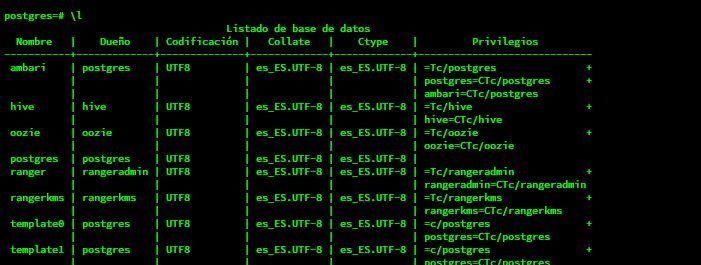
But before the doubt I ask.
Greetings
Created 10-22-2019 08:16 AM
- Mark as New
- Bookmark
- Subscribe
- Mute
- Subscribe to RSS Feed
- Permalink
- Report Inappropriate Content
@Peruvian81 You need to update ranger,
You can follow the below steps to reset the password in postgres:
1.Login into postgres
2. postgres=# \connect ranger
3. ranger=# update x_portal_user set password = 'ceb4f32325eda6142bd65215f4c0f371' where login_id = 'admin';
Above would reset the password to 'admin'.
4. Login to Ranger UI using the above password
5. Go to User Profile and change the password
6. Open Ambari UI Ranger Configs
7. Update 'admin_password' in Advanced ranger-env with the newly set password


