Our Community is getting an upgrade! To get everything ready for the relaunch, we’ll be placing the site in read-only mode starting September 21st.
We really appreciate your understanding while we get things set up behind the scenes. Catch up on all the exciting details about the move here.
Need help or have questions? Drop us a line at [email protected]

Support Questions

Find answers, ask questions, and share your expertise
Announcements
Share your experience with Cloudera on G2 and get a $25 Amazon Gift card.
Hi, I'm CLEO! Something exciting is coming to the Community. Stay Tuned!

Re-enable Kerberos

avatar
Rising Star

Hello,


I am trying to totally remove Kerberos and re-enable it. I have followed all the rollback steps as described in several posts:


https://community.cloudera.com/t5/Cloudera-Manager-Installation/Disabling-Kerberos/td-p/19654

https://stackoverflow.com/questions/29744821/how-to-disable-hadoop-kerberos

http://bigdata-tips.blogspot.com/2017/03/how-to-disable-kerberos-in-cloudera-cdh.html


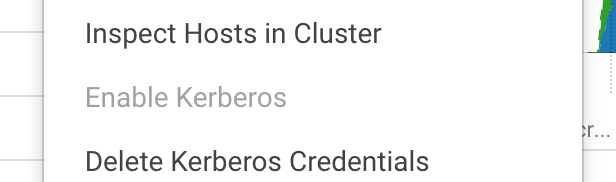
I seems that kerberos is indeed disabled BUT I cannot get the Enable Kerberos button back:


Screen Shot 2019-01-29 at 09.35.01.png


What should I do to re-enable it?


Thank you,

Gerasimos


1 ACCEPTED SOLUTION

avatar
Rising Star

The problem was on StreamSets, where I had not disabled Kerberos. Now the Enable Kerberos option is active again.

View solution in original post

1 REPLY 1

avatar
Rising Star

The problem was on StreamSets, where I had not disabled Kerberos. Now the Enable Kerberos option is active again.