Our Community is getting an upgrade! To get everything ready for the relaunch, we’ll be placing the site in read-only mode starting September 21st.
We really appreciate your understanding while we get things set up behind the scenes. Catch up on all the exciting details about the move here.
Need help or have questions? Drop us a line at [email protected]

Support Questions

Find answers, ask questions, and share your expertise
Announcements
Share your experience with Cloudera on G2 and get a $25 Amazon Gift card.
Hi, I'm CLEO! Something exciting is coming to the Community. Stay Tuned!

Regex to replace all characters after " ;" in a string in a flowfile - NiFi

avatar
Rising Star

Hi,

Am trying to replace all characters after ";" including ; in the flowfile record.

I was using replacetext processor with ;.*$ as the search value and set empty value for Replacement value properties to achieve this. However it is not working out.

Any inputs in this regard would be really helpful.


Example:


Input

Replace;text;processor

Expected Output:

Replace

Thanks,

Bala.

1 ACCEPTED SOLUTION

avatar
Master Mentor

@Bala S

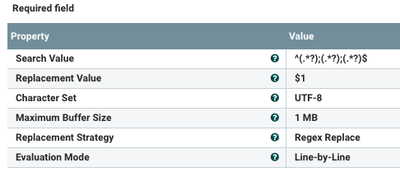
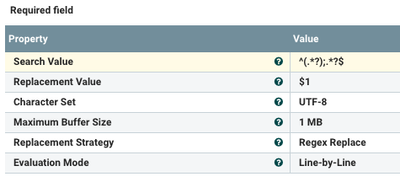
I would recommend using capture groups in your regex. Here is an example that will work for your example:

106450-screen-shot-2019-02-19-at-91026-am.png

I then replace with just the value from capture group 1

-

Here is another example that is more generic (can have many ";<somevalue>" after first one:

106471-screen-shot-2019-02-19-at-91344-am.png

Here again I use capture group 1 as my replacement value.

-

Thank you,

Matt

-

If you found this answer addressed your question, please take a moment to login in and click the "ACCEPT" link


View solution in original post

2 REPLIES 2

avatar
Master Mentor

@Bala S

I would recommend using capture groups in your regex. Here is an example that will work for your example:

106450-screen-shot-2019-02-19-at-91026-am.png

I then replace with just the value from capture group 1

-

Here is another example that is more generic (can have many ";<somevalue>" after first one:

106471-screen-shot-2019-02-19-at-91344-am.png

Here again I use capture group 1 as my replacement value.

-

Thank you,

Matt

-

If you found this answer addressed your question, please take a moment to login in and click the "ACCEPT" link


avatar
Rising Star

Thanks @Matt Clarke. I went with the option 2 and it worked. Thanks again for the quick reply.