
Our Community is getting an upgrade! To get everything ready for the relaunch, we’ll be placing the site in read-only mode starting September 21st.
We really appreciate your understanding while we get things set up behind the scenes. Catch up on all the exciting details about the move here.
Need help or have questions? Drop us a line at [email protected]

Archives of Support Questions (Read Only)
- Cloudera Community
- Board Archive
- Archives of Support Questions (Read Only)
- 'ReplaceText" processor does not replace special c...
- Subscribe to RSS Feed
- Mark Question as New
- Mark Question as Read
- Float this Question for Current User
- Bookmark
- Subscribe
- Mute
- Printer Friendly Page
- Subscribe to RSS Feed
- Mark Question as New
- Mark Question as Read
- Float this Question for Current User
- Bookmark
- Subscribe
- Mute
- Printer Friendly Page
'ReplaceText" processor does not replace special characters as a "Replacement Value"
- Labels:
-
Apache NiFi


Created 11-10-2016 10:33 AM
- Mark as New
- Bookmark
- Subscribe
- Mute
- Subscribe to RSS Feed
- Permalink
- Report Inappropriate Content
I have a 'Control A' separated file. I am trying to append each line with a date value with the regular expression,
${srcdelim}${now():format('mm-dd-yy')}
where ${srcdelim} contains the value '\u0001' from a schema file.
Apparently, the output file contains the string \u0001 rather than a control A delimiter.
I have attached my sample input and output.
Character Set: UTF-8


Created on 11-23-2016 07:00 PM - edited 08-18-2019 03:39 AM
- Mark as New
- Bookmark
- Subscribe
- Mute
- Subscribe to RSS Feed
- Permalink
- Report Inappropriate Content
It works for me when I set Replacement Strategy to "Literal Replace":
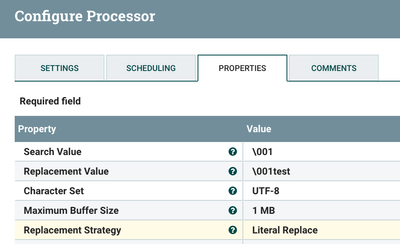
my input file has control-a (but no \001) and my output file has control-a followed by test.
When I use the default Replacement Value ("Regex Replace") my output file has \001test
Created 11-10-2016 01:42 PM
- Mark as New
- Bookmark
- Subscribe
- Mute
- Subscribe to RSS Feed
- Permalink
- Report Inappropriate Content
Could you include a sample of two records? Please update your question with the sample.



Created 11-10-2016 05:05 PM
- Mark as New
- Bookmark
- Subscribe
- Mute
- Subscribe to RSS Feed
- Permalink
- Report Inappropriate Content
is this UTF-8?


Created 11-11-2016 04:43 PM
- Mark as New
- Bookmark
- Subscribe
- Mute
- Subscribe to RSS Feed
- Permalink
- Report Inappropriate Content
Rather than using \u0001 can you try \cA for the control A character? Reference : http://www.regular-expressions.info/nonprint.html "Many regex flavors also support the tokens \cA through \cZ to insert ASCII control characters. The letter after the backslash is always a lowercase c. The second letter is an uppercase letter A through Z, to indicate Control+A through Control+Z. These are equivalent to \x01 through \x1A (26 decimal). E.g. \cM matches a carriage return, just like \r, \x0D, and \u000D. Most flavors allow the second letter to be lowercase, with no difference in meaning. Only Java requires the A to Z to be uppercase."
Created on 11-23-2016 07:00 PM - edited 08-18-2019 03:39 AM
- Mark as New
- Bookmark
- Subscribe
- Mute
- Subscribe to RSS Feed
- Permalink
- Report Inappropriate Content
It works for me when I set Replacement Strategy to "Literal Replace":
my input file has control-a (but no \001) and my output file has control-a followed by test.
When I use the default Replacement Value ("Regex Replace") my output file has \001test


