



Support Questions

Find answers, ask questions, and share your expertise
Announcements
Now Live: Explore expert insights and technical deep dives on the new Cloudera Community BlogsRead the Announcement

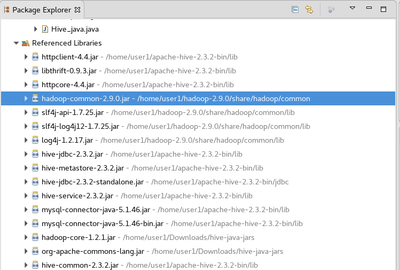
Unable to access hive database using jdbc , It gives following error though i have added all necessary jar files

avatar
18/05/30 17:12:15 INFO jdbc.Utils: Supplied authorities: localhost:10000
18/05/30 17:12:15 INFO jdbc.Utils: Resolved authority: localhost:10000
Exception in thread "main" java.lang.NoSuchMethodError: org.apache.hadoop.hive.common.auth.HiveAuthUtils.getSocketTransport(Ljava/lang/String;II)Lorg/apache/thrift/transport/TTransport;
 at org.apache.hive.jdbc.HiveConnection.createUnderlyingTransport(HiveConnection.java:519)
 at org.apache.hive.jdbc.HiveConnection.createBinaryTransport(HiveConnection.java:539)
 at org.apache.hive.jdbc.HiveConnection.openTransport(HiveConnection.java:309)
 at org.apache.hive.jdbc.HiveConnection.<init>(HiveConnection.java:196)
 at org.apache.hive.jdbc.HiveDriver.connect(HiveDriver.java:107)
 at java.sql.DriverManager.getConnection(DriverManager.java:664)
 at java.sql.DriverManager.getConnection(DriverManager.java:247)
 at Hive_java.main(Hive_java.java:15)

Driver name is org.apache.hive.jdbc.HiveDriver

connection URL is "jdbc:hive2://localhost:10000/default", "", ""

77438-jar-lib.png

2 REPLIES 2

avatar

Im getting the same issue when trying to use the Hive Warehouse Connector

avatar
Master Guru

The name of the server must be set, it can't be localhost.   NiFi and Hive are on other machines.