
Our Community is getting an upgrade! To get everything ready for the relaunch, we’ll be placing the site in read-only mode starting September 21st.
We really appreciate your understanding while we get things set up behind the scenes. Catch up on all the exciting details about the move here.
Need help or have questions? Drop us a line at [email protected]

Support Questions
 Hi, I'm CLEO! Something exciting is coming to the Community. Stay Tuned!
- Cloudera Community
- Support
- Support Questions
- Using yarn logs command
- Subscribe to RSS Feed
- Mark Question as New
- Mark Question as Read
- Float this Question for Current User
- Bookmark
- Subscribe
- Mute
- Printer Friendly Page
- Subscribe to RSS Feed
- Mark Question as New
- Mark Question as Read
- Float this Question for Current User
- Bookmark
- Subscribe
- Mute
- Printer Friendly Page
Using yarn logs command
- Labels:
-
Apache YARN


Created on
12-15-2019
07:08 PM
- last edited on
12-15-2019
07:56 PM
by
 ask_bill_brooks

- Mark as New
- Bookmark
- Subscribe
- Mute
- Subscribe to RSS Feed
- Permalink
- Report Inappropriate Content
Hi,
If I try and get the logs for an application like this:
yarn logs -applicationId application_1575531060741_10424
The command fails because I am not running it as the application owner. I need to run it like this:
yarn logs -applicationId application_1575531060741_10424 -appOwner hive
The problem is I want to write out all the yarn logs to the os so I can ingest them into splunk. If I try and figure out the appOwner for each application then this is awkward and time consuming even in a script.
Is there a better way to dump all the yarn logs to the os ?
Thanks


Created 12-15-2019 07:40 PM
- Mark as New
- Bookmark
- Subscribe
- Mute
- Subscribe to RSS Feed
- Permalink
- Report Inappropriate Content
Hi @Daggers
I think you can try this -
1. Below properties decides the path for storing yarn logs in hdfs -
Belos is sample example from my cluster -

yarn.nodemanager.remote-app-log-dir = /app-logs
yarn.nodemanager.remote-app-log-dir-suffix = logs-ifile
2. You can do "hadoop dfs -copyToLocal" for above path which will copy all applications to local and then you can pass to splunk ?
Do you think that can work for you?
Let me know if you have more questions on above.
Created 12-18-2019 07:44 PM
- Mark as New
- Bookmark
- Subscribe
- Mute
- Subscribe to RSS Feed
- Permalink
- Report Inappropriate Content
Hi @Daggers
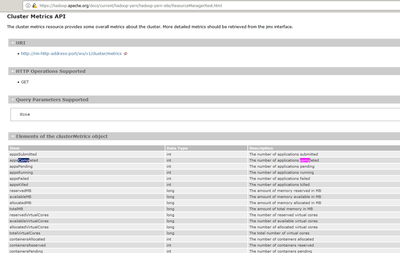
You can write simple script using yarn rest api to fetch only completed applications [month/daywise] and copy only those applications from hdfs to local. Please check below link -
https://hadoop.apache.org/docs/current/hadoop-yarn/hadoop-yarn-site/ResourceManagerRest.html
Created 12-15-2019 07:40 PM
- Mark as New
- Bookmark
- Subscribe
- Mute
- Subscribe to RSS Feed
- Permalink
- Report Inappropriate Content
Hi @Daggers
I think you can try this -
1. Below properties decides the path for storing yarn logs in hdfs -
Belos is sample example from my cluster -

yarn.nodemanager.remote-app-log-dir = /app-logs
yarn.nodemanager.remote-app-log-dir-suffix = logs-ifile
2. You can do "hadoop dfs -copyToLocal" for above path which will copy all applications to local and then you can pass to splunk ?
Do you think that can work for you?
Let me know if you have more questions on above.
Created on 12-15-2019 10:52 PM - edited 12-15-2019 10:55 PM
- Mark as New
- Bookmark
- Subscribe
- Mute
- Subscribe to RSS Feed
- Permalink
- Report Inappropriate Content
You can also check for HDFS NFS gateway which will allow hdfs filesystem to mount on local OS exposed via NFS.
https://hadoop.apache.org/docs/r2.8.0/hadoop-project-dist/hadoop-hdfs/HdfsNfsGateway.html
Created 12-18-2019 06:55 PM
- Mark as New
- Bookmark
- Subscribe
- Mute
- Subscribe to RSS Feed
- Permalink
- Report Inappropriate Content
Hey great suggestion ! I think this might work.
Created 12-18-2019 06:59 PM
- Mark as New
- Bookmark
- Subscribe
- Mute
- Subscribe to RSS Feed
- Permalink
- Report Inappropriate Content
I wonder if there is a way to ensure that all the files have finished being written to /tmp/log (The location at my site of yarn.nodemanager.remote-app-log-dir) before I copy them ?
Created 12-18-2019 07:44 PM
- Mark as New
- Bookmark
- Subscribe
- Mute
- Subscribe to RSS Feed
- Permalink
- Report Inappropriate Content
Hi @Daggers
You can write simple script using yarn rest api to fetch only completed applications [month/daywise] and copy only those applications from hdfs to local. Please check below link -
https://hadoop.apache.org/docs/current/hadoop-yarn/hadoop-yarn-site/ResourceManagerRest.html
Created 12-18-2019 10:37 PM
- Mark as New
- Bookmark
- Subscribe
- Mute
- Subscribe to RSS Feed
- Permalink
- Report Inappropriate Content
Hi @Daggers
Please feel free to select best answer if your questions are answered to close the thread.
Thanks


