Our Community is getting an upgrade! To get everything ready for the relaunch, we’ll be placing the site in read-only mode starting September 21st.
We really appreciate your understanding while we get things set up behind the scenes. Catch up on all the exciting details about the move here.
Need help or have questions? Drop us a line at [email protected]

Support Questions

Find answers, ask questions, and share your expertise
Announcements
Share your experience with Cloudera on G2 and get a $25 Amazon Gift card.
Hi, I'm CLEO! Something exciting is coming to the Community. Stay Tuned!

WARN cluster.YarnScheduler: Initial job has not accepted any resources

avatar
New Member

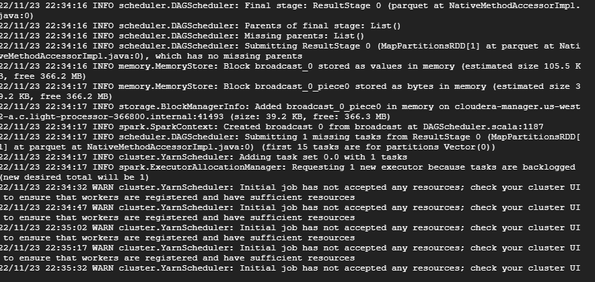
I'm using Cloudera manager 7.4.4 and running the spark(2.4.4) application. I'm facing below warning and application is going on to infinite loop.


WARN cluster.YarnScheduler: Initial job has not accepted any resources; check your cluster UI to ensure that workers are registered and have sufficient resources


SantoshB_0-1669243075939.png


I'm using a simple spark-submit command. spark-submit <filename.py>
my python version is 2.7

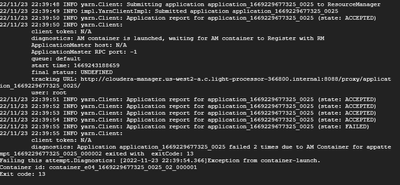
When I'm running the below command I got many other errors

spark-submit --master yarn --deploy-mode cluster --driver-memory 5g --executor-memory 5g --num-executors 3 --executor-cores 2 <filename.py>


Below are the errors


SantoshB_1-1669243319409.png


2 REPLIES 2

avatar
Master Collaborator

you should check the container logs for the one mentioned in the snapshots above for more details. Generally caused due to resource crunch. You can consider increasing the below yarn configs as well.

yarn.nodemanager.resource.memory-mb
yarn.nodemanager.resource.cpu-vcores


Hope this helps,
Paras
Was your question answered? Make sure to mark the answer as the accepted solution.
If you find a reply useful, say thanks by clicking on the thumbs up button.

avatar
Expert Contributor

Hi @SantoshB 

You can see such messages when you have reached user factor limit/resource limit on queue level.


You can check tune user-limit factor or check queue utilization to schedule applications accordingly. 


Also seems application has failed with exit-code 13, can you please share YARN trace to identify reason for failure?