ALWOSABY
Gold ⭐️
January 24, 2024
Solved

how can get the content of Json record and value of attributes

Hi All,

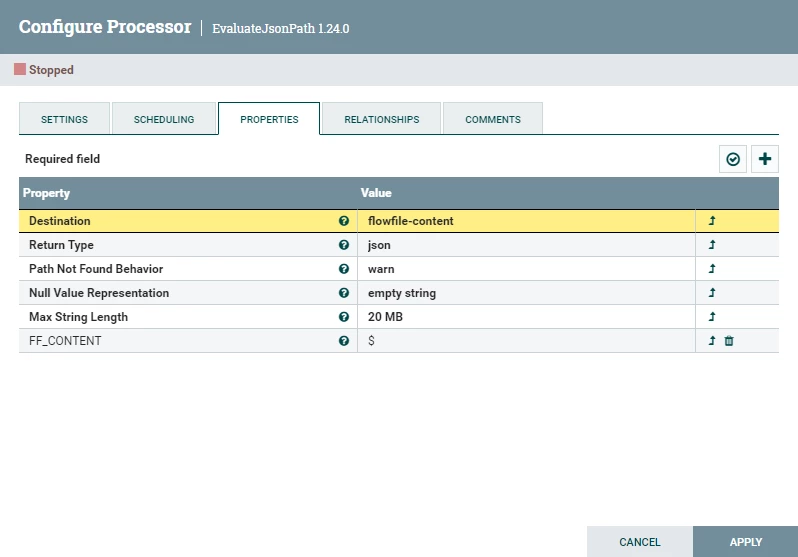
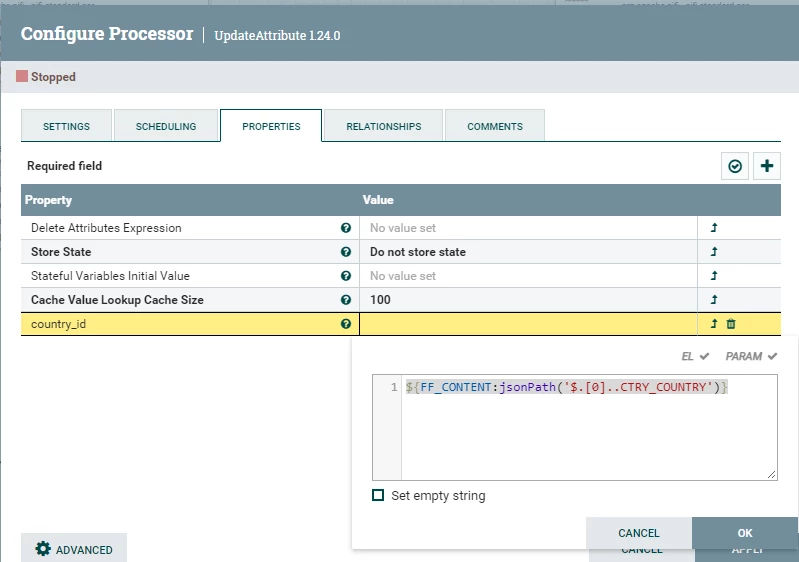
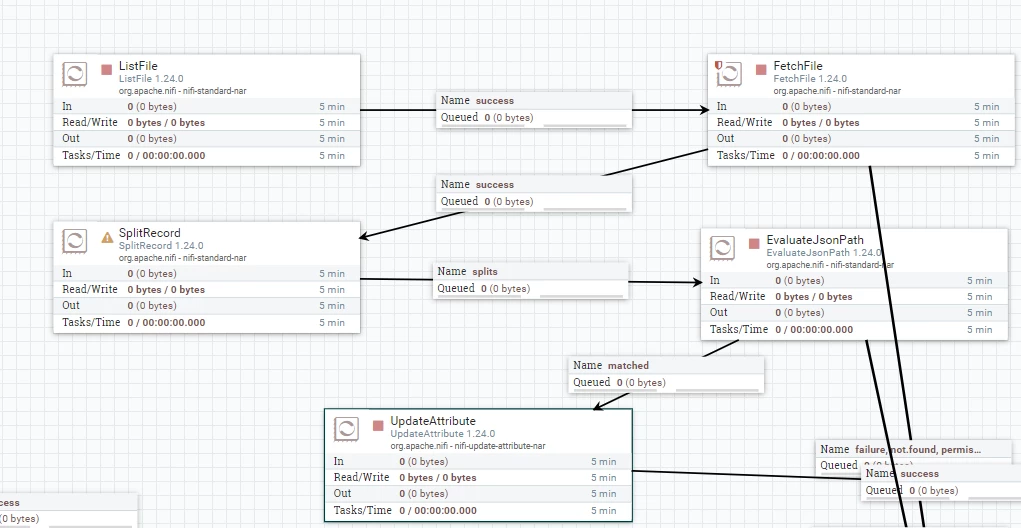
we try to fetch the results from database according to the content of cvs file.after converting the csv to json format by SpileRecord  then we try to  get the content of Json record  by  EvaluateJsonPath  then we  try to get value of attribute by  UpdateAttribute  but the  FF_Content attribute into inEvaluateJsonPath not recognized . 

listFile->FetchFiles->SpileRecord->EvaluateJsonPath ->UpdateAttribute ->ExecuteSQLUntitled picture3.png
 

Untitled picture1.png

Untitled picture4.png


cotopaul
cotopaulAnswer
Platinum ⭐️
January 26, 2024

@ALWOSABY, in EvaluateJsonPath, you set EvaluateJsonPath to write the information in the content of the flow file, and not in the attributes. In your next processor, you are using the FF_CONTENT as an attribute and it does not exist ... hence your flow not working as expected. 

Do you require the content of the JSON or do you need to generate some new attributes based on the content of the flow file?

If you require the content as well, I would suggest to add a new EvaluateJsonPath after your first one and modify to write the information as attributes and generate your desired attributes. 

If you only require some new attributes, modify the logic in your first EvaluateJsonPath to write the data as attributes and generate your desired attributes, using the Record Path for JSON. 

Have a look at your first EvaluateJsonPath and make sure that the data is extracted correctly, because it first glance, I am not quite certain it works properly. 

3 replies

VidyaSargur
Community Manager
Community Manager
January 24, 2024

@ALWOSABY, Welcome to our community! To help you get the best possible answer, I have tagged our NiFi experts @SAMSAL  @cotopaul @MattWho  who may be able to assist you further.

Please feel free to provide any additional information or details about your query, and we hope that you will find a satisfactory solution to your question.

Translate
Regards, Vidya Sargur, Community Manager Was your question answered? Make sure to mark the answer as the accepted solution. If you find a reply useful, say thanks by clicking on the thumbs up button.
SAMSAL
Platinum ⭐️⭐️⭐️
January 26, 2024

Hi @ALWOSABY ,

What is the value of the FF_Content? is it the entire JSON record ? if so - as it appears from the specified path - Why not use the EvaluateJsonPath to get whatever values that are  needed and store as attributes by setting the Destination property to flowfile-attribute.

See the following post to learn more: https://community.cloudera.com/t5/Support-Questions/How-to-handle-json-using-EvaluateJsonPath-processor-in-NiFi/m-p/295335

If that helps please accept solution.

Thanks

Translate
cotopaul
cotopaulAnswer
Platinum ⭐️
January 26, 2024

@ALWOSABY, in EvaluateJsonPath, you set EvaluateJsonPath to write the information in the content of the flow file, and not in the attributes. In your next processor, you are using the FF_CONTENT as an attribute and it does not exist ... hence your flow not working as expected. 

Do you require the content of the JSON or do you need to generate some new attributes based on the content of the flow file?

If you require the content as well, I would suggest to add a new EvaluateJsonPath after your first one and modify to write the information as attributes and generate your desired attributes. 

If you only require some new attributes, modify the logic in your first EvaluateJsonPath to write the data as attributes and generate your desired attributes, using the Record Path for JSON. 

Have a look at your first EvaluateJsonPath and make sure that the data is extracted correctly, because it first glance, I am not quite certain it works properly. 

Translate