Blogs
Recently active
Regular compaction is essential for Apache Iceberg tables to address the issue of small files, which can accumulate as transaction volume increases, leading to degraded query performance. Iceberg offers the rewrite data files Spark procedure as a mechanism for performing this compaction.What is Cloudera Lakehouse Optimizer?The Cloudera Lakehouse Optimizer (CLO) is an automated management service designed to optimize Apache Iceberg tables, thereby improving performance and reducing operational costs.It allows administrators to define maintenance policies for tables. The system evaluates these policies by gathering statistics from Iceberg metadata, which subsequently triggers maintenance actions. These actions include data compaction, snapshot expiration, and the removal of orphan files. It offers execution flexibility, supporting both schedule-based execution for predictable workloads and event-based triggers for real-time data changes.Lakehouse Optimizer maintenance actions are execute
In the world of Apache Iceberg, managing table maintenance efficiently is crucial for optimal performance and cost control. Cloudera Lakehouse Optimizer automatically manages your tables when you associate them with maintenance policies. These policies represent your maintenance intentions—defining which tables need attention and how they should be optimized.The system includes ready-to-use template policies shipped with the product, such as the ClouderaAdaptive policy. Each policy has two components: Constants (.json) and Script (.jexl), along with two execution models:Schedule Based Policies:Run maintenance during defined time windows using familiar cron expressions; must be used for predictable workloads and planned maintenance windows. A schedule-based policy must have a valid cron expression defined.Event Based Policies:Automatically trigger maintenance when actual data changes occur. Event-based policies should have a cron defined as ‘event’ rather than a standard time-based cron
The Storage Challenge Every Business FacesEnterprises create massive volumes of data—the Global Datasphere reached 149 ZB in 2024 and is projected to grow to 181 ZB by 2025 and 394 ZB by 2028. Multiple industry sources report that ~60–80% of enterprise data becomes "cold" (rarely accessed within months to a year), yet it often remains on expensive primary storage. Meanwhile, many Hadoop-based data lakes still default to 3× replication.Consider this: a company with 100TB of data actually consumes 300TB of storage due to 3x replication. What if you could automatically reduce that 300TB to under 200TB? In this blog, we'll walk through the calculations to show exactly how Cloudera's Ozone Storage Optimizer makes this possible—an intelligent system that converts cold data from expensive replication to storage-efficient Erasure Coding, reducing storage overhead from 200% to just 40–50% (≈50–53% storage reduction vs. 3× replication).Introducing Ozone St
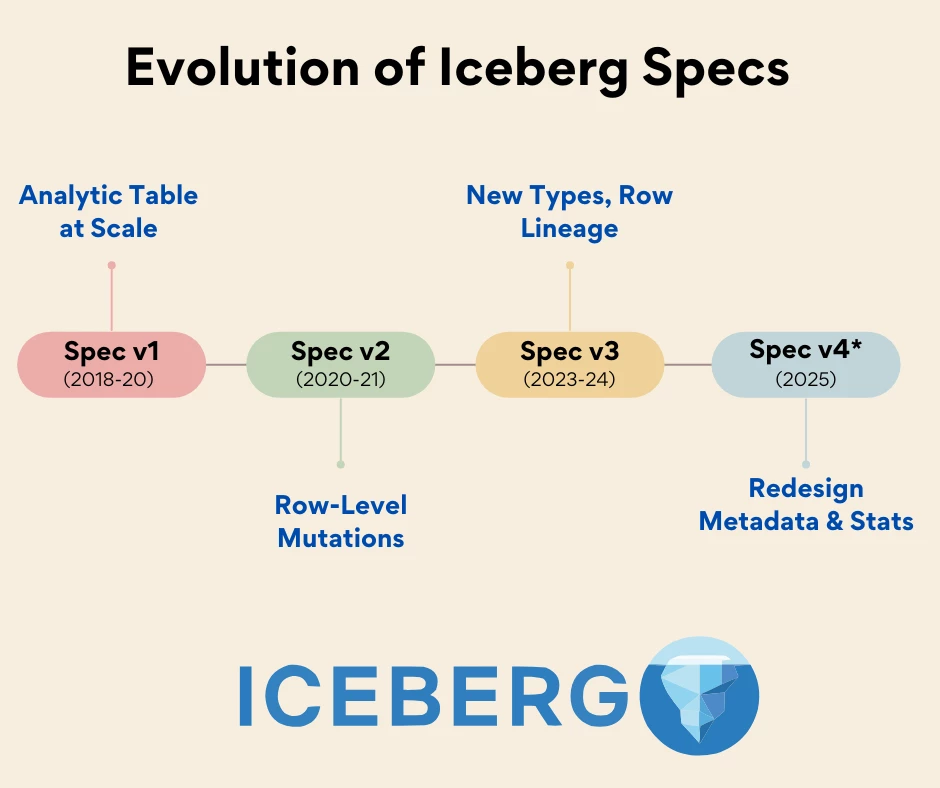
Table of ContentsEvolution of the Apache Iceberg Table format SpecificationSpec v1: How Iceberg Enabled Analytic Tables at ScaleSpec v2: How Iceberg Supports Row-Level Deletes and Incremental MutationsSpec v3: Extended Types, Metadata Enhancements & Row LineageSpec v4: What’s Next for Developers Building with IcebergCommunity Drives InnovationCloudera’s Commitment to the Iceberg JourneyApache Iceberg began as an internal project at Netflix to solve a very real problem: analytical data lakes built on file formats like Apache Parquet and ORC lacked reliable schema evolution, atomicity, and visibility into table state. To address these challenges, the team defined a specification that could enforce consistency and transactional guarantees at scale - introducing Iceberg as the “table format for slow-moving data.”If we take a step back, most early “big data” workloads relied on the Apache Hive table format stored in the Hadoop Distributed File System (HDFS). Over time, the Hive ta
This guide is Part 2 of our series on GRPO-based fine-tuning. It assumes you are already familiar with the core concepts of reasoning models and GRPO (see Part 1 Understanding Reasoning Models with GRPO: A Conceptual Introduction for Building your own Medical Reasoning Model ), and you are ready to apply them in practice using Python. All code is provided in a reproducible notebook, with detailed explanations and references to help you get started.Abstract: In this guide, we’ll walk step by step through fine tuning a large language model on a medical reasoning dataset from Hugging Face, using Group Relative Policy Optimization (GRPO). In the following sections, you will see exactly how the technical setup of GRPO works, how the data is structured, how to create custom reward functions, and how to test, evaluate, and save the medical reasoning model. By the end, you will have a working GRPO pipeline for building your own medical reasoning model that produces <reasoning>..</reas
1. IntroductionProblem:Most readily-available Medical AI models lack structured reasoning, which significantly limits their reliability and trustworthiness in critical clinical decision-making. GRPO offers a robust solution for building reasoning Medical AI models by reinforcing logical step-by-step explanations.Takeaway:This post explains how enterprises can fine-tune Large Language Models (LLMs) with reinforcement learning (RL) using GRPO for more structured, explainable AI, demonstrating its application with a medical reasoning use case.2. The Business Case Why should enterprises care?Reasoning is critical in high-stakes industries like healthcare, finance, and legal sectors. It provides better transparency, explainability, and tracing on how models generate their outputs, building crucial trust and facilitating accountability. Why GRPO?GRPO efficiently delivers advanced reasoning capabilities. It significantly reduces compute requirements, cutting them b
Cruise Control is an open-source solution to automate the dynamic workload rebalance and self-healing of large-scale Apache Kafka clusters. With the widespread adoption of Apache Kafka, many companies now maintain Kafka clusters with hundreds or even thousands of brokers. Operating large-scale clusters may lead to frequent broker failures and a substantial burden in redistributing workload. Cruise Control was designed to solve these operational scalability challenges.What is Cloudera Streams Messaging - Kubernetes Operator? Cloudera Streams Messaging - Kubernetes Operator brings enterprise-grade Kafka deployments to existing Kubernetes infrastructures. Cloudera Streams Messaging - Kubernetes Operator allows flexible, agile, and rapid deployment as well as scaling for variable workloads. This solution enables the deployment of Kafka and related components on existing, shared Kubernetes infrastructure, eliminating the need for dedicated infrastructureCruise Control is also part of t
One of the most exciting and valuable features (in my opinion) of Cloudera Flow Management 4 (powered by Apache NiFi 2) is the Flow Analysis Rules engine and the various rule implementations you can bring to bear. The Flow Analysis Rules Engine is a built-in capability to Apache NiFi 2 whose mission is to help Flow Administrators enforce Best Practices in flow design. This includes limiting how many resources (threads, memory, disk, etc.) a component can leverage. For example, a Flow Admin may want to restrict all processors to use a maximum of 10 concurrent tasks. One reason for this (especially in large flows) is to prevent a Flow Designer from "hogging" the threads away from other components / teams, or to maximize parallelization across physical CPU cores rather than concurrency (which can be viewed as "apparently parallel" but not truly parallel). The same goes for disk usage that can be enforced by limiting the size of a connection's backpressure settings to prevent too much data
In the final installment of Parameterize All The Things mini-series for the Cloudera Flow Management / Apache NiFi Best Practices cookbook, I will discuss Parameter Providers and how to use them. As we've seen in the previous two posts, we can create Parameter Contexts and manually add key/value pairs to be used as Parameter references in NiFi component properties. But manually maintaining these values can be tedious and this doesn't lend itself to automation. Not only that, but it is possible that the parameter values should not be known by the Flow Designers and instead just used to connect to external systems, such as can be the case for database user passwords, secret keys, etc. To solve this problem, the concept of Parameter Providers was introduced. This capability allows for parameters and their values (both sensitive and plain) to be fetched from an external source. These sources include (but aren't limited to) the following: Environment variables Database tables Password vaul
In the last article I explained the history of Parameters and Parameter Contexts and how to use them most effectively in your flows. But did you know you can actually swap out Controller Service instances using their UUIDs as parameter values? I will explain why this is valuable as an example: I have a DBConnectionPool (in Apache NiFi) or a PostgreSQLConnectionPool (in Cloudera Flow Management) that points to a PostgreSQL database, and I'm parameterizing all the connection properties using the strategy laid out in part 1 of this series. That's all well and good but what if the folks on the destination side say "we decided to switch to Impala on Cloudera Data Platform because we don't want the cost of managing our PostgreSQL cluster, plus it's integrated with our lakehouse". You can't just change the parameters used in the connection pool because you need an entirely different ControllerService. In Part 1 we were able to swap out configurations for a particular Controller Service, but w
This article is part of the Cloudera Flow Management / Apache NiFi Best Practices Cookbook series and will discuss Best Practices for using Parameters and Parameter Contexts in your flows. History First a little background about Parameters: In NiFi 1.x, the original solution for being able to configure various environments (development vs production, e.g.) was Variables. This was a global key/value store of variable names with values associated with them. These variable names could be used in Expression Language expressions as well as certain properties in processors looking specifically for a variable name. This single, global list was not flexible enough to solve many of the configuration challenges of our users. To solve this, Parameters were introduced. They are meant as a replacement for Variables and via Parameter Contexts are much more flexible and powerful due to inheritance (which I will discuss later). Parameters In general, a parameter is referred to by the following sy
Welcome! In this series of articles I will address various topics about Cloudera Flow Management (powered by Apache NiFi) in terms of Best Practices about how, when, and why to use the powerful and flexible features of Cloudera Flow Management (CFM) / Apache NiFi. I will use the terms CFM and NiFi interchangeably but will specify when something is specific to Cloudera Flow Management and does not apply to Apache NiFi. These examples and screenshots will be taken both from CFM 2 (powered by Apache NiFi 1.x) and CFM 4 (powered by Apache NiFi 2.x) when prudent to illustrate the features and Best Practices that are common to both CFM 2 and 4, as well as when something is specific to CFM 4 / NiFi 2. Links will be present for articles that have been published. This Best Practices Cookbook will feature the following articles, but please like/subscribe as articles may be added and/or edited at various times. Also if you have any ideas on Best Practices articles that may be helpful to the commu
Objective Deploying Dask Cuda Clusters on Kubernetes for distributed GPU workloads can require time, effort, and money, especially at Enterprise scale. You'd have to set up a Kubernetes cluster with GPU support, manage docker images, and dask cuda workers via complex deployment files. Cloudera AI simplifies distributed compute use cases in the context of Machine Learning and AI. In this article, you will learn how to quickly deploy a Dask Cuda Cluster in Cloudera AI using the cmlextensions library. Background Information Dask CUDA clusters enable scalable parallel computing on NVIDIA GPUs by leveraging Dask, a flexible parallel computing framework, in conjunction with the power of CUDA for GPU acceleration. These clusters allow users to distribute computation across multiple GPUs, significantly speeding up data processing and machine learning workflows, particularly for tasks involving large datasets or complex algorithms. Cloudera AI is a suite of artificial intelligence and machine l
While generative AI dominates today's headlines, traditional predictive machine learning models continue to drive critical business decisions across industries. To ensure predictive models achieve a solid ROI, well after models are initially deployed, establishing a Machine Learning Operations (MLOps) plan is essential. MLOps is the practice of streamlining the entire lifecycle of machine learning models—from development and training to deployment, monitoring, and maintenance—in a repeatable, scalable, and governable way. Think of it as bringing software engineering discipline to machine learning, ensuring that your AI investments don't remain theoretical exercises but become dependable business assets that continue to deliver value over time. Without robust MLOps practices, models often degrade in production as data shifts over time. What begins as an impressive prototype can quickly become unreliable, leading to poor decision quality with real financial consequences. Poor model
CREATING A CDE REPOSITORY WITH A PRIVATE GIT REPOSITORY OBJECTIVE In this article, you will learn how to create a CDE Repository by cloning a private Git repository using CDE Credentials. Cloudera Data Engineering (CDE) is a cloud-based service that helps businesses build, manage, and scale data pipelines. It is based on Apache Spark and integrates with other Cloudera services. Git repositories allow teams to collaborate, manage project artifacts, and promote applications from lower to higher environments. CDE Repositories can be used to clone git repositories into a Virtual Cluster to make the imported files available to CDE Jobs as reusable dependencies. CDE currently supports Git providers such as GitHub, GitLab, and Bitbucket. CDE Credentials allow you to store secrets such as usernames, passwords, and tokens, in secure, reusable objects associated with CDE Jobs, Custom Runtimes and Repositories. REQUIREMENTS This example was built with CDE 1.23. To reproduce the commands in your e
It's early 2025 and agentic workflows are the hottest commodities within AI. Giving large language models (LLMs) the ability to use tools to complete actions opens up a huge range of use cases. At the same time, it's important to ensure that the AI agents we build are secure. Why AI Agents? AI Agents have the potential to transform society and how we leverage technology to complete routine tasks. Some key use cases for AI Agents can involve: Automation Customer Service Tasks Orchestrating Business Processes & Workflows Taking Actions Based on Unstructured Data In this article you will get familiar the CrewAI library and how we can build fully private AI agents with CrewAI and Cloudera's AI Inference Service. Powered by Nvidia NeMo Inference Microservices (NIM), Cloudera's AI Inference Service gives you the ability to deploy private LLMs within your infrastructure. This article is designed to walk you through the setup and application of these tools in an agentic worfklow context
Prerequisites: This article assumes some knowledge of Spark and Iceberg. These examples make use of Cloudera Data Engineering and Cloudera Data Warehouse.Note: Iceberg branch-based WAP requires Spark 3.5 or above. Motivation (simulated scenario) Let's imagine we have a high-traffic table many users use in the platform. Each day, before the start of a work day, a Spark job populates this table with new records. On most days, this simple architecture will work quite well. However, this morning the Spark job had a data error and wrote out a batch of duplicate records. This data quality issue was reported by one of the users and the data engineers are now trying to fix it. However, during this time, access to the high-traffic table is obviously disrupted. Of course, data quality checks can be implemented to catch issues like this earlier. However, this still leaves you little time to roll back changes or fix the data issues before users are affected. Write Audit Publish a pattern These t
JupyterLab is a powerful, web-based interactive development environment widely used for data science, machine learning, and Spark application development. It extends the classic Jupyter Notebook interface, offering a more flexible and integrated workspace. For Spark application development, JupyterLab provides the following advantages: 1. Interactive Exploration: Run Spark queries and visualize results interactively, making it ideal for data exploration and debugging. 2. Rich Visualization: Seamlessly integrate with Python visualization libraries like Matplotlib, Seaborn, and Plotly to analyze and interpret Spark data. 3. Ease of Integration: Use PySpark or Sparkmagic to connect JupyterLab with Spark clusters, enabling distributed data processing from the notebook environment. Spark Connect is a feature introduced in Apache Spark that provides a standardized, client-server architecture for connecting to Spark clusters. It decouples the client from the Spark runtime, allowing users to
PyCharm is a popular integrated development environment (IDE) for Python, developed by JetBrains. It provides a comprehensive set of tools designed to boost productivity and simplify the coding process. When working with Apache Spark, PyCharm can be an excellent choice for managing Python-based Spark applications. Its features include: Code Editing and Debugging: PyCharm offers intelligent code completion, syntax highlighting, and robust debugging tools that simplify Spark application development. Virtual Environments and Dependency Management: PyCharm makes it easy to configure Python environments with Spark libraries and manage dependencies. Notebook Support: With built-in support for Jupyter Notebooks, PyCharm allows you to work interactively with data, making it easier to visualize and debug Spark pipelines. Version Control: PyCharm integrates with Git and other version control systems, simplifying collaboration and project management. Spark Connect is a feature in
Spark GraphFrames is a package within Apache Spark that allows users to perform graph processing operations on data using a DataFrame-based approach. It will enable you to perform various graph operations like finding connected components, calculating shortest paths, identifying triangles, and more. Real world applications include social network analysis, recommendation systems, web link structures, flight connections, and other scenarios where relationships between data points are crucial. Cloudera AI (CAI) is a cloud-native service within the Cloudera Data Platform (CDP) that enables enterprise data science teams to collaborate across the full data lifecycle. It provides immediate access to enterprise data pipelines, scalable compute resources, and preferred tools, streamlining the process of moving analytic workloads from research to production. Using Spark GraphFrames in Cloudera AI requires minimum configuration effort. This quickstart provides a basic example so you can get start
Contributors: Soumitra, Swami, Rishabh, Uma, Arpit Background White-box testing is essential for distributed file systems like Apache Ozone, ensuring data consistency, replication, and fault tolerance by exposing race conditions, concurrency issues, and failure scenarios. Unlike black-box testing, which focuses on system behavior without internal insights, white-box testing provides a deeper understanding of internal mechanisms, helping detect and resolve complex synchronization issues that are otherwise hard to reproduce. Why White-Box Testing for Ozone? Most downstream Ozone integration tests rely on black-box testing, which makes it difficult to automate synchronization events or reproduce escalations seen in production. White-box testing addresses this challenge by enabling precise fault injection and deterministic debugging. Early efforts used gdb to manipulate Java process threads, successfully reproducing the silent data corruption issue. However, automation was difficult with g
This story outlines the procedures undertaken to configure a multi-GPU host within the datacenter for the purpose of hosting and serving open-source models. The primary objective is to leverage two L40s GPUs to provide robust LLM inference capabilities locally. The deployment of large language models (LLMs) for local inference represents a crucial step in enhancing our on-premises AI capabilities. Given the increasing scale and complexity of contemporary LLMs, a single GPU frequently proves insufficient to accommodate the entire model within its Video RAM (VRAM). This necessitates the utilization of multiple GPUs to distribute the model's parameters and facilitate efficient inference. Our configuration, employing two L40s GPUs, is specifically designed to address this challenge, ensuring our ability to host robust LLMs that demand substantial memory and processing power for optimal performance. Prerequisites: We conducted this exercise on a host system with the following hardware and o
In the RDBMS world, query history has existed for many years. When I worked with MS SQL Server, I could easily check who executed which query on the server. In MS SQL, this feature is called Query Store. In Apache Hive and Apache Impala, the equivalent is called Query History. This feature is primarily used to simplify performance troubleshooting. With SQL queries, you can compare execution plans, check statistics, and analyze many other aspects. It gives you the ability to understand how your data warehouse is being utilized, using data from the data warehouse itself. You can even create your own reports and dashboards on top of this data. It does not stop here! You also gain insights into your query plans, compare past and present performance, and create trends based on historical data. One of the main motivations for introducing this feature in Apache Hive and Apache Impala was customer escalations in the past. There were many cases where customers complained about performance degra
Already have an account? Login
Enter your E-mail address. We'll send you an e-mail with instructions to reset your password.