
Our Community is getting an upgrade! To get everything ready for the relaunch, we’ll be placing the site in read-only mode starting September 21st.
We really appreciate your understanding while we get things set up behind the scenes. Catch up on all the exciting details about the move here.
Need help or have questions? Drop us a line at [email protected]

Archives of Support Questions (Read Only)
- Cloudera Community
- Board Archive
- Archives of Support Questions (Read Only)
- Re: 403 error with 'unsupported key type' messag...
- Subscribe to RSS Feed
- Mark Question as New
- Mark Question as Read
- Float this Question for Current User
- Bookmark
- Subscribe
- Mute
- Printer Friendly Page
- Subscribe to RSS Feed
- Mark Question as New
- Mark Question as Read
- Float this Question for Current User
- Bookmark
- Subscribe
- Mute
- Printer Friendly Page
403 error with 'unsupported key type' message upon accessing spengo enabled storm UI.
- Labels:
-
Apache Storm


Created on 09-14-2018 01:02 AM - edited 08-18-2019 12:45 AM
- Mark as New
- Bookmark
- Subscribe
- Mute
- Subscribe to RSS Feed
- Permalink
- Report Inappropriate Content
We have a kerberised hdp cluster ( 2.6.5 ) deployed in AWS. AWS network architecture is in such a way that all the hdp component nodes are under private subnet and the access to them is only via ssh from bastion node which is in public subnet. We have enabled all the web components ( Storm UI, Metron UI, Metron Management UI etc ) available outside via AWS ELB load balancer to the outside world.
Our kerberos server and kdc admin is available outside via ssh tunneling via bastion node, This is for the external accessing client to authenticate eg : Spengo.
When we access our storm UI via browser with proper step taken for to pass spengo authentication, We are getting 403 error even with proper keytab and principal.
Error getting in /var/log/storm/ui.out in storm UI hosted node
Found KeyTab /etc/security/keytabs/spnego.service.keytab for HTTP/[email protected]
Looking for keys for: HTTP/[email protected]
Found unsupported keytype (3) for HTTP/[email protected]
MemoryCache: add 1536315369/301662/8ABC886166F6808EA668D561462EDD37/[email protected] to metron@HOST.
Steps followed :
1- Installed kerberos client
2- Copied krb5.conf file from kerberose node to local file krb5.ini and configured
[libdefaults]
  renew_lifetime = 7d
  forwardable = true
  default_realm = EXAMPLE.COM
  ticket_lifetime = 24h
  dns_lookup_realm = false
  dns_lookup_kdc = false
  default_ccache_name = /tmp/krb5cc_%{uid}
  #default_tgs_enctypes = aes des3-cbc-sha1 rc4 des-cbc-md5
  #default_tkt_enctypes = aes des3-cbc-sha1 rc4 des-cbc-md5
[logging]
  default = FILE:/var/log/krb5kdc.log
  admin_server = FILE:/var/log/kadmind.log
  kdc = FILE:/var/log/krb5kdc.log
[realms]
  EXAMPLE.COM = {
    admin_server = localhost
    kdc = localhost
  }
3- Copied keytab file of principal - HTTP/[email protected]
spnego.service.keytab
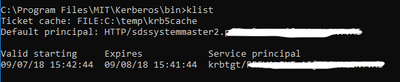
3- kinit executed () and ticket seems to be generated fine (screenshot added)

4- Configured firefox about:config
network.negotiate-auth.trusted-uris : loadbalancer-url
network.negotiate-auth.delegation-uris : loadbalancer-url
network.negotiate-auth.gsslib : C:\Program Files\MIT\Kerberos\bin\gssapi64.dll
network.negotiate-auth.using-native-gsslib : false
5- Loaded the storm UI
Storm UI spengo Kerberos configuration
ui.filter : org.apache.hadoop.security.authentication.server.AuthenticationFilter

ui.filter.params : {'type': 'kerberos', 'kerberos.principal': '{{storm_ui_jaas_principal}}', 'kerberos.keytab':'{{storm_ui_keytab_path}}' , 'kerberos.name.rules': 'DEFAULT'}


storm_ui_keytab : /etc/security/keytabs/spnego.service.keytab
storm_ui_principal_name : HTTP/[email protected]


Created 09-14-2018 03:35 PM
- Mark as New
- Bookmark
- Subscribe
- Mute
- Subscribe to RSS Feed
- Permalink
- Report Inappropriate Content
Key type 3 is DES_CBC_MD5, which is pretty much deprecated (see https://www.opencore.com/blog/2017/3/kerberos-encryption-types/), but by default Ambari requests/creates keytab entries using this type for backwards compatibility. Your KDC is probably rejecting keys encrypted with this type.
To fix this, you should go into the Kerberos service settings and edit the "Encryption Type" value under the "Advanced kerberos-env" section. The default value is "aes des3-cbc-sha1 rc4 des-cbc-md5". Change it to "aes des3-cbc-sha1 rc4".
You will also want to update the "krb5-conf template" value under "Advanced krb5-conf" to add the following under the "[libdefaults]" section:
allow_weak_crypto = false
After saving the changes and restarting the Kerberos service (which ensure the krb5.conf file is synced up), you should restart all of the services. If you still see issues, maybe regenerate all keytab files (Admin->Kerberos) and then restart all services. However depending on the KDC implementation you may or may not see a change in the generated keytab files. By default they will look like
[root@c7401 ~]# klist -kte /etc/security/keytabs/spnego.service.keytab
Keytab name: FILE:/etc/security/keytabs/spnego.service.keytab
KVNO Timestamp           Principal
---- ------------------- ------------------------------------------------------
   2 09/14/2018 15:06:22 HTTP/[email protected] (des3-cbc-sha1)
   2 09/14/2018 15:06:22 HTTP/[email protected] (des-cbc-md5)
   2 09/14/2018 15:06:22 HTTP/[email protected] (aes128-cts-hmac-sha1-96)
   2 09/14/2018 15:06:22 HTTP/[email protected] (arcfour-hmac)
   2 09/14/2018 15:06:22 HTTP/[email protected] (aes256-cts-hmac-sha1-96)
Created 09-14-2018 03:35 PM
- Mark as New
- Bookmark
- Subscribe
- Mute
- Subscribe to RSS Feed
- Permalink
- Report Inappropriate Content
Key type 3 is DES_CBC_MD5, which is pretty much deprecated (see https://www.opencore.com/blog/2017/3/kerberos-encryption-types/), but by default Ambari requests/creates keytab entries using this type for backwards compatibility. Your KDC is probably rejecting keys encrypted with this type.
To fix this, you should go into the Kerberos service settings and edit the "Encryption Type" value under the "Advanced kerberos-env" section. The default value is "aes des3-cbc-sha1 rc4 des-cbc-md5". Change it to "aes des3-cbc-sha1 rc4".
You will also want to update the "krb5-conf template" value under "Advanced krb5-conf" to add the following under the "[libdefaults]" section:
allow_weak_crypto = false
After saving the changes and restarting the Kerberos service (which ensure the krb5.conf file is synced up), you should restart all of the services. If you still see issues, maybe regenerate all keytab files (Admin->Kerberos) and then restart all services. However depending on the KDC implementation you may or may not see a change in the generated keytab files. By default they will look like
[root@c7401 ~]# klist -kte /etc/security/keytabs/spnego.service.keytab
Keytab name: FILE:/etc/security/keytabs/spnego.service.keytab
KVNO Timestamp           Principal
---- ------------------- ------------------------------------------------------
   2 09/14/2018 15:06:22 HTTP/[email protected] (des3-cbc-sha1)
   2 09/14/2018 15:06:22 HTTP/[email protected] (des-cbc-md5)
   2 09/14/2018 15:06:22 HTTP/[email protected] (aes128-cts-hmac-sha1-96)
   2 09/14/2018 15:06:22 HTTP/[email protected] (arcfour-hmac)
   2 09/14/2018 15:06:22 HTTP/[email protected] (aes256-cts-hmac-sha1-96)
Created 09-17-2018 03:56 PM
- Mark as New
- Bookmark
- Subscribe
- Mute
- Subscribe to RSS Feed
- Permalink
- Report Inappropriate Content
Thanks
Unsupported key type issue is solved.
Now getting another error in /var/log/krb5kdc.log while accessing storm web ui.
Sep1708:37:50 ip-10-0-2-8.ec2.internal krb5kdc[1536](info): TGS_REQ (6 etypes {181716232526})127.0.0.1: LOOKING_UP_SERVER: authtime 0,  HTTP/[email protected] for HTTP/[email protected],Servernot found inKerberos database
Sep1708:37:50 ip-10-0-2-8.ec2.internal krb5kdc[1536](info): closing down fd 13
Sep1708:37:50 ip-10-0-2-8.ec2.internal krb5kdc[1536](info): TGS_REQ (6 etypes {181716232526})127.0.0.1: UNKNOWN_SERVER: authtime 0,  HTTP/[email protected] for krbtgt/[email protected],Servernot found inKerberos database
Sep1708:37:50 ip-10-0-2-8.ec2.internal krb5kdc[1536](info): closing down fd 13
Created 09-17-2018 04:11 PM
- Mark as New
- Bookmark
- Subscribe
- Mute
- Subscribe to RSS Feed
- Permalink
- Report Inappropriate Content
HTTP/[email protected] is not a valid service principal. The "sdssystemmaster2" part needs to be a FQDN. Like HTTP/[email protected]. Where did that value come from? It is possible that you have a DNS or reverse DNS issue.
Created 09-18-2018 06:39 AM
- Mark as New
- Bookmark
- Subscribe
- Mute
- Subscribe to RSS Feed
- Permalink
- Report Inappropriate Content
Created 09-18-2018 12:47 PM
- Mark as New
- Bookmark
- Subscribe
- Mute
- Subscribe to RSS Feed
- Permalink
- Report Inappropriate Content
oops.. sorry about that. It is not always clear when hostnames are masked and I have seen issues where the hostname was incorrect (for various reasons).
Created 09-18-2018 12:59 PM
- Mark as New
- Bookmark
- Subscribe
- Mute
- Subscribe to RSS Feed
- Permalink
- Report Inappropriate Content
Looking at the error message again, it appears that the issue is with the principal name HTTP/[email protected]. My reason is the same as before... a DNS or reverse DNS issue. Take a look at the KDC to see if this principal exists. If you are using an MIT KDC and have access to the host where the KDC is installed, you can find all of the SPNEGO principals by doing:
kadmin.local -q list_principals | grep HTTP
Ideally they all look similar and the hostname for each of the HTTP/<hostname> principals is an expected hostname.
Keep in mind that both DNS and reverse DNS need to use the same IP address to DNS name mapping, else issues like this will occur.
Created 09-26-2018 07:22 AM
- Mark as New
- Bookmark
- Subscribe
- Mute
- Subscribe to RSS Feed
- Permalink
- Report Inappropriate Content
HTTP/[email protected]
HTTP/[email protected]
HTTP/[email protected]
HTTP/[email protected]
HTTP/[email protected]
HTTP/[email protected]
HTTP/[email protected]
HTTP/[email protected]
HTTP/[email protected]
HTTP/[email protected]
Turned off Reverse-DNS by setting rdns=false in krb5.conf file.
But still getting same error
HTTP ERROR: 403
Problem accessing /. Reason:
org.apache.hadoop.security.authentication.client.AuthenticationException
Powered by Jetty://
Created 09-26-2018 03:17 PM
- Mark as New
- Bookmark
- Subscribe
- Mute
- Subscribe to RSS Feed
- Permalink
- Report Inappropriate Content
Turning off rdns in the krb5.conf wont help. I am not even sure the property applies to this type of scenario. The Hadoop libraries do the reverse DNS lookup on their own.
Created 09-28-2018 05:31 AM
- Mark as New
- Bookmark
- Subscribe
- Mute
- Subscribe to RSS Feed
- Permalink
- Report Inappropriate Content
Could this be a problem related to principal mismatch in client and spengo configuration ?
When I checked `klist` I could see principal name has HTTP/[email protected]. Where I actually configured HTTP/[email protected] in ui.filter.params. Is the browser override the principal name as the host ? Can we bypass that ?
My Spnego configuration object -
{'type': 'kerberos', 'kerberos.principal': 'HTTP/[email protected]', 'kerberos.keytab':'/etc/security/keytabs/spnego.service.keytab' , 'kerberos.name.rules': 'DEFAULT'} klist output -
klist Ticket cache: FILE:/tmp/krb5cc_1000
Default principal: HTTP/[email protected]
Valid starting       Expires              Service principal
2018-09-28T10:12:09  2018-09-29T10:12:09  krbtgt/[email protected]
2018-09-28T10:22:44  2018-09-29T10:12:09  HTTP/elb.amazonaws.com@                                          2018-09-28T10:22:44  2018-09-29T10:12:09  HTTP/[email protected]


