
Our Community is getting an upgrade! To get everything ready for the relaunch, we’ll be placing the site in read-only mode starting September 21st.
We really appreciate your understanding while we get things set up behind the scenes. Catch up on all the exciting details about the move here.
Need help or have questions? Drop us a line at [email protected]

Archives of Support Questions (Read Only)
- Cloudera Community
- Board Archive
- Archives of Support Questions (Read Only)
- Re: Ambari install failed
- Subscribe to RSS Feed
- Mark Question as New
- Mark Question as Read
- Float this Question for Current User
- Bookmark
- Subscribe
- Mute
- Printer Friendly Page
- Subscribe to RSS Feed
- Mark Question as New
- Mark Question as Read
- Float this Question for Current User
- Bookmark
- Subscribe
- Mute
- Printer Friendly Page
Ambari install failed
- Labels:
-
Apache Ambari


Created on 07-05-2017 09:37 PM - edited 08-17-2019 05:40 PM
- Mark as New
- Bookmark
- Subscribe
- Mute
- Subscribe to RSS Feed
- Permalink
- Report Inappropriate Content
Hi ALL,
I installed Ambari on Amazon EC2 with three virtual machines.
ubuntu16.4
I followed the guide from:
But, I got the following error:
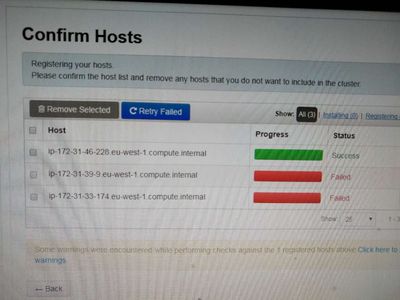
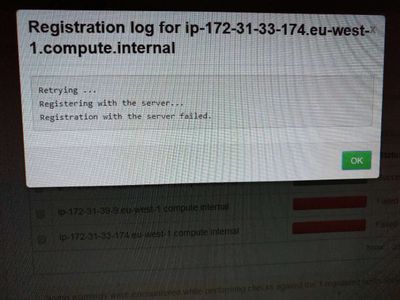
I cam confirm that:
Ambari-agents are running on all hosts.
/etc/ambari-agent/conf/ambari-agent.ini are correct.
ssh working fine.
I don't know I missed?


Created 07-05-2017 11:58 PM
- Mark as New
- Bookmark
- Subscribe
- Mute
- Subscribe to RSS Feed
- Permalink
- Report Inappropriate Content
1. make sure your ntpd, it need runing on all hosts. ntpd status and ntpd start
2. check your selinux file if SELINUX=disabled
3. your /etc/hosts file include all host privte ip and public ip. i.e. ip-..... ec2... 10.23.24.234
4. disable the iptables, service iptables stop. or systemctl stop firewall
5. reboot machine and make sure ntpd status is active.
this worked for me all the time. you need to clikc on the 'check here for warnings' to see exact info.


Created 07-05-2017 10:25 PM
- Mark as New
- Bookmark
- Subscribe
- Mute
- Subscribe to RSS Feed
- Permalink
- Report Inappropriate Content
Is the one that succeeded, running on the same host as the ambari-server? Perhaps there is no route to the server from the agents.
Created 07-05-2017 10:34 PM
- Mark as New
- Bookmark
- Subscribe
- Mute
- Subscribe to RSS Feed
- Permalink
- Report Inappropriate Content
Yes, the succeeded one is the one run as the server. Could you tell me how to route to the server?
Many thanks,



Created 07-05-2017 11:14 PM
- Mark as New
- Bookmark
- Subscribe
- Mute
- Subscribe to RSS Feed
- Permalink
- Report Inappropriate Content
Can you please check if there is any firewall which is blocking connections on port 22? You can also try to register agents manually by installing ambari-agent on each machine --> editing /etc/ambari-agent/conf/agent.ini --> point it to correct ambari-server hostname --> select manual registration at the time of agent registration in Ambari.
Hope this helps.
Created 07-05-2017 11:25 PM
- Mark as New
- Bookmark
- Subscribe
- Mute
- Subscribe to RSS Feed
- Permalink
- Report Inappropriate Content
Hi,
i can ssh to all hosts passwordless.
i checked all hosts, ambari-agents are runing fine.
/etc/ambari-agent/conf/agent.ini are pointting to the correct server.
but still not working
Created 07-05-2017 11:58 PM
- Mark as New
- Bookmark
- Subscribe
- Mute
- Subscribe to RSS Feed
- Permalink
- Report Inappropriate Content
1. make sure your ntpd, it need runing on all hosts. ntpd status and ntpd start
2. check your selinux file if SELINUX=disabled
3. your /etc/hosts file include all host privte ip and public ip. i.e. ip-..... ec2... 10.23.24.234
4. disable the iptables, service iptables stop. or systemctl stop firewall
5. reboot machine and make sure ntpd status is active.
this worked for me all the time. you need to clikc on the 'check here for warnings' to see exact info.
Created 07-06-2017 10:39 PM
- Mark as New
- Bookmark
- Subscribe
- Mute
- Subscribe to RSS Feed
- Permalink
- Report Inappropriate Content
Hi Robin Dong,
Many thanks for this,
I missed the hosts file
Created 07-05-2017 11:58 PM
- Mark as New
- Bookmark
- Subscribe
- Mute
- Subscribe to RSS Feed
- Permalink
- Report Inappropriate Content
1. make sure your ntpd, it need runing on all hosts. ntpd status and ntpd start
2. check your selinux file if SELINUX=disabled
3. your /etc/hosts file include all host privte ip and public ip. i.e. ip-..... ec2... 10.23.24.234
4. disable the iptables, service iptables stop. or systemctl stop firewall
5. reboot machine and make sure ntpd status is active.
this worked for me all the time. you need to clikc on the 'check here for warnings' to see exact info.

Created 07-07-2017 04:34 AM
- Mark as New
- Bookmark
- Subscribe
- Mute
- Subscribe to RSS Feed
- Permalink
- Report Inappropriate Content
Hi,
Can u reset the ambari-agent in all servers and try to register.
amabri-agent reset <Ambari_host_name>


