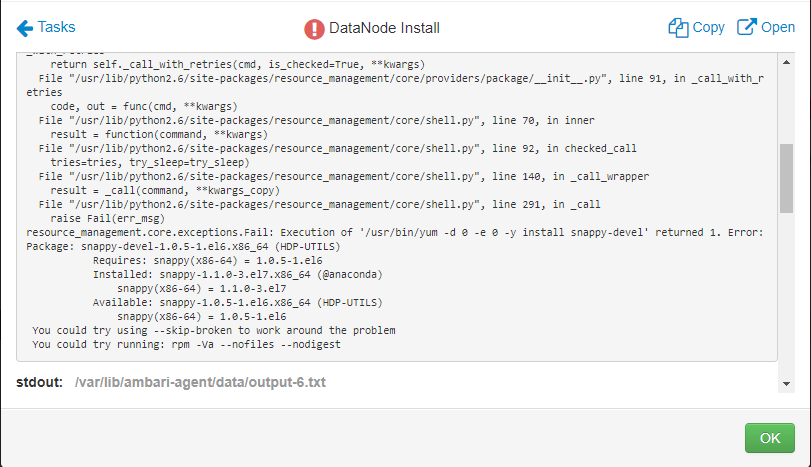
Hello Team,Seeking your assistance in setting up Hadoop Cluster on my system.
Below are the packages that I installed:
Errors:
stderr:
Traceback (most recent call last):
File "/var/lib/ambari-agent/cache/common-services/HDFS/2.1.0.2.0/package/scripts/datanode.py", line 167, in <module>
DataNode().execute()
File "/usr/lib/python2.6/site-packages/resource_management/libraries/script/script.py", line 219, in execute
method(env)
File "/var/lib/ambari-agent/cache/common-services/HDFS/2.1.0.2.0/package/scripts/datanode.py", line 49, in install
self.install_packages(env, params.exclude_packages)
File "/usr/lib/python2.6/site-packages/resource_management/libraries/script/script.py", line 410, in install_packages
retry_count=agent_stack_retry_count)
File "/usr/lib/python2.6/site-packages/resource_management/core/base.py", line 154, in __init__
self.env.run()
File "/usr/lib/python2.6/site-packages/resource_management/core/environment.py", line 160, in run
self.run_action(resource, action)
File "/usr/lib/python2.6/site-packages/resource_management/core/environment.py", line 124, in run_action
provider_action()
File "/usr/lib/python2.6/site-packages/resource_management/core/providers/package/__init__.py", line 54, in action_install
self.install_package(package_name, self.resource.use_repos, self.resource.skip_repos)
File "/usr/lib/python2.6/site-packages/resource_management/core/providers/package/yumrpm.py", line 49, in install_package
self.checked_call_with_retries(cmd, sudo=True, logoutput=self.get_logoutput())
File "/usr/lib/python2.6/site-packages/resource_management/core/providers/package/__init__.py", line 83, in checked_call_with_retries
return self._call_with_retries(cmd, is_checked=True, **kwargs)
File "/usr/lib/python2.6/site-packages/resource_management/core/providers/package/__init__.py", line 91, in _call_with_retries
code, out = func(cmd, **kwargs)
File "/usr/lib/python2.6/site-packages/resource_management/core/shell.py", line 70, in inner
result = function(command, **kwargs)
File "/usr/lib/python2.6/site-packages/resource_management/core/shell.py", line 92, in checked_call
tries=tries, try_sleep=try_sleep)
File "/usr/lib/python2.6/site-packages/resource_management/core/shell.py", line 140, in _call_wrapper
result = _call(command, **kwargs_copy)
File "/usr/lib/python2.6/site-packages/resource_management/core/shell.py", line 291, in _call
raise Fail(err_msg)
resource_management.core.exceptions.Fail: Execution of '/usr/bin/yum -d 0 -e 0 -y install snappy-devel' returned 1.
Error: Package: snappy-devel-1.0.5-1.el6.x86_64 (HDP-UTILS)
Requires: snappy(x86-64) = 1.0.5-1.el6 Installed: snappy-1.1.0-3.el7.x86_64 (@anaconda) snappy(x86-64) = 1.1.0-3.el7
Available: snappy-1.0.5-1.el6.x86_64 (HDP-UTILS) snappy(x86-64) = 1.0.5-1.el6
You could try using --skip-broken to work around the problem
You could try running: rpm -Va --nofiles --nodigest
stdout:
2017-08-06 16:54:38,570 - Using hadoop conf dir: /usr/hdp/current/hadoop-client/conf
2017-08-06 16:54:38,575 - Group['hadoop'] {}
2017-08-06 16:54:38,579 - Group['users'] {}
2017-08-06 16:54:38,580 - User['zookeeper'] {'gid': 'hadoop', 'fetch_nonlocal_groups': True, 'groups': [u'hadoop']}
2017-08-06 16:54:38,585 - User['ambari-qa'] {'gid': 'hadoop', 'fetch_nonlocal_groups': True, 'groups': [u'users']}
2017-08-06 16:54:38,587 - User['hdfs'] {'gid': 'hadoop', 'fetch_nonlocal_groups': True, 'groups': [u'hadoop']}
2017-08-06 16:54:38,590 - User['yarn'] {'gid': 'hadoop', 'fetch_nonlocal_groups': True, 'groups': [u'hadoop']}
2017-08-06 16:54:38,593 - User['mapred'] {'gid': 'hadoop', 'fetch_nonlocal_groups': True, 'groups': [u'hadoop']}
2017-08-06 16:54:38,596 - File['/var/lib/ambari-agent/tmp/changeUid.sh'] {'content': StaticFile('changeToSecureUid.sh'), 'mode': 0555}
2017-08-06 16:54:38,602 - Execute['/var/lib/ambari-agent/tmp/changeUid.sh ambari-qa /tmp/hadoop-ambari-qa,/tmp/hsperfdata_ambari-qa,/home/ambari-qa,/tmp/ambari-qa,/tmp/sqoop-ambari-qa'] {'not_if': '(test $(id -u ambari-qa) -gt 1000) || (false)'}
2017-08-06 16:54:38,696 - Skipping Execute['/var/lib/ambari-agent/tmp/changeUid.sh ambari-qa /tmp/hadoop-ambari-qa,/tmp/hsperfdata_ambari-qa,/home/ambari-qa,/tmp/ambari-qa,/tmp/sqoop-ambari-qa'] due to not_if
2017-08-06 16:54:38,698 - Group['hdfs'] {}
2017-08-06 16:54:38,700 - User['hdfs'] {'fetch_nonlocal_groups': True, 'groups': [u'hadoop', u'hdfs']}
2017-08-06 16:54:38,703 - FS Type:
2017-08-06 16:54:38,704 - Directory['/etc/hadoop'] {'mode': 0755}
2017-08-06 16:54:38,785 - File['/usr/hdp/current/hadoop-client/conf/hadoop-env.sh'] {'content': InlineTemplate(...), 'owner': 'hdfs', 'group': 'hadoop'}
2017-08-06 16:54:38,788 - Writing File['/usr/hdp/current/hadoop-client/conf/hadoop-env.sh'] because contents don't match
2017-08-06 16:54:38,790 - Changing owner for /usr/hdp/current/hadoop-client/conf/hadoop-env.sh from 0 to hdfs
2017-08-06 16:54:38,791 - Changing group for /usr/hdp/current/hadoop-client/conf/hadoop-env.sh from 0 to hadoop
2017-08-06 16:54:38,792 - Directory['/var/lib/ambari-agent/tmp/hadoop_java_io_tmpdir'] {'owner': 'hdfs', 'group': 'hadoop', 'mode': 0777}
2017-08-06 16:54:38,872 - Repository['HDP-2.4'] {'base_url': '
http://acadgild.hadoop.com/HDP/centos7/2.x/updates/2.4.2.0/', 'action': ['create'], 'components': [u'HDP', 'main'], 'repo_template': '[{{repo_id}}]\nname={{repo_id}}\n{% if mirror_list %}mirrorlist={{mirror_list}}{% else %}baseurl={{base_url}}{% endif %}\n\npath=/\nenabled=1\ngpgcheck=0', 'repo_file_name': 'HDP', 'mirror_list': None}
2017-08-06 16:54:38,911 - File['/etc/yum.repos.d/HDP.repo'] {'content': '[HDP-2.4]\nname=HDP-2.4\nbaseurl=
http://acadgild.hadoop.com/HDP/centos7/2.x/updates/2.4.2.0/\n\npath=/\nenabled=1\ngpgcheck=0'}
2017-08-06 16:54:38,914 - Repository['HDP-UTILS-1.1.0.20'] {'base_url': '
http://acadgild.hadoop.com/HDP-UTILS-1.1.0.20/repos/centos7/', 'action': ['create'], 'components': [u'HDP-UTILS', 'main'], 'repo_template': '[{{repo_id}}]\nname={{repo_id}}\n{% if mirror_list %}mirrorlist={{mirror_list}}{% else %}baseurl={{base_url}}{% endif %}\n\npath=/\nenabled=1\ngpgcheck=0', 'repo_file_name': 'HDP-UTILS', 'mirror_list': None}
2017-08-06 16:54:38,925 - File['/etc/yum.repos.d/HDP-UTILS.repo'] {'content': '[HDP-UTILS-1.1.0.20]\nname=HDP-UTILS-1.1.0.20\nbaseurl=
http://acadgild.hadoop.com/HDP-UTILS-1.1.0.20/repos/centos7/\n\npath=/\nenabled=1\ngpgcheck=0'}
2017-08-06 16:54:38,931 - Package['unzip'] {'retry_on_repo_unavailability': False, 'retry_count': 5}
2017-08-06 16:54:39,312 - Skipping installation of existing package unzip
2017-08-06 16:54:39,312 - Package['curl'] {'retry_on_repo_unavailability': False, 'retry_count': 5}
2017-08-06 16:54:39,343 - Skipping installation of existing package curl
2017-08-06 16:54:39,344 - Package['hdp-select'] {'retry_on_repo_unavailability': False, 'retry_count': 5}
2017-08-06 16:54:39,370 - Skipping installation of existing package hdp-select
2017-08-06 16:54:39,993 - Using hadoop conf dir: /usr/hdp/current/hadoop-client/conf
2017-08-06 16:54:40,029 - Using hadoop conf dir: /usr/hdp/current/hadoop-client/conf
2017-08-06 16:54:40,047 - Package['rpcbind'] {'retry_on_repo_unavailability': False, 'retry_count': 5}
2017-08-06 16:54:40,387 - Installing package rpcbind ('/usr/bin/yum -d 0 -e 0 -y install rpcbind')
2017-08-06 16:54:43,968 - Package['hadoop_2_4_*'] {'retry_on_repo_unavailability': False, 'retry_count': 5}
2017-08-06 16:54:44,003 - Skipping installation of existing package hadoop_2_4_*
2017-08-06 16:54:44,005 - Package['snappy'] {'retry_on_repo_unavailability': False, 'retry_count': 5}
2017-08-06 16:54:44,032 - Skipping installation of existing package snappy
2017-08-06 16:54:44,034 - Package['snappy-devel'] {'retry_on_repo_unavailability': False, 'retry_count': 5}
2017-08-06 16:54:44,076 - Installing package snappy-devel ('/usr/bin/yum -d 0 -e 0 -y install snappy-devel')