
Our Community is getting an upgrade! To get everything ready for the relaunch, we’ll be placing the site in read-only mode starting September 21st.
We really appreciate your understanding while we get things set up behind the scenes. Catch up on all the exciting details about the move here.
Need help or have questions? Drop us a line at [email protected]

Archives of Support Questions (Read Only)
- Cloudera Community
- Board Archive
- Archives of Support Questions (Read Only)
- Apache Atlas Started but with Errors and Warnings
- Subscribe to RSS Feed
- Mark Question as New
- Mark Question as Read
- Float this Question for Current User
- Bookmark
- Subscribe
- Mute
- Printer Friendly Page
- Subscribe to RSS Feed
- Mark Question as New
- Mark Question as Read
- Float this Question for Current User
- Bookmark
- Subscribe
- Mute
- Printer Friendly Page
Apache Atlas Started but with Errors and Warnings
- Labels:
-
Apache Atlas


Created on 01-17-2017 11:56 AM - edited 08-19-2019 02:04 AM
- Mark as New
- Bookmark
- Subscribe
- Mute
- Subscribe to RSS Feed
- Permalink
- Report Inappropriate Content
I have followed the following link to build and install Apache Atlas
Link: http://atlas.incubator.apache.org/InstallationSteps.html
And selected to install the embedded-hbase-solr profile, but when I started Atlas after installation it is showing me the following errors and warning.
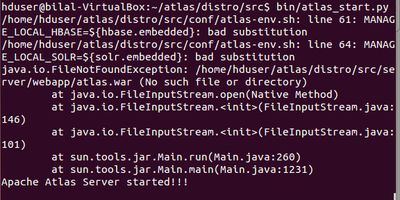
I have also tried to see which version is running curl -v http://localhost:21000/api/atlas/admin/version but it is giving the following:
* Hostname was NOT found in DNS cache * Trying 127.0.0.1... * connect to 127.0.0.1 port 21000 failed: Connection refused * Failed to connect to localhost port 21000: Connection refused * Closing connection 0 curl: (7) Failed to connect to localhost port 21000: Connection refused
Kindly let me know how shall I proceed to ensure Altas is working in the correct order. Any help will be highly appreciated. Thanking you in anticipation.
Kind Regards


Created 01-17-2017 07:10 PM
- Mark as New
- Bookmark
- Subscribe
- Mute
- Subscribe to RSS Feed
- Permalink
- Report Inappropriate Content
I think you have to build the server using "mvn clean install -Pdist,<your hbase profile name>", once this is done you need to navigate to the distro/target/ folder and then run the atlas_start.py from there.
HTH

Created 01-17-2017 01:28 PM
- Mark as New
- Bookmark
- Subscribe
- Mute
- Subscribe to RSS Feed
- Permalink
- Report Inappropriate Content
- netstat -tulnp | grep -i 21000
- ps -ef | grep -i atlas
Created on 01-17-2017 01:54 PM - edited 08-19-2019 02:04 AM
- Mark as New
- Bookmark
- Subscribe
- Mute
- Subscribe to RSS Feed
- Permalink
- Report Inappropriate Content
@Rishi I am not sure if it is running properly since I just got the notification : 'Apache Atlas Server started!!!'.
After that I tried to verify using the following command: curl -v http://localhost:21000/api/atlas/admin/version and it gave showed that connection was refused (* Hostname was NOT found in DNS cache * Trying 127.0.0.1... * connect to 127.0.0.1 port 21000 failed: Connection refused * Failed to connect to localhost port 21000: Connection refused * Closing connection 0 curl: (7) Failed to connect to localhost port 21000: Connection refused)
I tried to run the commands in your reply and that gives me the following (screenshot attached)
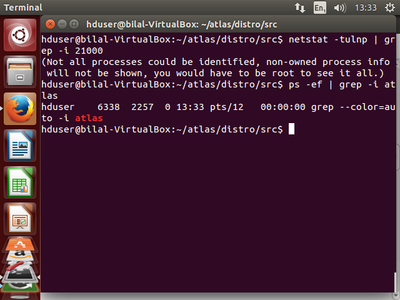
Thank you!
Created on 01-26-2017 03:28 PM - edited 08-19-2019 02:04 AM
- Mark as New
- Bookmark
- Subscribe
- Mute
- Subscribe to RSS Feed
- Permalink
- Report Inappropriate Content
@Rishi 'netstat -tulnp | grep -i 21000' command gives the following result:
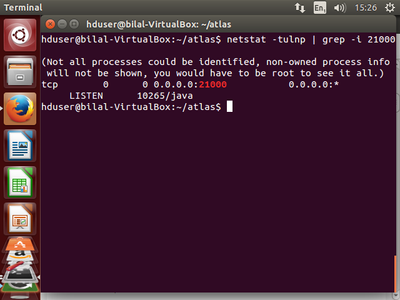
Created on 02-02-2017 11:35 AM - edited 08-19-2019 02:03 AM
- Mark as New
- Bookmark
- Subscribe
- Mute
- Subscribe to RSS Feed
- Permalink
- Report Inappropriate Content
The /var/log/atlas/application.log is in the link here: /var/log/atlas/application.log
Created 01-17-2017 07:10 PM
- Mark as New
- Bookmark
- Subscribe
- Mute
- Subscribe to RSS Feed
- Permalink
- Report Inappropriate Content
I think you have to build the server using "mvn clean install -Pdist,<your hbase profile name>", once this is done you need to navigate to the distro/target/ folder and then run the atlas_start.py from there.
HTH
Created 01-17-2017 07:31 PM
- Mark as New
- Bookmark
- Subscribe
- Mute
- Subscribe to RSS Feed
- Permalink
- Report Inappropriate Content
* -Pdist,embedded-hbase-solr
Created on 01-19-2017 01:52 PM - edited 08-19-2019 02:04 AM
- Mark as New
- Bookmark
- Subscribe
- Mute
- Subscribe to RSS Feed
- Permalink
- Report Inappropriate Content
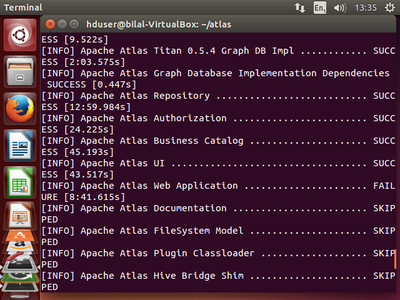
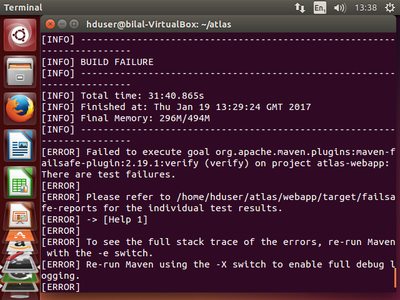
Created 01-23-2017 06:28 PM
- Mark as New
- Bookmark
- Subscribe
- Mute
- Subscribe to RSS Feed
- Permalink
- Report Inappropriate Content
@Bilal Arshad Looks like there are some IT failures on the master branch. Can you add -DskipITs as well to the maven command ?
Created 01-23-2017 10:22 PM
- Mark as New
- Bookmark
- Subscribe
- Mute
- Subscribe to RSS Feed
- Permalink
- Report Inappropriate Content
adding the command -DskipITs still gives me the error saying 'too many unapproved licenses'!


