
Our Community is getting an upgrade! To get everything ready for the relaunch, we’ll be placing the site in read-only mode starting September 21st.
We really appreciate your understanding while we get things set up behind the scenes. Catch up on all the exciting details about the move here.
Need help or have questions? Drop us a line at [email protected]

Archives of Support Questions (Read Only)
- Cloudera Community
- Board Archive
- Archives of Support Questions (Read Only)
- Apache Atlas Started but with Errors and Warnings
- Subscribe to RSS Feed
- Mark Question as New
- Mark Question as Read
- Float this Question for Current User
- Bookmark
- Subscribe
- Mute
- Printer Friendly Page
- Subscribe to RSS Feed
- Mark Question as New
- Mark Question as Read
- Float this Question for Current User
- Bookmark
- Subscribe
- Mute
- Printer Friendly Page
Apache Atlas Started but with Errors and Warnings
- Labels:
-
Apache Atlas


Created on 01-17-2017 11:56 AM - edited 08-19-2019 02:04 AM
- Mark as New
- Bookmark
- Subscribe
- Mute
- Subscribe to RSS Feed
- Permalink
- Report Inappropriate Content
I have followed the following link to build and install Apache Atlas
Link: http://atlas.incubator.apache.org/InstallationSteps.html
And selected to install the embedded-hbase-solr profile, but when I started Atlas after installation it is showing me the following errors and warning.
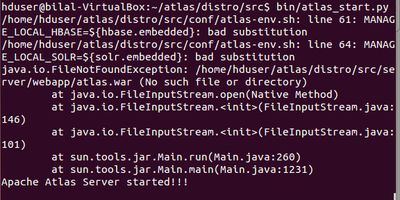
I have also tried to see which version is running curl -v http://localhost:21000/api/atlas/admin/version but it is giving the following:
* Hostname was NOT found in DNS cache * Trying 127.0.0.1... * connect to 127.0.0.1 port 21000 failed: Connection refused * Failed to connect to localhost port 21000: Connection refused * Closing connection 0 curl: (7) Failed to connect to localhost port 21000: Connection refused
Kindly let me know how shall I proceed to ensure Altas is working in the correct order. Any help will be highly appreciated. Thanking you in anticipation.
Kind Regards


Created 01-17-2017 07:10 PM
- Mark as New
- Bookmark
- Subscribe
- Mute
- Subscribe to RSS Feed
- Permalink
- Report Inappropriate Content
I think you have to build the server using "mvn clean install -Pdist,<your hbase profile name>", once this is done you need to navigate to the distro/target/ folder and then run the atlas_start.py from there.
HTH
Created 01-23-2017 11:15 PM
- Mark as New
- Bookmark
- Subscribe
- Mute
- Subscribe to RSS Feed
- Permalink
- Report Inappropriate Content
That's weird. Maybe there are some unnecessary files there in the directory. Either do a git clean on that or run mvn clean install -DskipTests -Pdist,berkeley-elasticsearch -Drat.numUnapprovedLicenses=100
HTH.
Created 01-24-2017 01:09 PM
- Mark as New
- Bookmark
- Subscribe
- Mute
- Subscribe to RSS Feed
- Permalink
- Report Inappropriate Content
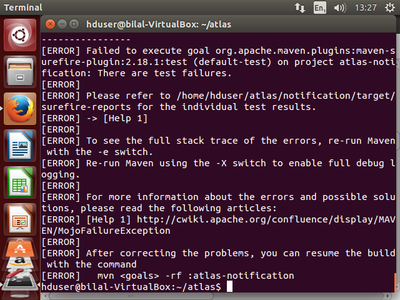
when I run the command 'mvn clean install -Pdist,embedded-hbase-solr -DskipITs' it is still pointing to the same error saying 'Failed to execute goal org.apache.maven.plugns:maven-surefire-plugin:2.18.1:test (default-test) on project atlas-notification: There are test failures'
Created on 01-24-2017 01:29 PM - edited 08-19-2019 02:04 AM
- Mark as New
- Bookmark
- Subscribe
- Mute
- Subscribe to RSS Feed
- Permalink
- Report Inappropriate Content
This is the exact message I am getting:
Created 01-24-2017 05:30 PM
- Mark as New
- Bookmark
- Subscribe
- Mute
- Subscribe to RSS Feed
- Permalink
- Report Inappropriate Content
Can you dump the maven logs here ? Need more context on what might be failing. The same command seems to be working fine for me.
[INFO] ------------------------------------------------------------------------
[INFO] Reactor Summary:
[INFO]
[INFO] Apache Atlas Server Build Tools .................... SUCCESS [  0.612 s]
[INFO] apache-atlas ....................................... SUCCESS [  5.822 s]
[INFO] Apache Atlas Integration ........................... SUCCESS [ 29.446 s]
[INFO] Apache Atlas Common ................................ SUCCESS [  8.293 s]
[INFO] Apache Atlas Typesystem ............................ SUCCESS [ 50.725 s]
[INFO] Apache Atlas Client ................................ SUCCESS [  8.318 s]
[INFO] Apache Atlas Server API ............................ SUCCESS [  4.615 s]
[INFO] Apache Atlas Notification .......................... SUCCESS [ 24.134 s]
[INFO] Apache Atlas Graph Database Projects ............... SUCCESS [  0.337 s]
[INFO] Apache Atlas Graph Database API .................... SUCCESS [  3.059 s]
[INFO] Graph Database Common Code ......................... SUCCESS [  3.140 s]
[INFO] Shaded version of Apache hbase client .............. SUCCESS [  5.861 s]
[INFO] Apache Atlas Titan 0.5.4 Graph DB Impl ............. SUCCESS [01:30 min]
[INFO] Apache Atlas Graph Database Implementation Dependencies SUCCESS [  0.444 s]
[INFO] Shaded version of Apache hbase server .............. SUCCESS [ 13.323 s]
Created 01-24-2017 05:44 PM
- Mark as New
- Bookmark
- Subscribe
- Mute
- Subscribe to RSS Feed
- Permalink
- Report Inappropriate Content
[ERROR] Failed to execute goal org.apache.maven.plugins:maven-surefire-plugin:2.18.1:test (default-test) on project atlas-notification: There are test failures. [ERROR] [ERROR] Please refer to /home/hduser/atlas/notification/target/surefire-reports for the individual test results. [ERROR] -> [Help 1] org.apache.maven.lifecycle.LifecycleExecutionException: Failed to execute goal org.apache.maven.plugins:maven-surefire-plugin:2.18.1:test (default-test) on project atlas-notification: There are test failures. Please refer to /home/hduser/atlas/notification/target/surefire-reports for the individual test results. at org.apache.maven.lifecycle.internal.MojoExecutor.execute(MojoExecutor.java:212) at org.apache.maven.lifecycle.internal.MojoExecutor.execute(MojoExecutor.java:153) at org.apache.maven.lifecycle.internal.MojoExecutor.execute(MojoExecutor.java:145) at org.apache.maven.lifecycle.internal.LifecycleModuleBuilder.buildProject(LifecycleModuleBuilder.java:84) at org.apache.maven.lifecycle.internal.LifecycleModuleBuilder.buildProject(LifecycleModuleBuilder.java:59) at org.apache.maven.lifecycle.internal.LifecycleStarter.singleThreadedBuild(LifecycleStarter.java:183) at org.apache.maven.lifecycle.internal.LifecycleStarter.execute(LifecycleStarter.java:161) at org.apache.maven.DefaultMaven.doExecute(DefaultMaven.java:317) at org.apache.maven.DefaultMaven.execute(DefaultMaven.java:152) at org.apache.maven.cli.MavenCli.execute(MavenCli.java:555) at org.apache.maven.cli.MavenCli.doMain(MavenCli.java:214) at org.apache.maven.cli.MavenCli.main(MavenCli.java:158) at sun.reflect.NativeMethodAccessorImpl.invoke0(Native Method) at sun.reflect.NativeMethodAccessorImpl.invoke(NativeMethodAccessorImpl.java:57) at sun.reflect.DelegatingMethodAccessorImpl.invoke(DelegatingMethodAccessorImpl.java:43) at java.lang.reflect.Method.invoke(Method.java:606) at org.codehaus.plexus.classworlds.launcher.Launcher.launchEnhanced(Launcher.java:289) at org.codehaus.plexus.classworlds.launcher.Launcher.launch(Launcher.java:229) at org.codehaus.plexus.classworlds.launcher.Launcher.mainWithExitCode(Launcher.java:415) at org.codehaus.plexus.classworlds.launcher.Launcher.main(Launcher.java:356) Caused by: org.apache.maven.plugin.MojoFailureException: There are test failures. Please refer to /home/hduser/atlas/notification/target/surefire-reports for the individual test results. at org.apache.maven.plugin.surefire.SurefireHelper.reportExecution(SurefireHelper.java:82) at org.apache.maven.plugin.surefire.SurefirePlugin.handleSummary(SurefirePlugin.java:254) at org.apache.maven.plugin.surefire.AbstractSurefireMojo.executeAfterPreconditionsChecked(AbstractSurefireMojo.java:854) at org.apache.maven.plugin.surefire.AbstractSurefireMojo.execute(AbstractSurefireMojo.java:722) at org.apache.maven.plugin.DefaultBuildPluginManager.executeMojo(DefaultBuildPluginManager.java:106) at org.apache.maven.lifecycle.internal.MojoExecutor.execute(MojoExecutor.java:208) ... 19 more [ERROR] [ERROR] Re-run Maven using the -X switch to enable full debug logging. [ERROR] [ERROR] For more information about the errors and possible solutions, please read the following articles: [ERROR] [Help 1] http://cwiki.apache.org/confluence/display/MAVEN/MojoFailureException [ERROR] [ERROR] After correcting the problems, you can resume the build with the command
[ERROR] mvn <goals> -rf :atlas-notification
Created on 01-25-2017 05:44 PM - edited 08-19-2019 02:04 AM
- Mark as New
- Bookmark
- Subscribe
- Mute
- Subscribe to RSS Feed
- Permalink
- Report Inappropriate Content
@anaik Thank you for the suggestions, the following command seems to work and provided a successful build 'mvn clean install -Pdist,embedded-hbase-solr -DskipITs -DskipTests -Drat.numUnapprovedLicenses=100'.
However after the build when I navigate to target folder and try running the atlas_start.py, it says 'Apache Atlas Server Started!!!'
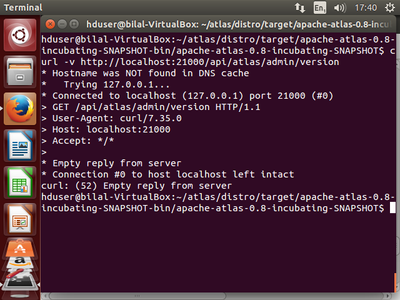
When I try the following to verify if the server is up and running: 'curl -v http://localhost:21000/api/atlas/admin/version'
It gives me the following:
Created 01-25-2017 07:34 PM
- Mark as New
- Bookmark
- Subscribe
- Mute
- Subscribe to RSS Feed
- Permalink
- Report Inappropriate Content
Ok awesome, atleast the server came up. Try the following commands
curl -sivk -u admin:admin http://localhost:21000/api/atlas/admin/version

curl -sivk http://localhost:21000/api/atlas/admin/status
Created 01-26-2017 11:04 AM
- Mark as New
- Bookmark
- Subscribe
- Mute
- Subscribe to RSS Feed
- Permalink
- Report Inappropriate Content
@anaik both the commands are giving the same response as the screenshot above!
The only thing different is the 'Authorization: Basic ****************=' line after the GET /api/atlas/admin/version HTTP/1.1
Created on 01-31-2017 04:35 PM - edited 08-19-2019 02:03 AM
- Mark as New
- Bookmark
- Subscribe
- Mute
- Subscribe to RSS Feed
- Permalink
- Report Inappropriate Content
Dear @anaik,
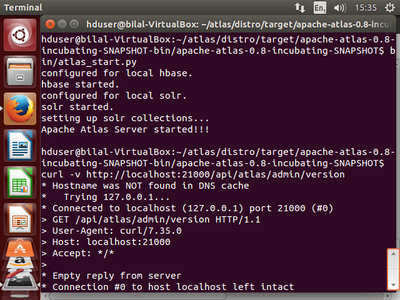
I tried to do the installation from scratch and this time when I tried to start the server I got the following response (image attached), but then again when I try to run the commands you suggested 'curl -sivk -u admin:admin http://localhost:21000/api/atlas/admin/version' It is giving me the same response as the image in the above mentioned comment!

Created 01-26-2017 01:59 PM
- Mark as New
- Bookmark
- Subscribe
- Mute
- Subscribe to RSS Feed
- Permalink
- Report Inappropriate Content
@Bilal Arshad
Please checks application.log,its in logs directory.
Post the log errors here for investigation


