
Our Community is getting an upgrade! To get everything ready for the relaunch, we’ll be placing the site in read-only mode starting September 21st.
We really appreciate your understanding while we get things set up behind the scenes. Catch up on all the exciting details about the move here.
Need help or have questions? Drop us a line at [email protected]

Archives of Support Questions (Read Only)
- Cloudera Community
- Board Archive
- Archives of Support Questions (Read Only)
- Re: Atlas Cross Origin CORS
- Subscribe to RSS Feed
- Mark Question as New
- Mark Question as Read
- Float this Question for Current User
- Bookmark
- Subscribe
- Mute
- Printer Friendly Page
- Subscribe to RSS Feed
- Mark Question as New
- Mark Question as Read
- Float this Question for Current User
- Bookmark
- Subscribe
- Mute
- Printer Friendly Page
Atlas Cross Origin CORS
- Labels:
-
Apache Atlas


Created 06-07-2017 03:53 PM
- Mark as New
- Bookmark
- Subscribe
- Mute
- Subscribe to RSS Feed
- Permalink
- Report Inappropriate Content
Hello,
I would like to access to Apache Atlas via a XmlHtttRequest object. It doesn't work:
Access-Control-Allow-Origin is missing.
Thks for your help.


Created 06-23-2017 07:10 AM
- Mark as New
- Bookmark
- Subscribe
- Mute
- Subscribe to RSS Feed
- Permalink
- Report Inappropriate Content
responseWrapper.setHeader("Access-Control-Allow-Origin", "*");
responseWrapper.setHeader("Access-Control-Allow-Methods", "GET, OPTIONS, HEAD, PUT, POST");
This should work.
Created 06-08-2017 06:39 AM
- Mark as New
- Bookmark
- Subscribe
- Mute
- Subscribe to RSS Feed
- Permalink
- Report Inappropriate Content
Can you please give more details on how are you trying to access and error you are getting?
Nixon
Created 06-08-2017 07:42 AM
- Mark as New
- Bookmark
- Subscribe
- Mute
- Subscribe to RSS Feed
- Permalink
- Report Inappropriate Content
Hello @Nixon Rodrigues
My snippet code :
<html>
<head>
</head>
<body>
<h1>TEST</h1>
<script type="text/javascript">
    var myTestRequest = function() {
        var myUrl = "http://SERVER_IP:21000/api/atlas/types/";
        //Instantiate HTTP Request
        var request = ((window.XMLHttpRequest) ? new XMLHttpRequest() : new ActiveXObject("Microsoft.XMLHTTP"));
        request.open("GET", myUrl, true);
        request.setRequestHeader("Content-Type","application/json");
        //request.channel.QueryInterface(Components.interfaces.nsIHttpChannel).redirectionLimit = 0;

        request.setRequestHeader("Authorization", "Basic " + btoa("admin:admin"));
        //request.withCredentials = true;
        request.send(null);
    }
</script>
    <div id="myTestRequest" style="display: block">
      <button onclick="myTestRequest()">Login</button>
    </div>
</body>
</html>
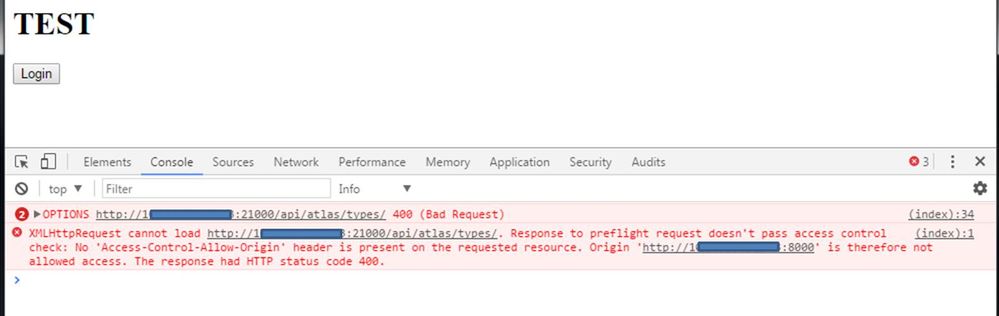
Error (in attached file):
XMLHttpRequest cannot load http://SERVER_IP:21000/api/atlas/types/. Response to preflight request doesn't pass access control check: No 'Access-Control-Allow-Origin' header is present on the requested resource. Origin 'http://SERVER_IP:8000' is therefore not allowed access. The response had HTTP status code 400.
Created 06-23-2017 07:10 AM
- Mark as New
- Bookmark
- Subscribe
- Mute
- Subscribe to RSS Feed
- Permalink
- Report Inappropriate Content
responseWrapper.setHeader("Access-Control-Allow-Origin", "*");
responseWrapper.setHeader("Access-Control-Allow-Methods", "GET, OPTIONS, HEAD, PUT, POST");
This should work.
Created 06-23-2017 12:24 PM
- Mark as New
- Bookmark
- Subscribe
- Mute
- Subscribe to RSS Feed
- Permalink
- Report Inappropriate Content
@Nixon RodriguesThank you so much for your help. It will try it; it should work.
May we shoud notify a JIRA ? Or Pull Request on github for this change.
It should better if we could put this on atlas-application.properties.
Best regards


