
Our Community is getting an upgrade! To get everything ready for the relaunch, we’ll be placing the site in read-only mode starting September 21st.
We really appreciate your understanding while we get things set up behind the scenes. Catch up on all the exciting details about the move here.
Need help or have questions? Drop us a line at [email protected]

Archives of Support Questions (Read Only)
- Cloudera Community
- Board Archive
- Archives of Support Questions (Read Only)
- Atlas UI doesn't load the properties of entity.
- Subscribe to RSS Feed
- Mark Question as New
- Mark Question as Read
- Float this Question for Current User
- Bookmark
- Subscribe
- Mute
- Printer Friendly Page
- Subscribe to RSS Feed
- Mark Question as New
- Mark Question as Read
- Float this Question for Current User
- Bookmark
- Subscribe
- Mute
- Printer Friendly Page
Atlas UI doesn't load the properties of entity.
- Labels:
-
Apache Atlas


Created on 11-15-2018 11:11 AM - edited 08-17-2019 05:52 PM
- Mark as New
- Bookmark
- Subscribe
- Mute
- Subscribe to RSS Feed
- Permalink
- Report Inappropriate Content
I'm using:project.version:1.1.0 build.version:1.1.0
I created 2 types: o_table and o_column and referenced entities with help of RestAPI. The table has an attribute column - array of o_column.
Check the sources: example-types.json column-entity.json table.json
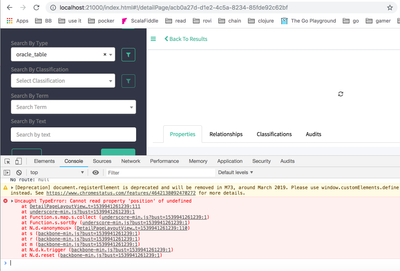
Now when I try to open table properties UI doesn't show it(Infinite loading), while showing properties for any column works fine.
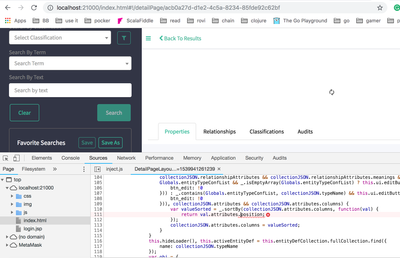
In the console of the browser, I found out the js error. Check the screenshots:
When I remove that "position" form js script everything works fine and I can see the properties of the entity table.
My question is: Is it related to how I defined the entities or is it a bug in Atlas UI?
Created 11-16-2018 09:16 PM
- Mark as New
- Bookmark
- Subscribe
- Mute
- Subscribe to RSS Feed
- Permalink
- Report Inappropriate Content
More details here: https://issues.apache.org/jira/browse/ATLAS-1521
In short, if your entity has attribute column then Atlas UI expects that it should have an attribute "position". The easy fix doesn't: use this "attribute" name. It might be fixed in later versions but I don't have such choice.
Created 11-16-2018 08:25 PM
- Mark as New
- Bookmark
- Subscribe
- Mute
- Subscribe to RSS Feed
- Permalink
- Report Inappropriate Content
Looks like it is a similar issue https://issues.apache.org/jira/browse/ATLAS-1536
Found it in issue tracker.
Created 11-16-2018 09:16 PM
- Mark as New
- Bookmark
- Subscribe
- Mute
- Subscribe to RSS Feed
- Permalink
- Report Inappropriate Content
More details here: https://issues.apache.org/jira/browse/ATLAS-1521
In short, if your entity has attribute column then Atlas UI expects that it should have an attribute "position". The easy fix doesn't: use this "attribute" name. It might be fixed in later versions but I don't have such choice.


