
Our Community is getting an upgrade! To get everything ready for the relaunch, we’ll be placing the site in read-only mode starting September 21st.
We really appreciate your understanding while we get things set up behind the scenes. Catch up on all the exciting details about the move here.
Need help or have questions? Drop us a line at [email protected]

Archives of Support Questions (Read Only)
- Cloudera Community
- Board Archive
- Archives of Support Questions (Read Only)
- CAN NOT CONNECT TO SANDBOX USING PUTTY OR WEB SHEL...
- Subscribe to RSS Feed
- Mark Question as New
- Mark Question as Read
- Float this Question for Current User
- Bookmark
- Subscribe
- Mute
- Printer Friendly Page
- Subscribe to RSS Feed
- Mark Question as New
- Mark Question as Read
- Float this Question for Current User
- Bookmark
- Subscribe
- Mute
- Printer Friendly Page
CAN NOT CONNECT TO SANDBOX USING PUTTY OR WEB SHELL !
- Labels:
-
Hortonworks Data Platform (HDP)


Created on 03-03-2017 03:37 PM - edited 09-16-2022 04:11 AM
- Mark as New
- Bookmark
- Subscribe
- Mute
- Subscribe to RSS Feed
- Permalink
- Report Inappropriate Content
capture.pngI am very new to Horton . I have installed HDP Sandbox on oracle Virtualbox. However, can't access to the sandbox neither from web client shell , neither from putty shell . Please, can anybody help ?
ssh: connect to host 127.0.0.1 port 2222: Connection refused
ipconfig comand is in the attach.



Created 03-03-2017 03:50 PM
- Mark as New
- Bookmark
- Subscribe
- Mute
- Subscribe to RSS Feed
- Permalink
- Report Inappropriate Content
Created 03-03-2017 03:41 PM
- Mark as New
- Bookmark
- Subscribe
- Mute
- Subscribe to RSS Feed
- Permalink
- Report Inappropriate Content
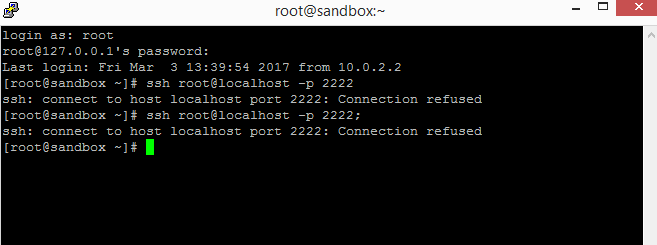
From your screenshot it looks like you are already connected to "sandbox" as we see that the prompt says "root@sandbox" so can you please double check that? Or try opening a new terminal and then run the same command:
ssh root@localhost -p 2222
. Enter "hadoop" as password when it asks.
Also in the terminal where you have run the "ifconfig" can you also run the following command to see the hostname?
hostname -f
.
Created 03-03-2017 03:44 PM
- Mark as New
- Bookmark
- Subscribe
- Mute
- Subscribe to RSS Feed
- Permalink
- Report Inappropriate Content
capture.png Thank u for reply . Here is the new terminal , why it says refused ?
Created 03-03-2017 03:46 PM
- Mark as New
- Bookmark
- Subscribe
- Mute
- Subscribe to RSS Feed
- Permalink
- Report Inappropriate Content
hostname -f says sandbox.hortonworks.com im watching this tutorial https://hortonworks.com/hadoop-tutorial/getting-started-hdf-sandbox/ Open your terminal (mac and linux) or putty (windows). Type the following command to access the Sandbox through SSH:
# Usage:
      ssh <username>@<hostname>-p <port>;# Example:
      ssh [email protected] 12222;

But says refused.

My user is root and i changed the password into quicktechie
Created 03-03-2017 03:50 PM
- Mark as New
- Bookmark
- Subscribe
- Mute
- Subscribe to RSS Feed
- Permalink
- Report Inappropriate Content
Created 03-03-2017 09:01 PM
- Mark as New
- Bookmark
- Subscribe
- Mute
- Subscribe to RSS Feed
- Permalink
- Report Inappropriate Content
Thank you !


