
Our Community is getting an upgrade! To get everything ready for the relaunch, we’ll be placing the site in read-only mode starting September 21st.
We really appreciate your understanding while we get things set up behind the scenes. Catch up on all the exciting details about the move here.
Need help or have questions? Drop us a line at [email protected]

Archives of Support Questions (Read Only)
- Cloudera Community
- Board Archive
- Archives of Support Questions (Read Only)
- Re: Can't upload to port 22, host entry wrong?,I h...
- Subscribe to RSS Feed
- Mark Question as New
- Mark Question as Read
- Float this Question for Current User
- Bookmark
- Subscribe
- Mute
- Printer Friendly Page
- Subscribe to RSS Feed
- Mark Question as New
- Mark Question as Read
- Float this Question for Current User
- Bookmark
- Subscribe
- Mute
- Printer Friendly Page
Can't upload to port 22, host entry wrong?,I have difficulties getting started with the sandbox
- Labels:
-
Apache Ambari


Created on 10-19-2016 12:12 PM - edited 09-16-2022 03:44 AM
- Mark as New
- Bookmark
- Subscribe
- Mute
- Subscribe to RSS Feed
- Permalink
- Report Inappropriate Content
I cannot figure out what is wrong: I am working with the sandbox. When I try to upload data via ssh, I get this:
[root@sandbox ~]# scp -P 2222 ~/Downloads/trace_50.zip root@localhost:/root
ssh: connect to host localhost port 2222: Connection refused
lost connection
Eventually my editing of /etc/hosts was wrong: this is my /etc/hosts on a mac:
127.0.0.1localhost 255.255.255.255broadcasthost ::1 localhost 127.0.0.1 sandbox.hortonworks.com
And in Ambari my host shows as faulty and with a different address:
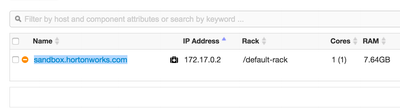
Help is greatly appreciated!
,
This is what I get after I started my virtual machine:
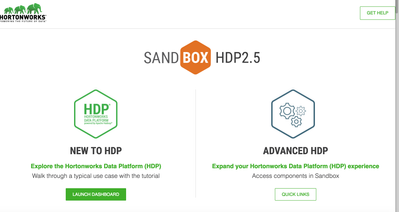
How do I start the tutorial from here? Is that correct? When I Go to Launch dashboard, I get into armari, but don not know the login credentials. Can someone please help me?


Created 10-19-2016 06:23 PM
- Mark as New
- Bookmark
- Subscribe
- Mute
- Subscribe to RSS Feed
- Permalink
- Report Inappropriate Content
@Sabine Maennel , you have got it wrong. You are running scp command from the sandbox terminal itself which doesn't have ~/Downloads/trace_50.zip. Run this command from the local machine terminal and the file will be copied. Let us know if you get any issue.
PS - Do Not change the port to 2122. 2122 is for VM and 2222 is for docker container. Use 2222 because HDP components are installed in the docker container.

Created 10-19-2016 12:42 PM
- Mark as New
- Bookmark
- Subscribe
- Mute
- Subscribe to RSS Feed
- Permalink
- Report Inappropriate Content
Hi @Sabine Maennel,
Regarding the scp question, if you are on Sandbox 2.5 (virtualbox) try using port 2122 (If you are running a different version please provide the details.)
E.g. scp -P 2122 ./test.txt root@localhost:/root
You can see all the ports set for forwarding in your local machine by going to the virtualbox menu / machine / settings / network / advanced / port forwarding.
Regarding login in to Ambari, you can follow this tutorial which will walk you through login in as maria_dev who has limited rights in Ambari but also walk you through setting up the admin password so you can login with full admin rights.
http://hortonworks.com/hadoop-tutorial/learning-the-ropes-of-the-hortonworks-sandbox/
Regarding the tutorials, if you are unable to access the tutorials through the sandbox they are also available in this URL: http://hortonworks.com/tutorials/
I hope this helps!
- Luis
Created 10-19-2016 01:52 PM
- Mark as New
- Bookmark
- Subscribe
- Mute
- Subscribe to RSS Feed
- Permalink
- Report Inappropriate Content
One comment on the tutorials question. When you go to http://localhost:8888 and click on launch dashboard, in addition to the Ambari page the tutorials page pops up in a separate window. Note that the popup blocker may prevent this page from displaying. Adjust your browser settings accordingly or just head out to the tutorials page referenced above.
Created 10-19-2016 09:30 PM
- Mark as New
- Bookmark
- Subscribe
- Mute
- Subscribe to RSS Feed
- Permalink
- Report Inappropriate Content
Thank you Lois for helping me out. I can log in to Ambari now, I used the tutorial to do it.
Created 10-20-2016 06:24 PM
- Mark as New
- Bookmark
- Subscribe
- Mute
- Subscribe to RSS Feed
- Permalink
- Report Inappropriate Content
You are welcome @Sabine Maennel , please accept the best answer to close the thread.
Created 10-19-2016 06:23 PM
- Mark as New
- Bookmark
- Subscribe
- Mute
- Subscribe to RSS Feed
- Permalink
- Report Inappropriate Content
@Sabine Maennel , you have got it wrong. You are running scp command from the sandbox terminal itself which doesn't have ~/Downloads/trace_50.zip. Run this command from the local machine terminal and the file will be copied. Let us know if you get any issue.
PS - Do Not change the port to 2122. 2122 is for VM and 2222 is for docker container. Use 2222 because HDP components are installed in the docker container.
Created 10-19-2016 08:13 PM
- Mark as New
- Bookmark
- Subscribe
- Mute
- Subscribe to RSS Feed
- Permalink
- Report Inappropriate Content
Thank you mrizi, I got it know. I appreciate your help with this.
Created 10-19-2016 11:35 PM
- Mark as New
- Bookmark
- Subscribe
- Mute
- Subscribe to RSS Feed
- Permalink
- Report Inappropriate Content
No problem @Sabine Maennel , please accept the best answer to close the thread.


Created 02-24-2017 03:12 PM
- Mark as New
- Bookmark
- Subscribe
- Mute
- Subscribe to RSS Feed
- Permalink
- Report Inappropriate Content
@Luis Figueroa: Thank you for your suggestion however it doesn't work for me:
I am using HDP 2.5, and I need to transfer a file from my local windows host to sandbox, here is my command:
scp -P 2122 /RXIE/..../test.csv root@localhost:root
I received the following error message:
ssh: connection to host localhost port 2122: Connection refused
Thank you.


