
Our Community is getting an upgrade! To get everything ready for the relaunch, we’ll be placing the site in read-only mode starting September 21st.
We really appreciate your understanding while we get things set up behind the scenes. Catch up on all the exciting details about the move here.
Need help or have questions? Drop us a line at [email protected]

Archives of Support Questions (Read Only)
- Cloudera Community
- Board Archive
- Archives of Support Questions (Read Only)
- Cloudea parcel distribution
- Subscribe to RSS Feed
- Mark Question as New
- Mark Question as Read
- Float this Question for Current User
- Bookmark
- Subscribe
- Mute
- Printer Friendly Page
- Subscribe to RSS Feed
- Mark Question as New
- Mark Question as Read
- Float this Question for Current User
- Bookmark
- Subscribe
- Mute
- Printer Friendly Page
Cloudea parcel distribution
- Labels:
-
Cloudera Manager


Created 03-03-2017 05:57 PM
- Mark as New
- Bookmark
- Subscribe
- Mute
- Subscribe to RSS Feed
- Permalink
- Report Inappropriate Content
Hi
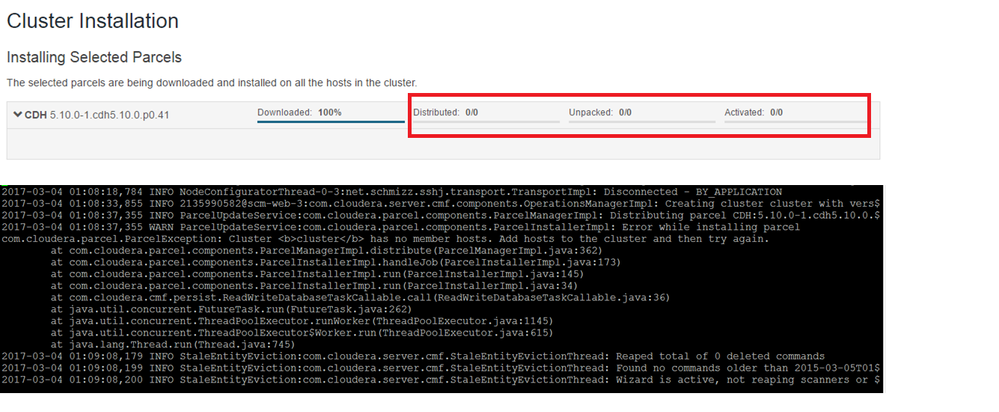
I have tried all possible combinations to install cloudera express edition. everytime i get stuck at parcel distribution. I am installing on azure using ubuntu 14.04 LTS. The port 7191 and other parcel configuration are in place, no firewall, all mentioned ports are working. The heart beating of thread is creating frustration from last two days.
The logs of agents are fine only the server log has one exception. please resolve at the earliest as i need to make choice between opting for enterprise edition vs other distribution
Created 03-11-2017 06:18 PM
- Mark as New
- Bookmark
- Subscribe
- Mute
- Subscribe to RSS Feed
- Permalink
- Report Inappropriate Content
Hi
I have opted for Cloudera Enterprise Data Hub from Azure Market place. Once installed i have customized it. Azure installed the Cluster in VNet with Subnets.
I am able to get it working. However, the above one is not working. I am using this option now.



Created 03-04-2017 06:57 AM
- Mark as New
- Bookmark
- Subscribe
- Mute
- Subscribe to RSS Feed
- Permalink
- Report Inappropriate Content
I am sorry to hear that you are having issues @Shafiullah. While you are waiting for more experienced help I thought I would drop in a link to our Community Article (with video) on Path B installation of Cloudera Manager to see if it may be of assistance. There is also another one on Hearbeat errors that could be worth a look.
Created 03-04-2017 09:29 AM
- Mark as New
- Bookmark
- Subscribe
- Mute
- Subscribe to RSS Feed
- Permalink
- Report Inappropriate Content
Thank you so much. I have tried the installation on Google Cloud it works like a charm and installs in an hour. No issues at all.
There is something with Azure platform. The installation is not straight forward. I tried Path B as well as manual installation. Getting lot of problems. Is there any reference link to install cloudera latest one on Azure Platform.
Please share the link. Otherwise no issues at all on Google Cloud
Created 03-05-2017 08:22 AM
- Mark as New
- Bookmark
- Subscribe
- Mute
- Subscribe to RSS Feed
- Permalink
- Report Inappropriate Content
Have you looked at this page in the documentation?
Getting Started on Microsoft Azure
Hopefully that gets you to a better place. 🙂
Created 03-11-2017 06:18 PM
- Mark as New
- Bookmark
- Subscribe
- Mute
- Subscribe to RSS Feed
- Permalink
- Report Inappropriate Content
Hi
I have opted for Cloudera Enterprise Data Hub from Azure Market place. Once installed i have customized it. Azure installed the Cluster in VNet with Subnets.
I am able to get it working. However, the above one is not working. I am using this option now.


